


TLDR
- An AI workflow implementation timeline needs separate milestones for discovery, integration, validation, and release.
- Endertech’s AI workflow automation services fit businesses needing custom software and system integration.
- A working demonstration is not a production-ready workflow; approvals, exceptions, and monitoring still need implementation.
- Reduce the initial scope before removing safeguards to meet a launch date.
An AI workflow implementation timeline depends on the workflow’s scope, system access, data readiness, and release requirements—not a universal number of weeks. Building a demonstration does not include everything needed to operate the workflow safely: integration testing, exception handling, human approvals, monitoring, and staff handoff also belong in the schedule. For a 2026 project, define the production acceptance criteria before committing to a launch date.
How long does an AI automation workflow take to implement?
The implementation period is the time required to move a defined business process from documented requirements to an accepted, supported release. Estimate the actual workflow, not the category of technology. An internal drafting assistant and a workflow that updates business records require different work, even when both use the same model.
Start with an AI workflow assessment to establish inputs, outputs, dependencies, and responsibility for decisions. The assessment should produce a schedule with explicit assumptions rather than a launch date detached from scope.
Use these milestones to distinguish progress from readiness:
Milestone | What it demonstrates | What it does not establish |
|---|---|---|
Feasibility demonstration | The proposed approach can perform the core task on selected examples | Reliability across real operating conditions |
Connected pilot | The workflow can use designated systems with limited users or controlled records | Readiness for unrestricted production use |
Production acceptance | Agreed requirements, failure paths, and operating responsibilities have been tested | Permission to expand scope without further evaluation |
Operational handoff | Named owners can monitor, support, and pause the workflow | That future system changes need no maintenance |
A schedule is useful only when each milestone has an observable exit condition. “Integration complete” should mean that the workflow can read or write the required records, handle failures, and demonstrate the agreed behavior—not simply that a connection succeeds.
Why this matters
Business teams need a date they can plan around. A demonstration date can support an early decision, but it should not become a production promise by accident.
For your 2026 implementation plan, separate elapsed calendar time from implementation effort. A developer can finish a task while the project waits for credentials, a security decision, representative records, or user acceptance. Those waits still affect the release date.
Your schedule should make these dependencies visible. Assign an owner and required decision to each dependency so a stalled approval does not look like unexplained development delay.
Match the schedule to the workflow’s scope
The following approaches are planning choices, not fixed-duration packages. Each changes what must be built and what must be proven before release.
Approach | Best for | Planning advantage | Limitation or tradeoff |
|---|---|---|---|
Human-reviewed assistance | Drafting, classification, or recommendations that a person checks | Keeps the initial release boundary focused on assistance | Review remains part of the operating workload |
Connected, approval-based automation | Preparing updates across systems while retaining approval before consequential actions | Tests integration and decision support without handing over every action | Approval routing, access controls, and record reconciliation still need work |
Bounded automatic execution | Clearly defined actions with explicit permissions, validation, and recovery rules | Removes manual execution within the approved boundary | Requires stronger safeguards and operational testing before release |
Human-reviewed assistance
A workflow that drafts a response for staff review has a different release boundary from one that sends the response itself. You still need to establish what information it can use, where drafts appear, and how reviewers identify errors.
Best for: tasks where a person can verify the output before it affects a customer or business record. The tradeoff is that assistance does not remove the review step. Include reviewer training and acceptance testing in the plan rather than treating them as work that happens after launch.
Connected, approval-based automation
Consider a hypothetical ecommerce workflow that reads an inquiry, locates a relevant order, and prepares a proposed update. Connecting the systems is only part of implementation: the workflow also needs to identify the correct record and route the proposal to an authorized person.
Best for: workflows that need business-system access but still require judgment before execution. Schedule the approval interface, rejection path, and record validation alongside the integration. A working connection does not settle those requirements.
Bounded automatic execution
Automatic execution means the workflow acts within a defined permission boundary without approval for every action. That boundary must describe which actions are allowed, which inputs are unacceptable, and when execution stops.
Best for: narrowly defined actions with clear validation and recoverable failure paths. The tradeoff is additional responsibility for safeguards, monitoring, and support. Do not describe a workflow as autonomous unless its actual operating rules support that description.
Build the timeline around acceptance gates
For a 2026 implementation, organize the schedule around completed decisions and tested behavior. These stages provide a practical sequence; they do not imply a standard duration.
Define scope. Document the trigger, inputs, expected output, permitted actions, and business owner. Write down what is excluded from the initial release. Finish this stage with acceptance criteria that operations and technical teams both understand.
Confirm access. Verify authentication, permissions, available interfaces, and a suitable test environment. Confirm access to representative records rather than relying entirely on simplified examples. Resolve restrictions before scheduling work that depends on them.
Build the workflow. Implement the model-assisted task, system connections, validation, and approval rules. Keep deterministic business rules separate from model-generated content where practical. Demonstrate the full path from trigger to intended result.
Validate behavior. Test ordinary cases, exceptions, ambiguous inputs, and failed connections. Check that the workflow stops or escalates when its operating rules require it. Obtain acceptance from the people responsible for the business process.
Release and support. Establish monitoring, access administration, incident response, and rollback or pause procedures. Give users clear operating instructions. Release only the scope that passed acceptance.
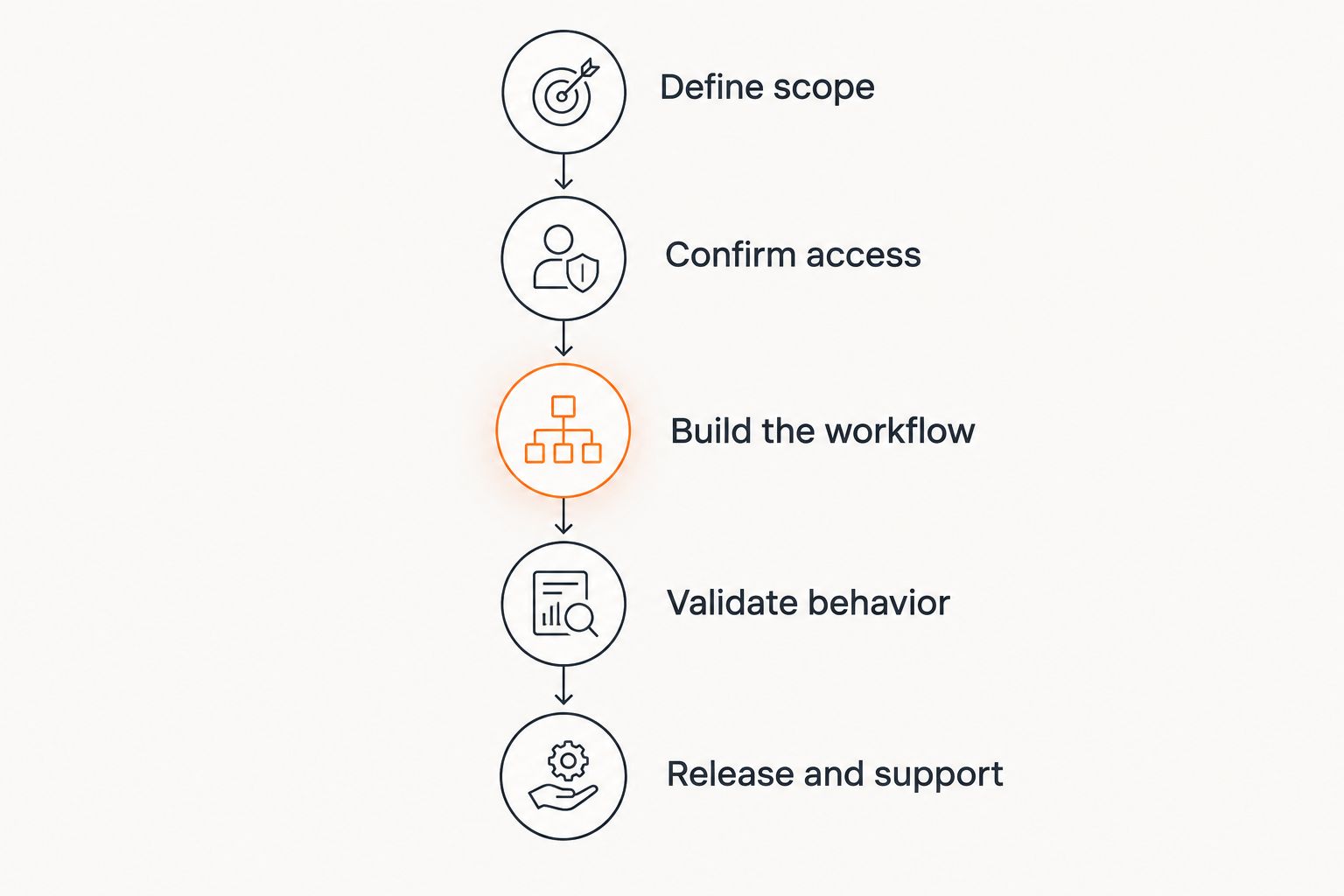
Each stage ends with evidence that the next stage can proceed.
Some work can overlap. For example, you can prepare reviewer instructions while developers build the approval interface. Other work has a hard dependency: testing production permissions requires those permissions to exist.
Ask the delivery team to identify the critical path—the dependent tasks that control the earliest release date. Adding staff to unrelated tasks does not remove a blocked system connection or unresolved business decision.
Why an AI workflow implementation timeline varies
The schedule changes when the implementation requirements change. Review these drivers before approving a delivery plan:
Workflow boundaries. Drafting a recommendation and executing a transaction have different acceptance requirements. Define where assistance ends and action begins.
System access. Authentication, permissions, API access, and test environments determine whether integration work can proceed. Access restrictions belong in the dependency list.
Data readiness. Missing identifiers, inconsistent formats, and unclear record ownership require decisions about matching and validation. The workflow needs rules for incomplete inputs.
Approval requirements. Human review needs routing, authorization, rejection handling, and a usable interface. Approval is an implemented process, not just a policy sentence.
Failure handling. Timeouts, duplicate events, partial completion, and unavailable systems require explicit behavior. The release plan must cover recovery as well as successful execution.
Operational acceptance. Users, security stakeholders, and system owners need to confirm the workflow is fit for its intended use. Their availability and acceptance criteria affect elapsed time.
Treat integration as its own workstream. The same dependencies that shape API integration timelines also affect an automated workflow: credentials, endpoint behavior, data mapping, testing, and system-owner decisions.
What should an implementation estimate include?
A useful estimate explains the work, its dependencies, and the conditions behind the proposed date. A task list without those conditions leaves you unable to distinguish a delivery problem from a scope change.
Request these planning artifacts:
Workflow map: the trigger, data movement, decisions, approvals, and final action.
Release boundary: the users, systems, and permitted actions included at launch.
Dependency register: required access, records, decisions, and responsible owners.
Acceptance plan: what must pass before the business accepts the workflow.
Operating plan: who monitors failures, manages access, and authorizes changes.
For a 2026 delivery commitment, ask which assumptions would invalidate the date. Examples include discovering that a required system cannot support the planned access method or changing the release from draft-only assistance to automatic record updates.
Endertech is a fit for businesses that need AI workflow automation connected to custom software and existing systems. That fit does not replace project planning: the workflow still needs documented requirements, integration boundaries, and acceptance criteria.
How can you shorten implementation without removing safeguards?
Reduce the release boundary before reducing validation. Start with a clearly defined task, a limited operating context, and a named reviewer where approval is appropriate.
For example, a hypothetical retailer can initially use a workflow to prepare internal inquiry summaries rather than also authorizing account changes. That release still needs testing, but it does not need to solve every downstream business action at once.
Prepare the business inputs before development begins. Provide representative records, document the existing process, identify exception types, and appoint someone who can resolve requirements questions.
Avoid scheduling shortcuts that move unfinished work into production:
Do not replace permission design with broad system access.
Do not test only successful examples and call the workflow accepted.
Do not omit duplicate handling when an event can be delivered again.
Do not assume users will discover the approval process without instructions.
The practical goal is a smaller accepted workflow, not a larger unfinished one.
Does a prototype mean the workflow is ready to launch?
A prototype proves selected behavior, not production readiness. It can establish whether a proposed approach deserves further investment, but its demonstration conditions must remain clear.
Ask whether the prototype uses live integrations, representative records, the intended permissions, and the actual approval path. If those elements are absent, the production plan still needs to implement and validate them.
Keep prototype findings useful by recording what worked, what failed, and which assumptions remain untested. That record turns the demonstration into evidence for the next implementation decision.
Can you commit to a launch date before discovery?
You can set a target date before discovery, but a target is not a validated implementation estimate. Commit to a release date only after the essential scope and dependencies are understood.
If your 2026 business calendar imposes a deadline, define a minimum acceptable release and a fallback process. Preserve manual operation when the workflow has not passed acceptance. A deadline does not resolve an access restriction or make an untested action safe.
What happens after the workflow goes live?
Launch transfers the workflow into an operating process. Someone must own failed runs, rejected outputs, changes to connected systems, and requests to expand permissions.
Monitor behavior against the acceptance requirements rather than assuming every completed run produced a correct business outcome. A workflow can finish technically while matching the wrong record or producing an unusable result.
Treat new actions and new system connections as scope changes. They require their own validation, even when the original workflow is already in production.
One last thing
The workflow’s behavior when it cannot complete a task belongs in the release criteria. Ask the team to demonstrate an unavailable system, an ambiguous record match, and a rejected approval—not just a successful run.
If the operating team cannot explain what happens next in those situations, keep the workflow within a controlled pilot. A clear stopping rule is part of implementation, not a feature to add after launch.
Related guides
Frequently asked questions
How long does an AI automation workflow take to implement?
The implementation timeline depends on defined scope, system access, data readiness, testing, and operational acceptance. Separate a demonstration milestone from the date when the workflow is approved for production use.
Can an AI workflow launch immediately after a successful demo?
A successful demo does not establish production readiness. The workflow still needs the required integrations, permissions, exception handling, acceptance testing, and support procedures.
What usually determines the release date?
The critical path determines the earliest release date: the dependent tasks that must finish before acceptance and launch. Required access, unresolved business rules, and system-owner approvals belong on that path when later work depends on them.
Does human approval make implementation simpler?
Human approval limits which actions the workflow executes independently, but it introduces its own implementation requirements. Plan the review interface, authorized reviewers, rejection path, and handling of unanswered approvals.
Can we automate a workflow when business software has no API?
Software without an API requires assessment of the access methods it actually supports. Do not commit to an integration method or delivery date before confirming permissions, technical constraints, and maintenance requirements.
How can we shorten an AI workflow implementation timeline?
Shorten the initial release by narrowing the task, connected systems, and permitted actions. Prepare access, representative records, and business decisions early; retain validation and failure handling.
Can Endertech help with connected workflow automation?
Endertech offers automation, custom software, and system integration services for business clients. A connected workflow should begin with a defined business process, its integration requirements, and acceptance criteria.