


TLDR
- To choose first AI automation workflow candidates, prioritize clear inputs, verifiable outputs, and human review.
- Endertech provides custom software and system integration services for business automation projects.
- Drafting and extraction are useful starting points when people verify results before downstream actions.
- Use rules-based automation when explicit conditions already determine the correct action.
- Measure total handling time, corrections, and exceptions before expanding an AI pilot.
Choose your first AI automation workflow by finding a repetitive task with accessible inputs, a clear definition of a correct result, and errors that a person can catch before they affect customers or business records. Start with a bounded step, such as drafting a response or extracting information, rather than automating an entire department. The right starting point is work you can evaluate and control, not the most impressive demonstration.
Why this matters
A useful AI demonstration does not establish that a workflow belongs in production. Production work includes permissions, incomplete records, changing business rules, exceptions, and people who must resolve mistakes. Your first project needs to address those conditions, not just generate a convincing answer.
For your 2026 automation plan, choose a workflow whose success you can describe before selecting software. An AI workflow assessment is a relevant planning topic when you need to separate the business process, data requirements, and implementation decisions.
Automate a verifiable step before automating a consequential decision. That distinction gives your team a practical way to test usefulness without handing an unproven system control over customer commitments or operational records.
How do you choose the first business workflow for AI automation?
Choose the workflow by examining the current process, checking whether AI is necessary, defining acceptable outputs, and containing failure. Use the following sequence to make the decision. Each step produces something concrete that your operations and technical teams can review together.
1. Map the work
Describe the task as an input, a transformation, and an output. Identify who starts it, which systems supply information, who receives the result, and what happens when information is missing.
For example, a retailer might receive customer messages that need to be categorized and routed. The bounded task is assigning a proposed category; resolving the entire customer issue is a much larger process involving policies, order records, and judgment.
Write down the existing exception path as well. If employees already handle ambiguous messages differently, that disagreement needs attention before you use those decisions as examples of correct behavior.
2. Check AI fit
Ask whether the task requires interpreting variable language or whether explicit rules already determine the action. Reading an unstructured message can justify an AI component. Moving a record when a known status changes usually calls for conventional automation.
Separate those responsibilities instead of asking a model to perform everything. An AI component can propose a category, while ordinary application logic checks the permitted categories and controls which actions are allowed.
Use AI for interpretation; use explicit rules for enforceable business constraints. This is an architectural choice, not a requirement to replace an existing system.
3. Define success
Specify what makes an output acceptable before building the pilot. A summary might need to preserve the customer's request and identify missing information. An extraction task might need to return named fields while leaving unsupported values blank.
Choose examples from actual work that you are authorized to use. Include ordinary cases, incomplete inputs, conflicting information, and cases that should be rejected. Otherwise, a polished demonstration can conceal the situations that matter most in operation.
Agree on who judges the output. If reviewers disagree about acceptable answers, resolve the evaluation criteria before interpreting pilot results.
4. Contain failure
Decide what the system is permitted to do and where a person must approve its work. Draft-only access is different from permission to send an email, modify an order, or update an accounting record.
For an initial pilot, keep consequential actions behind review. Give reviewers access to the source material, not just the generated answer, so they can verify claims and detect omissions.
Define the fallback explicitly: route the task to the existing manual process when required information is absent, a validation check fails, or a reviewer rejects the output. A fallback is part of the workflow, not an afterthought.
5. Test the handoff
Follow the output through the next operational step. A correctly extracted field is not useful if it arrives in the wrong system, overwrites an authoritative value, or leaves the receiving employee unsure what to do.
Test permissions, duplicate processing, rejected outputs, and recovery after an interrupted run. Then ask the person receiving the work whether the result actually removes effort or merely changes where that effort occurs.
For a 2026 pilot, the deliverable should be a working handoff with recorded outcomes, not a collection of attractive sample responses.
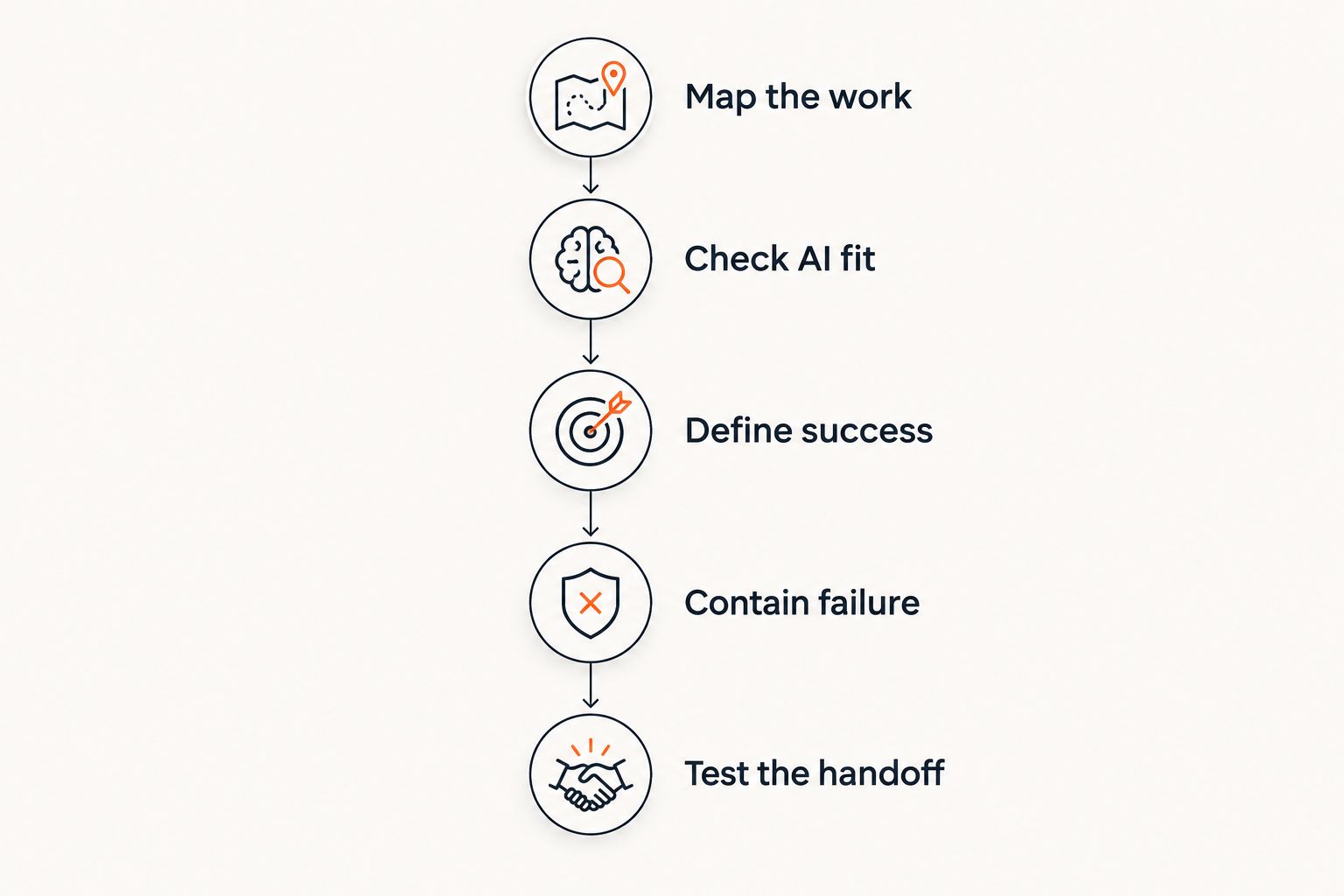
Define acceptable results and failure handling before testing downstream actions.
Which workflow types make useful starting points?
The following are illustrative task patterns, not claims about a particular company's results. Select the pattern that matches your available data and review process. None is automatically safe simply because the task sounds administrative.
Workflow pattern | Best for | Practical advantage | Limitation | Initial boundary |
|---|---|---|---|---|
Drafting responses | Teams with documented guidance and a review step | Produces a proposed reply for an employee to edit | Can introduce unsupported statements or commitments | Do not send without approval |
Extracting fields | Teams processing variable documents with defined destination fields | Converts unstructured material into a proposed record | Can misread values or fill gaps incorrectly | Validate fields before saving |
Categorizing requests | Teams with clear routing categories | Suggests where incoming work belongs | Ambiguous requests can receive the wrong category | Route uncertain cases to a person |
Summarizing records | Teams that need to review lengthy notes | Creates a shorter starting point for review | Can omit an important condition or disagreement | Keep source records available |
Rules-based transfer | Teams moving structured data under explicit conditions | Applies defined mappings without language generation | Requires stable rules and exception handling | Validate the destination and prevent duplicates |
Response drafting: useful when guidance is explicit
Response drafting is a reasonable candidate when employees repeatedly turn established policies or approved information into messages. The person reviewing the draft should be able to identify the supporting source for any factual claim.
Avoid starting with replies that negotiate exceptions, promise delivery dates, or interpret disputed obligations. Those tasks mix language generation with decisions that require authority and context. A fluent draft does not establish that the promise is valid.
Field extraction: useful when verification is straightforward
Extraction works as a pilot when you know the required fields and can compare the proposed values with the source. Keep missing information distinct from information the system inferred.
For example, an intake document can produce a proposed customer name, request type, and reference identifier. Application logic should check required fields and permitted formats before creating a downstream record. Reviewers still need to inspect values that cannot be validated mechanically.
Rules-based transfer: useful when AI adds no judgment
Do not add language generation to a process that already has explicit mapping rules. If a known field maps directly to another known field, an integration can perform that transfer without interpreting prose.
This distinction matters when connecting an ERP to an ecommerce platform. Deciding which system owns inventory or order status is an integration requirement; generating a plausible answer does not resolve ownership.
Why the right first workflow varies
Workflow selection depends on the operating conditions around the task. Use these factors to compare candidates rather than choosing the department with the loudest request.
Input accessibility: The system needs authorized access to the relevant information. A task is not ready if employees must repeatedly assemble missing context by hand.
Output verifiability: Reviewers need a clear basis for accepting or rejecting results. Open-ended judgments are harder to evaluate than defined fields or documented categories.
Consequences of error: A rejected internal draft and an incorrect customer commitment have different operational consequences. Set permissions accordingly.
Integration dependencies: Useful output must reach the appropriate system without corrupting records or duplicating actions. Existing APIs, data ownership, and permissions affect the design.
Exception ownership: Someone must resolve rejected or incomplete work. Without that owner, automation creates an unattended queue rather than a finished process.
Your 2026 shortlist should favor candidates that satisfy these conditions now. A strategically important workflow can remain a later project if its data access, approval rules, or system responsibilities are unresolved.
How do you measure whether the pilot is working?
Compare the proposed workflow with the existing process using the same definition of completed work. Do not compare AI generation time with the entire manual process; that excludes review, correction, and downstream handling.
Record these measures using your own operational data:
Total handling time: Include preparation, review, corrections, and exception resolution.
Accepted outputs: Track whether reviewers accept the result unchanged, edit it, or reject it.
Error type: Distinguish omissions, unsupported statements, incorrect classifications, and integration failures.
Unfinished work: Identify outputs that never reach the next responsible person or system.
Recovery effort: Record what employees must do when the workflow fails or produces duplicate work.
Set acceptance criteria before reviewing results. That prevents the team from redefining success around whatever the pilot happens to do well.
For a 2026 evaluation, retain the source input, the proposed output, the review decision, and the final action where your privacy and retention requirements permit it. Those records let you investigate failures and check whether later changes improve the same task.
A pilot succeeds only when the complete workflow improves, including review and recovery. If employees spend the saved drafting time repairing errors, the project has not demonstrated the intended operational benefit.
When should you postpone a workflow?
Postpone a candidate when nobody can define a correct result, the necessary data cannot be accessed appropriately, or a mistaken action would be difficult to reverse. Also postpone work whose manual process is still changing substantially; otherwise, the implementation encodes decisions the business has not settled.
A practical readiness document should name the process owner, identify the source systems, define the output, state approval requirements, and explain the fallback. It should also describe which decisions remain human responsibilities.
Endertech is a fit for business clients that need custom software and system integration for an automation project. That service model is relevant when the problem extends beyond generating text into application behavior, data movement, and ongoing support.
Endertech's business automation services do not remove your need to define acceptance criteria and assign operational ownership. Treat implementation support and process accountability as complementary responsibilities, not substitutes.
Should the first workflow involve customers?
Start with customer-facing work only when a person can verify the output before it reaches the customer. Drafting a reply is different from sending it automatically, and suggesting a resolution is different from authorizing it.
Internal work is not automatically low risk. An internal summary used to approve a refund or change a financial record still needs appropriate controls. Evaluate the downstream decision, not just the audience for the generated text.
Can you automate only part of a workflow?
Yes: automate the bounded step whose input and output you can define. Keep adjacent decisions manual until the pilot establishes that the handoff works.
For example, extract information from an incoming request, let an employee verify it, and then use established application logic to create the record. This separates interpretation, approval, and execution so you can inspect failures at the correct boundary.
One last thing
Before approving your first workflow in 2026, ask the receiving employee to describe how they would detect a wrong result without asking the system that produced it. If the answer requires repeating the entire task, reconsider the output format or the candidate workflow.
Make verification easier than redoing the work. Show the relevant source material, distinguish missing information from inferred information, and make rejection return the task to a defined owner. Endertech's custom software and system integration services are relevant when those controls need to become part of an application rather than a separate manual workaround.
Related guides
Frequently asked questions
What's the best way to choose my first AI automation workflow?
Choose a repetitive task with accessible inputs, verifiable outputs, and a controlled failure path. Start with a bounded step and define approval requirements before building the pilot.
Should I start with the task that takes the most time?
No: time spent is only one selection criterion. A lengthy task is a poor starting point if its inputs are inaccessible, its correct output is undefined, or its errors are difficult to reverse.
Is AI automation better than rules-based automation?
AI automation is appropriate for interpreting variable language; rules-based automation is appropriate when explicit conditions determine the action. A workflow can use both, with application logic enforcing permitted actions.
Can my first AI workflow send customer emails automatically?
Keep customer emails behind human approval for an initial pilot. Reviewers should verify factual statements and commitments against approved source information before sending.
What data do I need before starting an AI automation pilot?
You need authorized examples of the actual inputs, a definition of acceptable outputs, and examples of exceptions. Identify which system owns each fact and how reviewers will verify it.
How do I know whether AI automation is saving work?
Compare total handling time, including preparation, review, corrections, and exception resolution. Also track rejected outputs and downstream completion so faster generation does not conceal additional operational work.
Does the whole process need to be automated at once?
No: a first pilot can automate a bounded step while people retain approval and decision authority. Expand only after you have evaluated the complete handoff and recovery process.