


TLDR
- Not sure which workflow to automate first? An AI workflow assessment inventories tasks, tests AI fit, and outputs a prioritized automation backlog.
- Core components: process mapping, data readiness review, tool evaluation, integration review, risk review, roadmap.
- Scope depends on the number of departments in play, data quality, and existing system integrations.
- Skipping the assessment risks automating the wrong workflow, or one your data and systems can't support yet.
Which business workflow should you automate first with AI? An AI workflow assessment answers that by mapping how work actually moves through a business, testing which steps a language model or automation tool can take over reliably, and turning that analysis into a prioritized build plan. The output is a document and a backlog, not a demo — a ranked list of which workflows are worth automating first and which ones aren't ready yet. Most companies skip this step and go straight to buying an AI tool, which is exactly why so many of those tools sit unused six months later.
Why This Matters
Companies buying AI tools in 2026 without an assessment tend to make the same mistake: they pick software based on a demo, not on whether their own data and systems can actually feed it. A chatbot trained on outdated product data, or a document-summarization tool pointed at inconsistent file naming, fails quietly instead of loudly — the team just stops using it.
An assessment forces the harder questions first. Which tasks are repetitive enough to automate? Which ones touch data that's too messy to trust yet? Which systems need an API integration before any AI tool can even see the relevant data? A digital agency like Endertech runs this kind of review before scoping automation work, because recommending a tool without checking the underlying data pipes usually leads to a rebuild a year in.
What Does an AI Workflow Assessment Include?
The scope shifts by project, but a real AI workflow assessment includes six recurring components. Each one produces a specific artifact — not a slide, a working document the engineering team can build from.
Component | What It Covers | What You Get |
|---|---|---|
Process and task inventory | Every step in the target workflow, who performs it, and how often | Ranked list of candidate tasks |
Data readiness review | Whether the data behind the workflow is structured, complete, and accessible | Data quality findings |
Tool evaluation | Off-the-shelf AI tools vs. custom-built automation for the specific task | Build-vs-buy recommendation |
Integration and technical review | How new automation connects to existing software, ERPs, and databases | Integration architecture notes |
Risk and governance review | Compliance, data privacy, and where a human still needs to sign off | Risk log |
Prioritized roadmap | Effort vs. impact ranking across every candidate workflow | Phased implementation backlog |
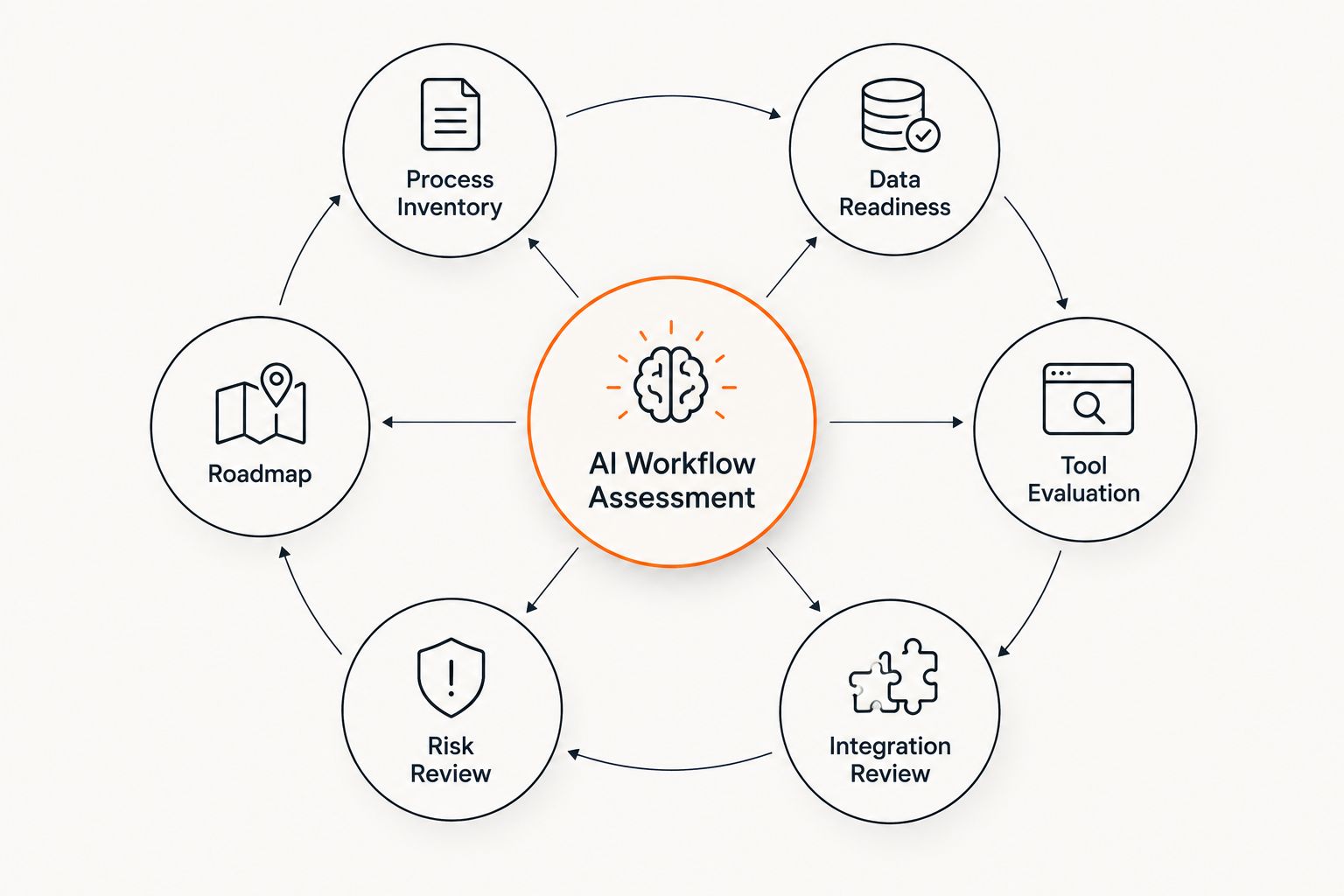
Each component feeds the same document: a ranked backlog, not a tool recommendation.
Process and Task Inventory
This phase starts with the workflow itself, not the software. Every step gets written down: who does it, how long it takes, how often it repeats, and what triggers it. A customer service workflow might break into 12 discrete steps; only three or four of those are usually repetitive enough to hand to an AI tool.
The output is a ranked list, not a wish list. Tasks that are high-volume, rule-based, and low-risk rise to the top. Tasks that require judgment calls, exceptions, or sensitive decisions stay flagged as human-only, at least for now.
Data Readiness Review
An AI tool is only as good as the data it can see. This review checks whether the systems behind the workflow — a CRM, an ERP, a spreadsheet someone maintains by hand — hold data in a format the automation can actually use.
A lot of assessments stop here, at least temporarily. If product data lives in three disconnected spreadsheets with inconsistent naming, no automation tool fixes that on its own; the data cleanup becomes its own project before the AI layer makes sense.
Tool Evaluation: Build vs. Buy
Once the task list and data picture are clear, the assessment compares off-the-shelf AI tools against a custom-built approach for each candidate task. Some workflows fit a subscription tool well. Others need custom logic because the business process doesn't match how a generic tool assumes work happens.
This is also where the assessment checks whether a tool can actually reach the data it needs — for example, whether a workflow that touches financial records can connect to a web application that integrates with QuickBooks and other accounting software, or whether that connection has to be built from scratch.
Integration and Technical Review
This phase maps how new automation would connect to the systems already in place: the ERP, the ecommerce platform, internal databases, third-party APIs. It's the part of the assessment that catches the expensive surprises before development starts, not after.
A workflow that looks simple on a whiteboard often depends on three systems that were never designed to talk to each other. The technical review documents exactly where those gaps are and what it takes to close them.
Risk and Governance Review
Every AI workflow assessment should flag where a human needs to stay in the loop. That includes compliance requirements, data privacy exposure, and decisions where an error carries real cost — a pricing engine, a customer intake form, a financial approval step.
This phase produces a risk log, not a warning label. Each flagged task gets a specific note on what oversight it needs and why, so the roadmap that follows doesn't automate something that shouldn't run unsupervised.
The Prioritized Roadmap
The assessment ends with a backlog, ranked by effort against impact. High-impact, low-effort tasks go first. High-effort, uncertain-payoff tasks get pushed later or dropped entirely if the data readiness review already ruled them out.
“An AI workflow assessment fails the moment it ends as a slide deck instead of a backlog.”
Why the Scope of an AI Workflow Assessment Varies
No two assessments look identical because no two businesses run the same mix of systems and processes. Scope typically shifts based on:
Number of departments in play — a single-department review moves faster than a company-wide audit
Data quality and accessibility — clean, centralized data shortens the readiness review; scattered spreadsheets extend it
Existing system integrations — businesses with modern APIs already in place skip a chunk of the technical review
Regulatory exposure — finance, legal, and other regulated workflows require a deeper risk and governance pass
In-house technical capacity — teams with an internal engineering group can hand off the roadmap directly; teams without one need an outside partner to build it
The end goal — a single automated task needs a lighter assessment than a full AI strategy across the business
Is an AI Workflow Assessment the Same as a Process Audit?
An AI workflow assessment builds on a process audit but goes further: a process audit documents how work happens, while the AI assessment adds the data readiness, tool evaluation, and integration layers needed to decide what's actually automatable. Treat the process audit as step one inside the larger assessment, not a separate deliverable.
Does an AI Workflow Assessment Recommend Specific Software?
A solid AI workflow assessment recommends a category of solution — build custom, buy a specific type of tool, or hold off — rather than naming one vendor upfront. The tool decision comes after the data readiness and integration findings are in, because the right choice depends on what the existing systems can support.
What Happens After an AI Workflow Assessment Is Complete?
After the assessment, the business has a ranked backlog of automatable tasks and a technical plan for the first one or two. From there the work moves into normal software development: scoping, building, and testing the highest-priority item before moving to the next one on the list. When that first item puts AI agents to work across your CRM, email, or operations tools, AI agent orchestration connects them to those systems with people approving the steps that matter.
One Last Thing
The most-skipped part of an AI workflow assessment isn't the tool evaluation — it's the data readiness review. Teams get excited about picking software and treat the data check as a formality, then spend the first month of the actual build fixing the data problems the assessment was supposed to catch. Run that review honestly in 2026 before any tool gets purchased, and the automation project that follows moves faster with fewer surprises.
Related Guides
Frequently asked questions
What is an AI workflow assessment?
An AI workflow assessment is a review of a business process that identifies which steps can be automated with AI, checks whether the underlying data and systems support that automation, and produces a prioritized implementation plan. It covers process mapping, data readiness, tool evaluation, integration review, and risk review.
How long does an AI workflow assessment take?
Timeline depends on how many workflows and systems are in scope, not a fixed number of weeks. A single-department review with clean, centralized data moves faster than a company-wide audit spanning several disconnected systems.
Who should be involved in an AI workflow assessment?
The people who actually perform the workflow day to day should be involved first, along with whoever owns the underlying systems — IT, operations, or the department manager. Their input is what catches the exceptions and edge cases a process document alone would miss.
How much does an AI workflow assessment cost?
There's no fixed price for an AI workflow assessment because cost scales with the number of departments, workflows, and systems reviewed. A single-workflow review touching one system costs less than a full audit across multiple departments and legacy systems.
Can an AI workflow assessment be done in-house?
Yes, if the business has staff who understand both the operational workflow and the technical systems behind it. Companies without that internal overlap typically bring in an outside team to run the process mapping, data review, and technical assessment together.
Does an AI workflow assessment cover data privacy and compliance?
Yes, a complete AI workflow assessment includes a risk and governance review that flags where sensitive data, regulatory requirements, or high-stakes decisions require a human to stay in the loop. This is a standing component, not an optional add-on.
Is an AI workflow assessment different from an AI readiness assessment?
The terms overlap heavily, but an AI workflow assessment focuses specifically on individual processes and tasks, while an AI readiness assessment can be broader, covering organizational data maturity and infrastructure. In practice, most vendors use the terms interchangeably.
What's the deliverable at the end of an AI workflow assessment?
The deliverable is a prioritized backlog ranking candidate workflows by effort and impact, along with the data readiness findings and integration notes needed to start building. It's meant to hand directly to an engineering team, not sit in a folder.