


TLDR
- AI agent integration without API is feasible when software offers an authorized, testable access path.
- File exchange suits batch workflows; browser automation suits tasks available only through the user interface.
- Database access needs explicit authorization; direct writes risk bypassing application rules.
- Keep human approval for consequential actions, and verify saved records before marking work complete.
Yes—an AI agent can work with business software that has no API by using file imports and exports, authorized database access, or browser and desktop automation. The limitation is reliability: reading a screen or importing a file does not provide the same controls as a supported application interface. For ai agent integration without api in 2026, choose the access method first, then define permissions, validation, approval, and recovery before allowing the agent to change business records.
Endertech is a fit for businesses that need custom software and system integration rather than another standalone tool. The central decision is how to connect the agent to existing operations without weakening the controls those operations depend on.
Can an AI agent work with business software that has no API?
Yes, provided the software exposes an authorized way to read information or perform the required action. An API is not the only interface, but each alternative introduces different constraints.
The right choice depends on the task. Extracting a report is different from posting an invoice, changing inventory, or updating a customer’s account.
Access method | Best for | Strength | Limitation |
|---|---|---|---|
File exchange | Scheduled reports and supported batch imports | Uses explicit files that can be inspected and archived | Updates depend on export schedules, file formats, and import validation |
Authorized database access | Reporting from approved tables or views | Reads structured records without interpreting screens | Direct writes can bypass application rules; schema changes affect queries |
Browser or desktop automation | Workflows available only through application screens | Follows the interface employees use | Layout changes, session expiry, and unexpected dialogs interrupt execution |
Human-assisted workflow | Consequential tasks without safe automated access | Keeps the final action under employee control | Requires staff participation and does not remove the entire manual process |
Prefer a supported data exchange over screen interaction when both can accomplish the task. A documented import format gives you a clearer contract than a button whose position or label can change.
“No API” also does not automatically mean “no integration support.” Confirm whether the application offers exports, imports, scheduled reports, approved database views, or other documented interfaces before choosing screen automation.
Why this matters
A demonstration can show an agent opening software and completing a task. A production workflow must also handle expired sessions, ambiguous records, failed saves, and employees changing the same information.
For your 2026 automation plan, separate the business outcome from the access mechanism. “Prepare approved orders for entry” is an outcome; “click through the order screen” is only a mechanism. That distinction makes it easier to replace a fragile connector without redesigning the entire workflow.
Your goal is not to make every step autonomous. It is to remove avoidable work while preserving accountability for the actions that matter.
File exchange: use the application's supported import rules
File exchange is the first approach to investigate when the application already supports structured imports or exports. An agent can interpret incoming information, prepare a proposed record, and pass it to a controlled process that generates the required file.
For example, consider an order-entry workflow in which employees currently transfer customer requests into business software. If the application supports an order import, the integration can map approved request data into that format rather than imitate every screen interaction.
The benefit is inspectability. You can retain the original request, the proposed transformation, the submitted file, and the import result.
The limitation is timing and feedback. A file being delivered does not prove that every record was accepted, and an export reflects information available when it was generated.
Before relying on file exchange, establish:
Which fields are required and which values the application accepts.
How customer and product identifiers are matched.
How the importer reports rejected or partially accepted records.
How repeated submissions are detected.
How the workflow confirms the final application state.
Do not treat file delivery as business completion. Completion means the intended record exists in the application with the expected values.
Authorized database access: separate reading from writing
Database access suits reporting and information retrieval when the application owner permits it. Approved read-only views can expose structured information without requiring an agent to interpret screenshots.
Reading and writing need different decisions. A database connection that can retrieve orders does not establish that it is safe to insert or modify them.
Applications often enforce rules outside their database tables. Direct writes can bypass validation, related-record updates, notifications, or other application behavior. A technically successful update can therefore leave an operationally incorrect result.
Use read-only access unless the software owner explicitly supports the proposed write method. Confirm the permitted tables or views, access restrictions, and implications for support before implementation.
Database access also needs a maintenance owner. A schema change can break a query or change its meaning, even when the application still works normally for employees.
For a 2026 design review, document which system owns each field. If the business software owns inventory availability, an agent should not silently replace that value with an interpretation from an email or document.
Browser and desktop automation: control the executor
Browser or desktop automation is appropriate when the required task exists only in the user interface and automated access is permitted. The automation opens the application, identifies controls, enters data, and checks the result.
An AI agent can help interpret a request or classify an exception. That does not mean the model should decide every click or invent a recovery action when the screen differs from expectations.
For repeatable tasks, use explicit steps and checks wherever possible. The executor should confirm the application, account, record, and expected screen before making a change.
Screen automation has practical weaknesses:
A changed layout can break control identification.
A session can expire between reading and saving.
A dialog can obscure the intended action.
Another employee can change the record during execution.
A failed response can leave the automation unsure whether a save succeeded.
Stop on an unexpected state rather than guessing. A paused workflow with a clear exception is easier to resolve than an incorrect transaction that appears complete.
Authentication is another boundary. Do not bypass multifactor authentication, access restrictions, or application terms to keep automation running. Agree on an authorized operating model with the application owner.
Human-assisted workflows: automate preparation, not authority
A human-assisted workflow is appropriate when automated writes cannot be made safely. The agent can still gather information, identify missing fields, prepare a proposed update, and explain what an employee needs to review.
The employee then performs or approves the consequential action. This keeps useful automation separate from permissions the integration should not hold.
Consider a request to change a customer’s payment details. Preparing a structured summary is different from authorizing the change, and extracting an account number does not establish that the request is legitimate.
The advantage is controlled scope. The disadvantage is a remaining manual step, so the workflow needs a clear handoff rather than an unattended queue nobody owns.
Use human assistance as a deliberate architecture choice, not an undocumented fallback. Specify who reviews the work, what evidence they receive, and how their decision returns to the workflow.
How do you implement a no-API agent workflow safely?
For a 2026 pilot, start with 1 workflow whose outcome you can verify. Keep the scope narrow enough that you can describe its inputs, permitted actions, and completion conditions without referring to the agent’s judgment.
Define the task. Identify the starting event, required information, intended result, and actions that remain prohibited. Separate reading records from changing them.
Confirm access. Verify the supported interface, application permissions, and authorized account. Record restrictions before building the connector.
Validate inputs. Check required fields, record identifiers, and accepted values. Treat email, documents, and screen text as business data, not instructions that can override workflow rules.
Approve changes. Present consequential proposed actions for review. Show the target record and the actual changes rather than asking someone to approve an opaque instruction.
Execute actions. Use the approved connector and limited permissions. Track what was attempted so a retry does not blindly repeat a completed transaction.
Verify results. Read back the saved state or inspect the application’s acceptance result. Route discrepancies to an exception queue with enough context for resolution.
The architecture should keep interpretation separate from execution. An agent proposes structured work; validation and permissions determine which actions the executor accepts.
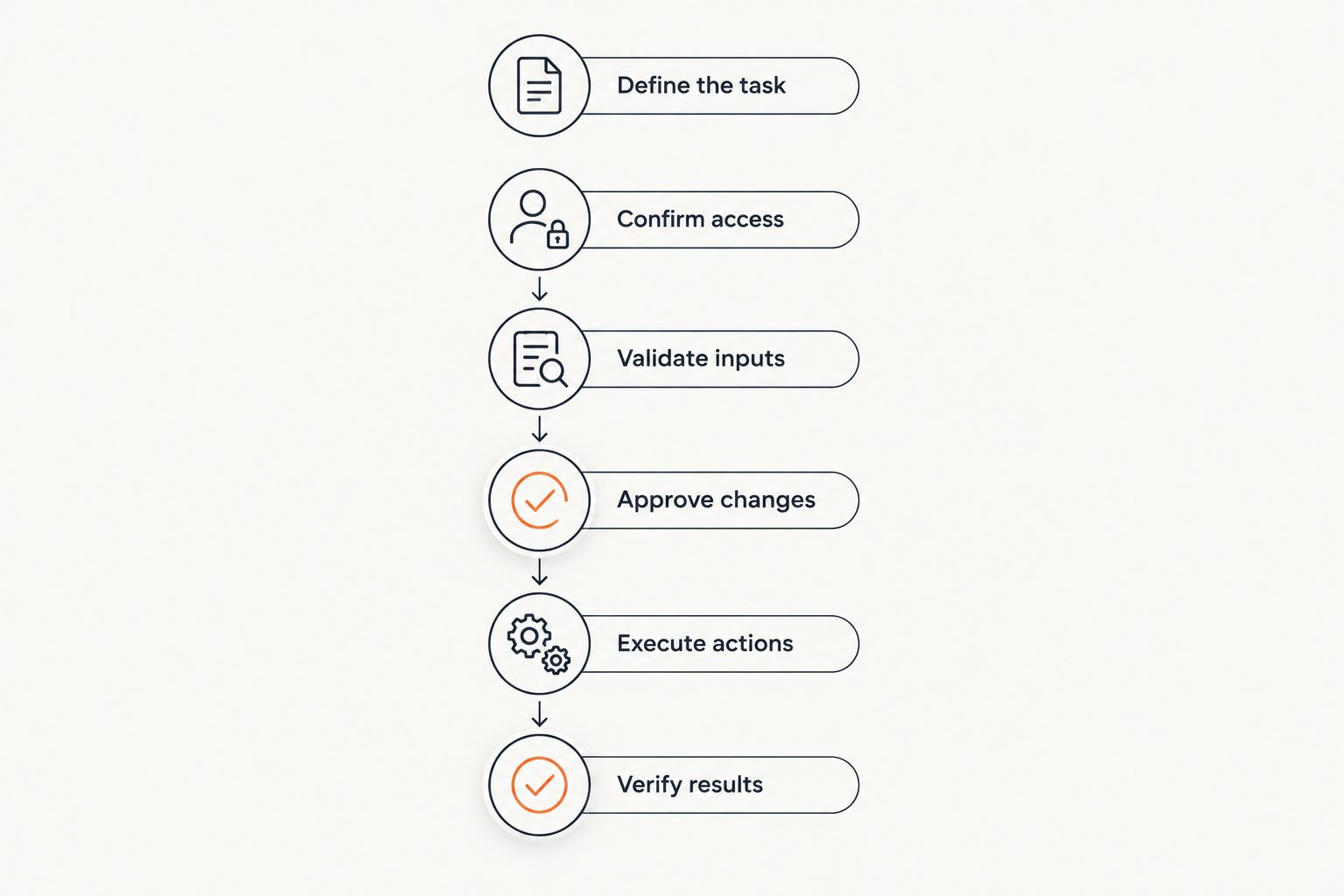
Verification follows execution; a submitted action is not automatically a completed business task.
For consequential writes, place 2 approval gates in your proposed design: approve the workflow’s permissions before launch, and approve individual actions that fall outside its agreed operating rules. These gates serve different purposes; permission to run is not permission to make every possible change.
Why implementation difficulty varies
No-API integration difficulty depends on the access path and the consequences of failure, not simply on whether an agent can operate the application.
Use these factors in your 2026 scope review:
Interface stability: Documented file formats provide clearer expectations than screens that change without integration notice.
Read versus write access: Retrieving a report requires different safeguards from posting a financial transaction.
Record matching: Missing or inconsistent identifiers make customer, product, and order matching ambiguous.
Authentication requirements: Session expiry and interactive sign-in affect unattended operation.
Failure visibility: An application must expose enough evidence to distinguish acceptance, rejection, and an unknown result.
Business consequences: Irreversible or sensitive changes require stricter permissions, approval, and recovery planning.
Do not estimate the project from a successful demonstration alone. Include connector maintenance, exception handling, access administration, and operational ownership in the scope.
Can an agent update records without an API?
Yes, an agent can update records through a supported import or authorized interface automation. The workflow still needs application validation, permission boundaries, and confirmation that the intended change was saved.
Direct database writes require separate authorization and technical review. The ability to connect to a database is not evidence that writing to it preserves the application’s behavior.
Is screen automation better than file integration?
Screen automation is better suited to tasks that exist only in the interface; file integration is better suited to supported batch exchanges. Neither method wins independently of the workflow.
Choose based on accepted inputs, required timing, error feedback, and maintenance needs. Avoid screen automation when a supported import already performs the required operation.
When should an employee approve the agent's work?
An employee should approve consequential changes, ambiguous record matches, and actions outside the workflow’s authorized rules. Approval needs the proposed change and its supporting evidence, not just an agent-generated assurance.
Define the approval boundary before testing. Otherwise, exceptions become informal decisions that are difficult to audit or reproduce.
One last thing
The most revealing test is often an uncertain save, not an obvious error. If a connection drops after the application accepts a change, a blind retry can create a duplicate.
Before your 2026 launch, include 3 test cases specifically for completion: a confirmed save, a rejected save, and a save whose result is unknown. Require the workflow to distinguish them and demonstrate how an employee resolves the unknown result.
If it cannot make that distinction, keep automated writes out of production. Reading, preparation, and human-approved entry can still provide a useful starting point.
Related guides
Frequently asked questions
Can an AI agent use old business software without an API?
Yes, if the software offers an authorized access path such as file exchange, approved database reads, or interface automation. The integration must validate inputs and verify the resulting application state.
Does no-API integration require an AI model?
No, fixed rules and conventional automation can handle predictable workflows. An AI model is useful when the task requires interpreting unstructured requests, with controlled execution kept separate.
Can an AI agent write directly to a business database?
Direct database writes require explicit support and authorization from the application owner. They can bypass application rules, so a supported import or application interface is preferable when available.
How do you prevent duplicate transactions during retries?
Track the attempted action and check the application before repeating a write. A timeout means the result is unknown, not necessarily that the transaction failed.
What happens when the application screen changes?
Interface automation should stop when the screen no longer matches its expected state. A maintainer then reviews the change and tests the affected workflow before resuming it.
Can an agent work around multifactor authentication?
An agent should not bypass multifactor authentication or access controls. Establish an authorized authentication process with the application owner, and use human participation where the approved process requires it.
What should you test before launching a no-API workflow?
Test successful execution, rejected input, duplicate submissions, interrupted sessions, and uncertain save results. Confirm that each failure produces a controlled stop or a documented recovery path.