


TLDR
- AI automation platforms ranked by ease of integration: Zapier leads for straightforward SaaS workflows, not every integration.
- Make suits visual data transformations; Power Automate suits Microsoft-centered business processes.
- n8n suits developer-managed API integration; Workato suits enterprise integration with formal operational ownership.
- Choose connectors by supported actions, authentication, error recovery, and data ownership—not application logos.
Best overall for straightforward SaaS workflows: Zapier; best for visual data transformations: Make; best for Microsoft-centered operations: Power Automate. This 2026 guide ranks five AI automation platforms by integration effort, with n8n for custom API workflows and Workato for governed enterprise connections; start by choosing the first business workflow for AI automation.
AI automation platforms at a glance
The ranking assumes you want to connect existing business applications, introduce an AI processing step, and maintain the resulting workflow. It favors less implementation work for common SaaS connections—not maximum functionality.
Rank | Platform | Best for | Standout integration feature | Key limitation |
|---|---|---|---|---|
1 | Zapier | Straightforward SaaS workflows | App triggers and actions assembled without building an integration service | Specialized API behavior requires more technical work |
2 | Make | Visual data transformations | Visual scenarios with routers, iterators, and data mapping | Complex scenarios become harder to inspect and maintain |
3 | Power Automate | Microsoft-centered operations | Connections to Microsoft business applications and approval workflows | Non-Microsoft systems still require connector and authentication checks |
4 | n8n | Developer-managed API workflows | Workflow nodes, HTTP requests, code, and self-hosting options | Hosting and custom logic create operational responsibilities |
5 | Workato | Governed enterprise integration | Recipes and connectors for business-system orchestration | Enterprise implementation requires more planning than a small workflow |
A lower position does not mean a weaker platform. A developer-managed integration or enterprise rollout has different requirements from a marketing team connecting familiar applications.
Why this matters
The easiest demonstration is not necessarily the easiest integration to operate. A workflow that summarizes a message has fewer dependencies than one that interprets an order and writes to an ERP.
For Endertech clients evaluating AI automation platforms in 2026, the important question is what happens beyond the model response. Authentication, field mapping, approvals, duplicate prevention, and failed deliveries determine whether the workflow supports daily operations.
Consider a furniture retailer extracting delivery instructions from customer messages. The AI step interprets text; the surrounding integration must identify the correct order, validate the extracted fields, and prevent an uncertain interpretation from changing fulfillment instructions without review.
Separate interpretation from permission to act. A model can suggest a structured value without receiving authority to update a business-critical record. When that permission boundary spans several business systems, AI agent orchestration connects agents to those systems with people approving the steps that matter.
What makes the best AI automation platform?
Use these six selection checks before choosing a platform:
Action coverage: Confirm the connector supports the exact read, search, create, or update operation you need.
Authentication fit: Check permissions, credential ownership, token renewal, and access to the relevant environment.
Data mapping: Inspect nested fields, identifiers, dates, missing values, and the destination system's required format.
Recovery: Establish how failed steps are detected, investigated, and safely retried.
AI boundaries: Decide which outputs require validation or human approval before downstream changes.
Operational ownership: Name the team responsible for maintenance, credentials, monitoring, and workflow changes.
Connector presence answers only whether a connection exists. It does not establish whether that connection supports your business process. Ask for a demonstration using the required action and representative data rather than an application logo.
1. Zapier: best AI automation platform for straightforward SaaS workflows
Zapier connects application triggers to actions through workflows called Zaps. You can combine application steps with AI processing and send the result into another business application.
Its strongest fit is a bounded workflow built around supported connector actions. For example, a form submission can provide text for classification before a workflow creates a task for the appropriate team.
Zapier pros:
Application triggers and actions reduce the need to write integration code.
Filters and paths support conditional routing.
Webhooks provide a route for connections beyond standard application steps.
Zapier cons:
A connector does not expose every operation available in an application's API.
Complex transformations and extensive branching make workflows harder to follow.
Safe retries still require attention when downstream actions create records.
Best for: Business teams connecting SaaS applications through supported, well-defined actions.
Before adopting Zapier, verify the trigger behavior and destination action with actual account permissions. An action that creates a contact is not interchangeable with one that finds and updates an existing contact.
Verdict: Buy for bounded SaaS workflows; skip as the default for deeply customized integration logic.
2. Make: best AI automation platform for visual data transformations
Make organizes automation into visual scenarios made of connected modules. Routers, iterators, and mapping tools help express workflows that transform data or process collections of records.
For a 2026 project involving nested API responses or multiple decision branches, Make deserves an early evaluation. Its visual structure makes the transformation path visible, but visibility does not eliminate complexity.
Make pros:
Visual mapping supports inspection of data moving between modules.
Routers separate workflow branches by conditions.
Iterators support processing items within collections.
HTTP modules support API requests beyond dedicated connectors.
Make cons:
Large scenarios require deliberate organization and documentation.
Collection handling demands an understanding of the source data structure.
An incorrect filter or mapping can send valid-looking data down the wrong branch.
Best for: Operations teams that need visual control over branching and data transformation.
A practical example is processing product information from an API before passing selected fields to an AI step. Keep product identifiers unchanged, validate generated content separately, and make publishing a distinct action rather than an automatic consequence of generation.
Verdict: Buy when visual transformation is central; skip when nobody owns the mapping logic.
3. Power Automate: best AI automation platform for Microsoft operations
Power Automate supports business workflows through cloud flows, connectors, approvals, and desktop automation. It fits processes that already depend on Microsoft applications and organizational identity controls.
A Microsoft-centered starting point changes the integration decision in 2026. Evaluate the workflow within your existing environment rather than treating it as an isolated automation purchase.
Power Automate pros:
Connectors support workflows involving Microsoft business applications.
Approval actions provide a defined human decision point.
Desktop flows address processes involving user-interface automation.
Power Automate cons:
External applications still need connector, permission, and action verification.
Desktop automation depends on the interface it interacts with.
Environment configuration and administrative policies affect implementation.
Best for: Organizations building workflows around Microsoft applications and established administrative ownership.
An approval workflow illustrates the fit: extract information from a document, validate the proposed fields, request approval, and then update the destination record. Confirm where the AI processing occurs and which data it receives before enabling the final update.
Do not treat desktop automation as equivalent to a stable API connection. Interface changes introduce a different maintenance problem.
Verdict: Buy for Microsoft-centered processes; hold until external-system access and governance are confirmed.
4. n8n: best AI automation platform for developer-managed APIs
n8n combines visual workflows with HTTP requests and code-based processing. It also offers self-hosting, giving technical teams an option to manage the workflow runtime themselves.
That flexibility makes n8n relevant when the integration requires custom API calls or transformations that do not fit a standard connector. The tradeoff is ownership: custom behavior needs someone who can explain, test, and maintain it.
n8n pros:
HTTP request nodes support connections to accessible APIs.
Code nodes accommodate custom transformations.
Self-hosting provides control over the runtime environment.
n8n cons:
Self-hosting requires deployment, updates, monitoring, and backup planning.
Custom code needs testing and a maintenance owner.
Managing the runtime does not remove third-party API restrictions.
Best for: Technical teams building custom API workflows with ongoing development support.
Self-hosting is not a guarantee that all data stays inside your infrastructure. If a workflow sends customer text to an external model API, that request crosses the infrastructure boundary regardless of where n8n runs.
Verdict: Buy when a technical owner needs API flexibility; skip self-hosting without operational support.
5. Workato: best AI automation platform for enterprise orchestration
Workato uses recipes and connectors to coordinate workflows across business applications. Its relevant use case is integration spanning systems and teams, rather than a single isolated task.
For ERP, CRM, and ecommerce processes, ease of integration includes ownership and change control. The platform choice must account for who approves changes and who handles exceptions after deployment.
Workato pros:
Recipes express multistep business workflows.
Connectors support integration across business applications.
Reusable connections and workflow components support organized implementation.
Workato cons:
Cross-system workflows require detailed mapping and ownership decisions.
Connector coverage still needs verification against specific operations.
A broader orchestration platform does not simplify unclear business rules.
Best for: Organizations coordinating integrations across multiple business systems and responsible teams.
For an ecommerce-to-ERP workflow, define which system owns products, inventory, customer identifiers, and order status. The guide to connecting an ERP to an ecommerce platform explains the operational questions that precede tool selection.
Verdict: Buy for governed cross-system orchestration; skip when a bounded workflow meets the requirement.
How these platforms are ranked
This 2026 ranking prioritizes setup simplicity for common SaaS workflows, then considers transformation effort, environment fit, custom development, and operational responsibility. It is an architectural comparison—not a measured implementation-speed benchmark.
Zapier takes the default position because connector-driven workflows suit the stated starting scenario. Make takes the transformation slot, Power Automate the Microsoft slot, n8n the custom API slot, and Workato the enterprise orchestration slot.
Endertech is a fit for businesses connecting AI automation platforms with ecommerce, custom software, and operational systems. That implementation context matters more than choosing the first-ranked tool regardless of requirements.
Validate the integration before expanding it
Test one complete business process before replicating its pattern. A successful AI response is only an intermediate result; the destination system must receive the right change, and the team must understand failures.
Verify access
Use the intended account and environment. Confirm that permissions cover the required records and actions, not just a successful connection screen.
Map records
Document source identifiers, destination identifiers, required fields, and update rules. Preserve stable business identifiers outside generated text so matching does not depend on a model's interpretation.
Validate output
Define the accepted fields and values before adding the AI step. Reject output that does not match the expected structure, and route ambiguous business decisions to review.
Test recovery
Use three test cases: a valid record, a record missing a required field, and a repeated event. Check whether the repeated event creates a duplicate, repeats a notification, or leaves the destination unchanged as intended.
Assign ownership
Name the person responsible for failed runs and the person authorized to change mappings. Document credential renewal and the procedure for stopping writes without losing incoming work.
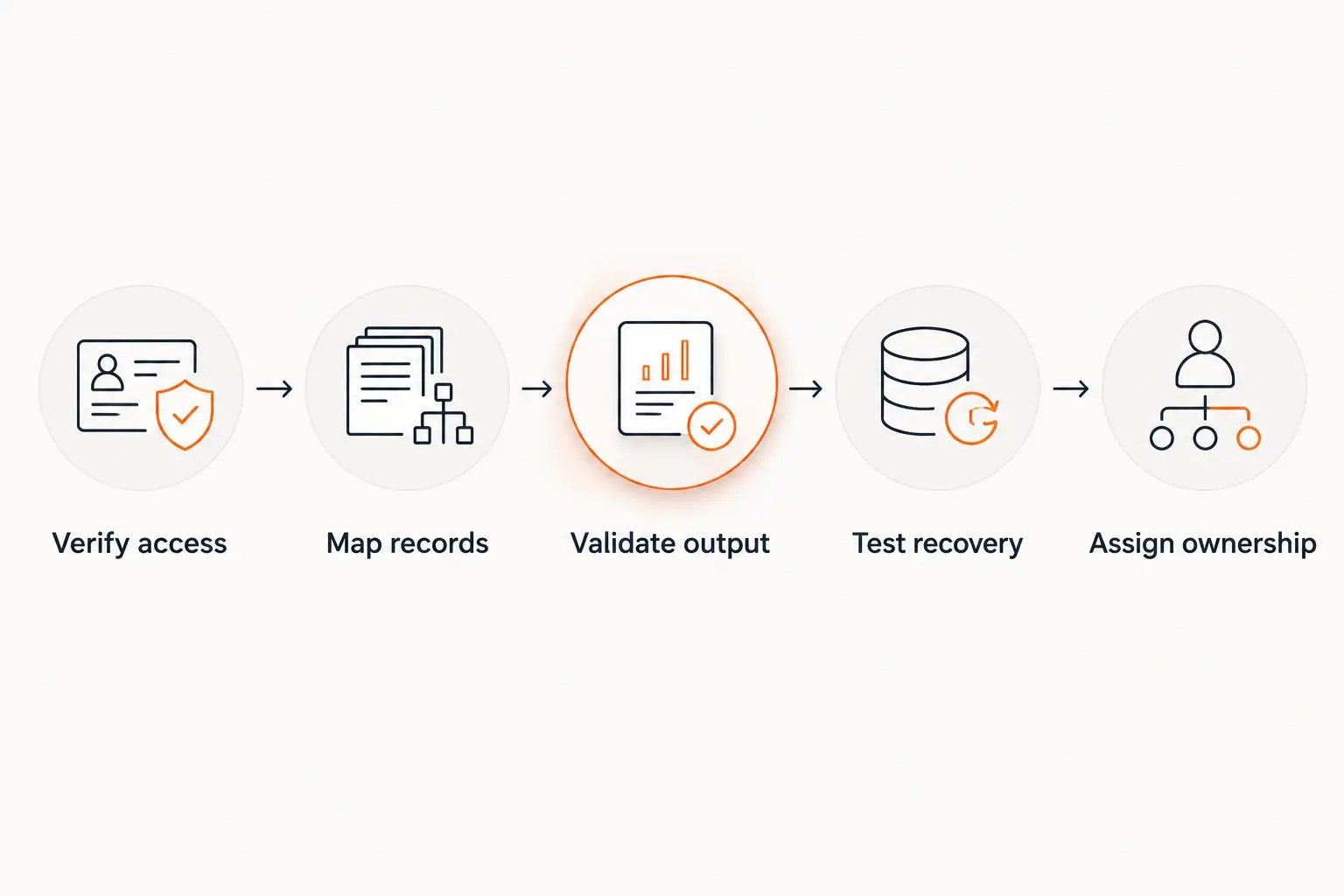
Validate the complete workflow, including recovery, before expanding automation.
The acceptance decision should cover the whole workflow. If nobody can explain how a failed destination update is recovered, the integration is not ready for unattended operation.
Which AI automation platform should you choose?
Choose Zapier as the starting point for a straightforward SaaS workflow in 2026. Choose Make when visual transformation dominates, Power Automate when Microsoft environment fit dominates, n8n when custom API control dominates, and Workato when cross-system orchestration dominates.
Avoid switching platforms to compensate for an undefined process. First resolve record ownership, write permissions, validation rules, and exception handling; then compare how much work each platform requires to implement those decisions.
One last thing
The least visible integration failure is a successful write to the wrong record. An AI-generated result can look sensible while an incorrect identifier quietly connects it to the wrong customer or order.
Before expanding a 2026 rollout, trace a completed transaction backward from the destination record to its source event. For projects involving Endertech, make that traceability an acceptance requirement: a polished demonstration is not a substitute for an explainable business transaction.
Related guides
Frequently asked questions
What's the easiest AI automation platform to integrate?
Zapier is the starting recommendation for straightforward SaaS workflows using supported triggers and actions. The recommendation changes when you need extensive data transformation, custom APIs, or enterprise orchestration.
Is Make better than Zapier for API integration?
Make is the stronger fit when visual branching and data transformation drive the workflow. Verify the required API operations and authentication before choosing either platform.
Should a Microsoft business choose Power Automate?
Power Automate is a strong starting point for workflows centered on Microsoft applications. External systems still require checks for connector actions, permissions, and administrative restrictions.
Is n8n self-hosting easier than using a hosted platform?
Self-hosting adds operational work rather than removing it. n8n suits teams that want runtime control and can own deployment, updates, monitoring, and recovery.
When does Workato make sense for AI automation?
Workato fits workflows that coordinate business systems across multiple teams. Define record ownership and exception handling before implementing the recipes.
Does an application connector guarantee an easy integration?
No, a connector does not guarantee support for your required operation. Check the exact action, available fields, authentication method, and failure behavior using representative records.
Can AI automation update ERP records without human review?
Restrict unattended updates to defined actions with validated inputs and clear recovery rules. Use human approval when an uncertain interpretation changes a business-critical record.