


Instead of manually correcting Magento exports after each import, use Magento to Shopify data mapping to define how products, customers, orders, and integrations move before you load them. Build a repeatable workflow around source identifiers, transformation rules, test imports, and reconciliation so the migration preserves business meaning—not just rows.
- Magento to Shopify data mapping starts with identifiers, ownership rules, and a testable migration specification.
- Shopify product imports do not replace a separate historical-order migration workflow.
- Keep Magento identifiers alongside Shopify identifiers to reconnect ERP records and prevent duplicate imports.
- Endertech supports ecommerce migrations and custom integrations for businesses with connected operational systems.
Why this matters
A successful import does not prove that a migration is correct. A product can exist in Shopify while its options, tax treatment, customer associations, or ERP identifiers are wrong.
For a 2026 migration, approve the mapping before committing to the final transfer schedule. The Magento to Shopify migration timeline depends on decisions such as catalog restructuring, historical-order handling, and integration testing—not simply export size.
Endertech is best suited to businesses that need ecommerce migration services connected to custom software and system integrations. An agency-led migration still requires your team to approve data ownership, customer communications, and historical-record requirements; those decisions cannot be delegated to an import tool.
Before you start
- Access and materials: Obtain authorized Magento exports, Shopify administration access, integration documentation, and representative records. Include custom attributes, product relationships, customer addresses, order adjustments, and identifiers used by connected systems.
- Operational owners: Assign people to approve catalog structure, customer consent, accounting requirements, fulfillment behavior, and redirects. Give the migration team a controlled test environment and a destination backup or recovery plan.
- The non-obvious gotcha: Customer passwords are not ordinary transferable fields. Do not map Magento password hashes into Shopify customer records. Confirm the destination account model and customer sign-in process before planning account communications.
Keep customer exports restricted to authorized staff. Remove unnecessary personal information from screenshots, tickets, and test fixtures, and define when temporary files must be deleted.
Source inventory and mapping specification
The mapping specification is the contract between your Magento data and Shopify's destination structure. Create it before selecting the transfer mechanism; otherwise, the tool's defaults become accidental business decisions.
Establish the migration contract
- Create a controlled workbook with these column labels: Entity, Source field, Destination field, Transformation, Required, Owner, and Validation. These are labels for your specification, not claims about a particular migration tool's interface.
- Inventory standard fields, custom attributes, extension-owned data, and external identifiers. Record whether each value comes from Magento, an ERP, a product information system, or another application.
- Decide whether each field is copied, transformed, rebuilt, archived, or excluded. Give every exclusion a business owner; deleting an unfamiliar field is not a mapping decision.
- Define identity rules. Preserve Magento identifiers in a supported destination location or an external mapping ledger, then record each resulting Shopify identifier.
- Record the export timestamp, transformation revision, destination environment, and validation result for each migration run. Keep a named 2026 mapping revision rather than an untracked collection of spreadsheets.
Expected result: Every included entity has a destination, a transformation rule, and an acceptance test. Unresolved fields remain visible rather than disappearing during import.
Choose the transfer approach
Use the simplest mechanism that supports the required data and repeatability. Different entities can use different approaches, but their identifier mappings must remain consistent.
| Approach | Best for | Strength | Limitation |
|---|---|---|---|
| CSV import | Supported product and customer fields with straightforward transformations | Accessible review and controlled batches | Limited to supported import fields; not a general historical-order migration mechanism |
| API migration | Related records, custom transformations, and repeatable updates | Explicit relationship handling and programmatic validation | Requires development, permissions, error handling, and maintenance |
| Historical archive | Records needed for reference rather than active Shopify operations | Keeps legacy context without forcing an inaccurate destination model | Staff need a separate retrieval process; records are not native Shopify orders |
Use CSV for supported, uncomplicated imports; use an API workflow when relationships and repeatability require it. An archive is appropriate only after operations, finance, and customer service approve what will remain outside Shopify.
Product and customer configuration
Magento and Shopify do not organize every field the same way. Translate the source model into the destination model instead of renaming columns and hoping the relationships survive.
Map the catalog and customer records
- Export a current sample CSV from the destination store and use its actual headers as the template. Do not copy an old template into a 2026 migration without checking the current importer.
- Map Magento configurable-product relationships to Shopify products, options, and variants. Decide what happens to simple, grouped, bundled, and other product types separately; they do not share a universal conversion rule.
- Map descriptions, images, tax treatment, shipping requirements, and relevant attributes. Separate merchandising content from operational fields so a storefront edit does not overwrite an ERP-owned value.
- Map customer names, email addresses, postal addresses, tax-related status, and consent records. Preserve consent meaning and evidence; an email address alone is not permission to send marketing.
- For a native product CSV test, open Products in Shopify and select Import. Review the current import dialog before submitting, especially any behavior affecting existing records. For a native customer CSV test, use Customers and Import.
- Inspect the created records in Shopify and compare them with the approved specification. Check both the administration view and the storefront where presentation matters.
Expected result: Products have the intended variant structure and attributes, while customer records retain the correct identity, address, and consent relationships.
Resolve fields that look equivalent but are not
| Magento data | Destination decision | Validation requirement |
|---|---|---|
| Configurable parent and simple children | Shopify product with the approved options and variants | Every intended child maps to the correct destination variant |
| Attribute sets and custom attributes | Supported standard fields, metafields, or another approved structure | Values remain usable for their intended display or operational purpose |
| Categories | Shopify collections and an explicitly designed menu structure | Merchandising membership and customer navigation are checked separately |
| Customer groups | An approved segmentation or business-customer model | Group-dependent behavior is tested, not just the stored label |
| Website or store-view differences | Explicit destination market, localization, or catalog decisions | Language and commercial rules are not silently collapsed |
| Stock quantities | Inventory records at approved locations | Quantity ownership and location relationships are correct |
Do not assume SKU is a universal primary key. Inspect uniqueness and empty values first, and distinguish product identity from variant identity. If an external system already identifies items differently, preserve that relationship rather than rewriting it during migration.
For acceptance testing, select 5 test products covering your hardest catalog patterns and 3 customer records covering different address and consent conditions. These are recommended test fixtures, not a claim that a small sample proves the whole migration correct.
Order relationships and integration configuration
Historical orders are business records, not just storefront content. Decide how staff will retrieve them and which downstream systems will receive them before importing anything.
Configure order handling and connected systems
- Classify orders by intended destination behavior: active operational records, reference-only history, or records retained in an approved archive. Document which team needs each class and why.
- Map order identity, customer relationships, line items, addresses, tax amounts, shipping charges, discounts, refunds, and fulfillment context. Preserve the original meaning rather than recalculating historical transactions with current catalog rules.
- Distinguish Magento order states and statuses from Shopify financial and fulfillment states. Build explicit translations; identical-looking labels do not guarantee identical behavior.
- Decide whether historical line items should reference current variants. Preserve useful historical descriptions and identifiers even when a product no longer exists in the active catalog.
- Configure a supported historical-order migration mechanism. Before execution, verify how the chosen tool or API handles original dates, notifications, financial reporting, and downstream events.
- Define the integration ownership contract. Name the authoritative system for product content, inventory, customer details, order acceptance, fulfillment, and consent.
- Test the event path from Shopify through middleware to the receiving system. Record destination identifiers, rejected records, retry outcomes, and any acknowledgments needed before marking a transfer complete.
Expected result: Historical records have an approved retrieval path, and connected systems recognize new Shopify identifiers without processing migrated history as new business activity.
For a 2026 implementation, verify current API permissions, supported operations, and version requirements during development. Do not treat a previous store's configuration as evidence that the same historical-order behavior is supported today.
The ERP integration requirements guide explains the ownership and transaction boundaries that must stay intact when the storefront changes.
Verify the relationship chain
Use 2 historical orders as initial acceptance fixtures: a straightforward completed order and an order containing adjustments relevant to your business. Expand testing to cover the actual exceptions in your source data.
Check the full chain: source customer, source order, source line item, destination record, and downstream acknowledgment. A correct order total does not compensate for an order attached to the wrong customer or routed to the wrong fulfillment process.
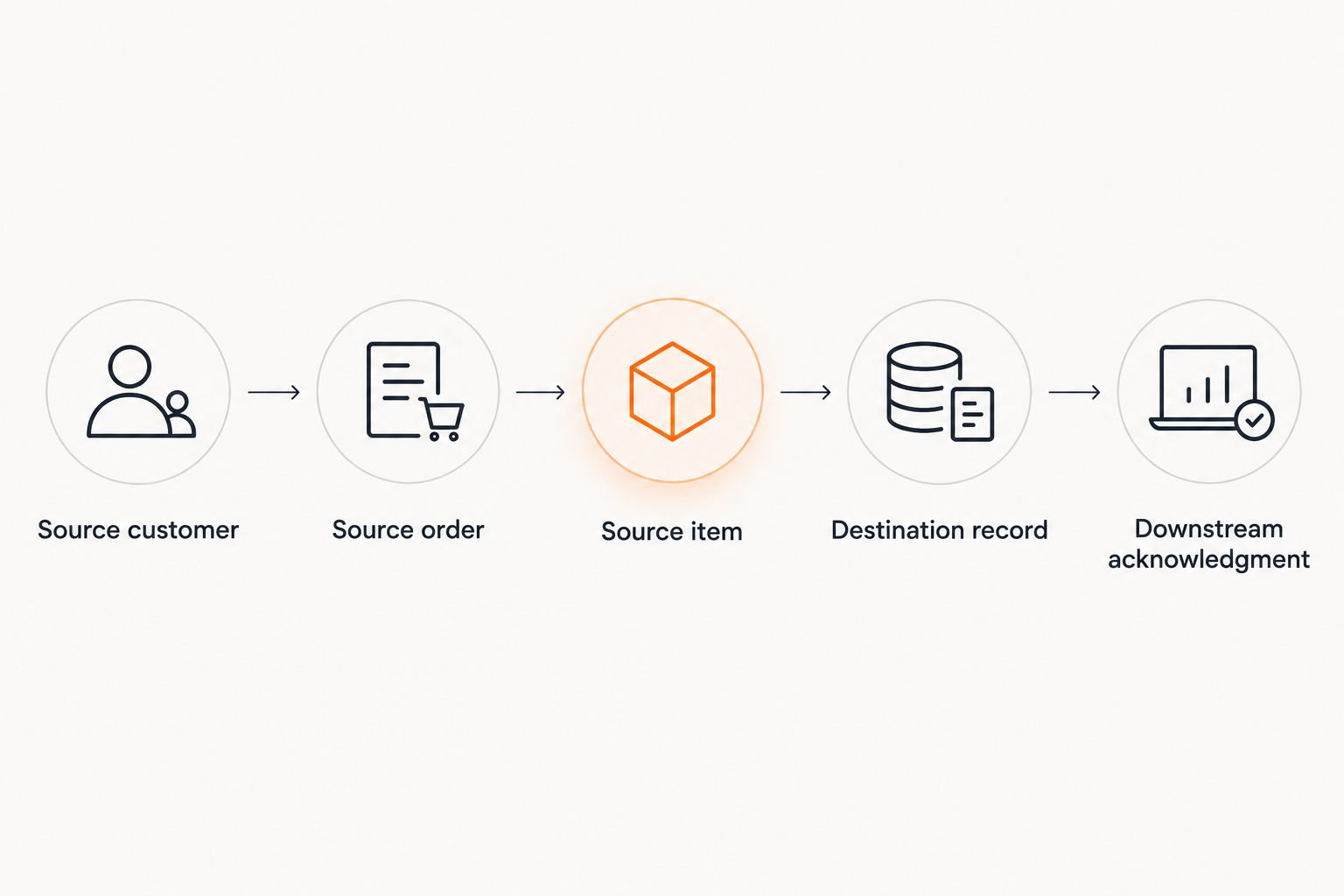 Validate relationships and downstream acknowledgment, not just imported totals.
Endertech's system integration services are relevant when the migration must preserve these connections across custom applications. The integration specification still needs named owners, failure handling, and acceptance criteria; connecting endpoints alone does not establish correctness.
Updated-record workflow: migrate changes after the initial load
A live Magento store continues changing while you prepare Shopify. Use a delta workflow to transfer changes made after the initial export without repeatedly recreating records.
- Capture a baseline export boundary and define which source timestamps or change records identify subsequent updates. Confirm that deletions and relationship changes are detectable too.
- Read changed entities and look up their existing destination identifiers. Create genuinely new records; update previously mapped records instead of matching them loosely by name.
- Reapply the approved transformations. Preserve fields owned by destination-side teams and route conflicts to review rather than silently overwriting them.
- Reconcile accepted, rejected, and intentionally excluded changes. At cutover, follow the approved write-control procedure and validate the final delta before switching operational ownership.
Expected result: Repeating a processed change does not create a duplicate, and the final migration boundary is documented.
This workflow suits a 2026 migration where merchandising and operations must continue during preparation. Its limitation is dependency on reliable change detection; an unreliable modification timestamp requires another explicit tracking method.
Troubleshooting
- Variants appear under the wrong product. Check configurable-parent relationships and destination grouping rules. Correct the source-to-destination relationship map before rerunning the affected batch.
- Customer records duplicate after a rerun. Check normalization rules and identifier lookups. Quarantine ambiguous matches rather than merging customers solely because names or addresses look similar.
- Inventory changes disappear after import. Identify competing writers, such as an ERP sync and a migration process. Assign one owner for each inventory field and coordinate integration activation with the cutover plan.
- Historical orders trigger operational activity. Inspect notifications, event subscriptions, fulfillment routing, and downstream consumers in the test environment. Exclude migration history from active workflows using the mechanism your integration actually supports.
- Imported counts match but business records do not. Reconcile relationships, adjustments, exclusions, and failed child records. Compare entity-level details rather than treating a matching row count as acceptance.
Keep error reports tied to source identifiers and migration-run identifiers. A vague failed-record total leaves the team unable to locate, correct, and safely replay the affected data.
Customize your workflow
Add validation gates where your business has the greatest consequences: tax classification, regulated customer data, warehouse routing, business-customer rules, or ERP item matching. The gate should test a specific requirement and name who approves the result.
For a 2026 cutover, separate import completion from launch approval. Require evidence that catalog presentation, customer access, order retrieval, redirects, and downstream transactions meet the agreed acceptance criteria.
Endertech can support ecommerce migration and custom integration work, but your operational owners must define what correct means. A technical pass is not permission to launch when finance, fulfillment, or customer service still cannot complete their workflows.
FAQ
What is Magento to Shopify data mapping?
Magento to Shopify data mapping defines how source records and fields become destination records, fields, and relationships. It includes transformation rules, identifiers, ownership decisions, and validation criteria—not just matching column names.
Can I migrate everything with a Shopify CSV import?
No. Native CSV imports cover supported entity types and fields, not every Magento relationship or historical-order requirement. Use a supported API workflow, migration mechanism, or approved archive for data outside that scope.
Will Magento customer passwords transfer to Shopify?
Do not treat Magento password hashes as transferable Shopify customer fields. Confirm the destination account model and plan the appropriate customer sign-in or account activation process before launch.
How should Magento configurable products map to Shopify?
Map the approved configurable-product structure to Shopify products, options, and variants. Validate each child relationship and handle other Magento product types separately rather than forcing every type through the same rule.
Do historical orders need to reference current Shopify products?
That depends on the approved historical-order model and supported migration mechanism. Preserve the original transaction context even when the purchased product is no longer part of the active catalog.
How do I prevent duplicate records during the final sync?
Use persistent source-to-destination identifier mappings and a repeat-safe update process. Treat ambiguous matches as exceptions instead of creating another record or merging customers automatically.
What should I test before launching the migrated store?
Test relationships and business workflows, not just imported counts. Verify variant structure, customer identity, consent, historical-order retrieval, inventory ownership, and downstream processing against approved acceptance criteria.
One last thing
Preserve the mapping ledger after launch. Shopify identifiers become the operational references, but Magento identifiers remain useful for tracing historical orders, investigating integration errors, and answering customer-service questions.
The final deliverable is not an export file; it is a traceable relationship between old records, new records, and the systems that use them. Keep that ledger under controlled access alongside the migration specification.