


TLDR
- Category metafields are the standard attributes Shopify attaches to each Standard Product Taxonomy category.
- They're the right landing zone no matter where the data comes from: an ERP, a PIM, a migration or another Shopify store.
- Values are shared entries, so outside systems must match them by type and handle, not by ID.
- In our experience, one rejected field can drop a product's other metafields, so save per field and report failures.
Product data rarely starts in Shopify. It starts in an ERP, a PIM, a catalog being migrated from another platform, a supplier feed or a spreadsheet someone has maintained for ten years. The general lesson: the source matters less than the landing zone. If attributes land in the standard fields the platform itself understands, every surface can use them, including the AI channels Shopify now feeds. If they land in custom fields only you understand, every surface has to be taught where to look.
On Shopify, those standard fields are category metafields. This post explains what they are, why they're the right target no matter where your data comes from, and what anyone writing to them from outside Shopify should expect.
What category metafields are
Shopify maintains the Standard Product Taxonomy, an open, versioned tree of product categories. When a product is assigned a category, Shopify offers the attributes that belong to that category as category metafields. A shirt gets clothing size, neckline and sleeve length type. A sofa gets its own set.
Three details make them different from a custom metafield you define yourself:
The values are shared entries, not free text. Each value is an entry Shopify stores once, with a standard base value behind it. Rename "Black" to "Graphite" for your brand and it changes everywhere it's used, while the standard meaning stays attached.
They can drive variant options. Shopify lets you connect a category metafield to a variant option, so the Color option and the Color attribute are the same data, not two copies that drift.
Shopify itself knows what they mean. According to Shopify's category metafields documentation, they exist to make products more discoverable on your site, on marketplaces and on search engines, and they can be used as store filters and as dimensions in Shopify reports.
Why this matters more for AI channels
As of October 2026, Shopify syndicates eligible products to AI channels through Shopify Catalog. Shopify's agentic storefronts documentation says Catalog lists products with their title, description, options, images, price, availability and "other key attributes", structured so agents can parse them.
If your important data lives in custom fields, Shopify offers Shopify Catalog Mapping to point it at the right source. Mapping is useful, and it's narrow: it lets you choose a single source for the product title, description and category, plus grouping rules for combined listings. It isn't a general-purpose way to teach Catalog what every custom metafield means. The category itself and the attributes attached to it are where structured meaning comes from.
Shopify's Agentic admin also shows listing quality signals per product, including variant and option completeness. Category metafields linked to options are the cleanest way to make that signal honest.
My view: treat standard category metafields as the public contract for your product data, and custom metafields as the private details your own storefront needs on top. Detailed product page specifications can still come from custom fields. The category and its standard attributes are what every other surface can rely on.
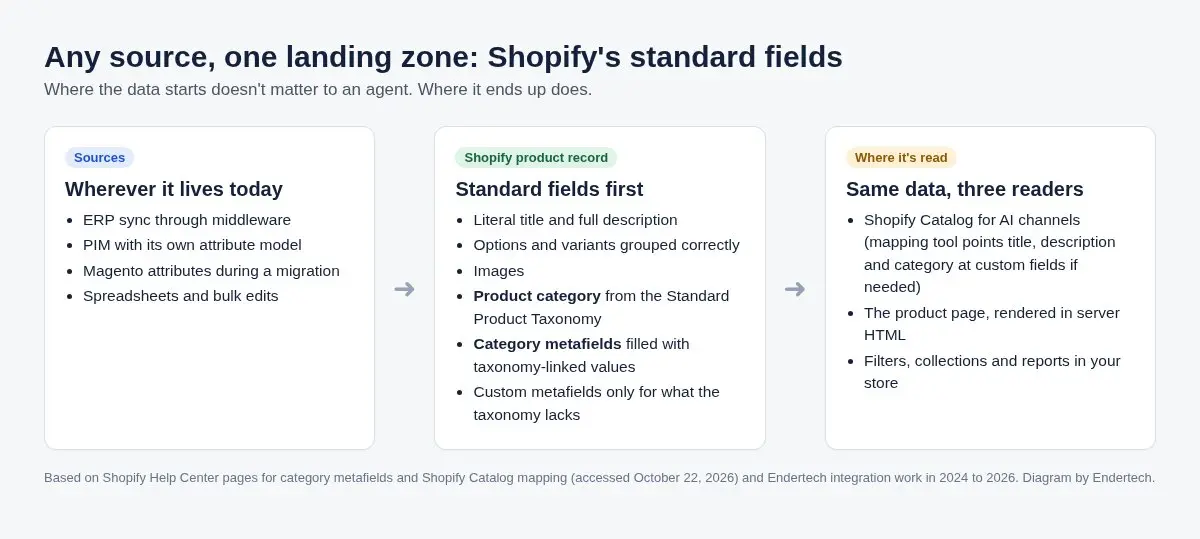
The source can be anything. The landing zone should be Shopify's standard fields, product category and category metafields.
Diagram: Endertech
The source doesn't matter. The mapping does.
We've landed product data in category metafields from very different starting points, and the decision is the same each time: for each source attribute, does the category already have a standard equivalent? If it does, map to it before inventing a custom field.
A platform migration. Moving from Magento, attribute sets are transformed anyway, so it's the cheapest moment to map each attribute to a standard field first. Our Magento to Shopify data mapping guide covers the approach, and our Magento to Shopify program runs it.
A content tool with an approved category list. Editors pick categories and attributes from what the taxonomy supports, not from a free-form list, so the data stays usable later.
An ERP or PIM through middleware. The middleware translates source values into Shopify's category metafield entries, so Shopify stays the place every channel reads from. If the ERP changes, the Shopify side doesn't. That's the rule we follow in Shopify back-office integration work, including for furniture retailers on STORIS.
Another Shopify store. Sister stores can share attribute values, but only through the same lookup step every other source needs.
What to expect when you write them from outside Shopify
Any system that writes category metafields, whether an ERP connector, a migration script or a store-to-store sync, runs into the same five things. We learned each of them on real projects in 2026.
Values are references, so match them by meaning, not by ID
A category metafield value points to an entry, and each store has its own entries with its own IDs. Copying an ID from one store or system to another fails. Match entries by type and handle, and report any value you can't match.
One bad field can sink the whole product save
In our experience, Shopify saved a product's metafields all or nothing. When one value was rejected, every other value in the request was dropped too, including ones that were perfectly valid. Validate each field, save the ones that pass, and report the failures so a person can fix the source.
Standard definitions have rules your app can't change
Shopify manages which categories each standard category metafield definition applies to. When we tried to adjust those assignments through the API, Shopify returned an access denied error, and Shopify support confirmed apps can't edit them. Write values only to products whose category already supports the attribute.
Recategorizing has side effects
Moving a product into a more accurate standard category can quietly remove it from a smart collection that depended on its old categorization. Before bulk recategorizing, list every smart collection, filter and report that keys off category or product type, and check each one after a test batch.
The taxonomy moves, so plan for updates
Shopify publishes new taxonomy versions. Any tool that offers category choices needs its taxonomy package kept current, so put it on the same maintenance list as your app dependencies.
Where to start
Assign standard categories first. Category metafields only appear once a product has a category, so this is the gate for everything else.
Map source attributes to category metafields before creating custom ones. Keep custom metafields for details the taxonomy doesn't cover.
Connect variant options to category metafields where Shopify supports it, especially color and size.
Write values with a lookup and a per-field save. Match entries by handle, save what validates and report what doesn't.
Use Catalog Mapping for what it's for. Point title, description and category at the right source if they live in custom fields.
Check the result where agents see it. Shopify's Agentic admin has a search preview and listing quality signals. Review a sample of products after each change.
How we know
This post draws on Shopify Help Center pages read on October 22, 2026, and on Endertech project work: a product content tool built in 2024, a category metafield sync and recategorization work in September and October 2026, and the Magento mapping approach in the guide linked above. The access denied behavior was confirmed by Shopify support during that project.
Limits
Shopify doesn't publish how Catalog weighs individual attributes when an agent ranks products, so a filled category metafield isn't a guaranteed recommendation. What Shopify does document is that Catalog lists key attributes, that Mapping controls a few fields, and that category metafields exist for discoverability. The all-or-nothing save and API restrictions are what we observed as of October 2026 and could change.
Last reviewed: October 22, 2026.
Sources
Category metafields, Shopify Help Center (accessed October 22, 2026).
Shopify Catalog and product discovery for agentic storefronts, Shopify Help Center (accessed October 22, 2026).
Customizing your product data for Shopify Catalog, Shopify Help Center (accessed October 22, 2026).
Shopify Standard Product Taxonomy, Shopify (accessed October 22, 2026).
Get your catalog into the fields Shopify reads
This is the third post in our series on Shopify's agentic storefronts, after how AI direct checkout bypasses checkout customizations and what structured data does for SEO and AI search. If your product data lives in an ERP, PIM or legacy catalog and you want it landing in Shopify's standard fields, talk with Endertech.
Frequently asked questions
What are Shopify category metafields?
They're the standard product attributes, such as color, material or size, that Shopify offers for each category in its Standard Product Taxonomy. Their values are shared entries that can also drive variant options, store filters and report dimensions.
Do I need Shopify Catalog Mapping if I use category metafields?
Catalog Mapping lets you choose the source for a product's title, description and category, and set grouping rules for combined listings. Use it if those fields live in custom metafields. It doesn't replace filling category metafields.
Can an app change which categories a standard category metafield applies to?
In our experience, no. When our sync tried to adjust those assignments through the API, Shopify returned an access denied error, and Shopify support confirmed apps can't edit them as of October 2026.