


TLDR
- Judge a product page by its first server response. Many agents don't run JavaScript or wait for streamed content.
- Pages hide content three ways: browser-fetched blocks, streamed placeholders and bot-detection gates.
- On the Hydrogen store we checked, price, specs and Product JSON-LD were in the initial HTML, but review text and delivery terms weren't for every reader.
- Render anything that affects a purchase on the server, for every user agent.
A product page can look complete in a browser and still be half empty to the software reading it. AI shopping agents, search crawlers and link previews often read the first HTML response, and many don't run JavaScript or wait for content that arrives later. The general lesson: judge a product page by what's in the first server response, not by what a person sees after everything has loaded.
Modern storefronts make this easy to get wrong because they're good at loading things later. Headless stacks like Shopify Hydrogen stream the page, defer slow data behind placeholders and fetch some blocks in the browser. All of that helps shoppers. Some of it hides content from machines. This post covers the three ways that happens, how to check your own pages in an afternoon, and what we found when we ran the check on a production Hydrogen store in October 2026.
Crawl signals like robots.txt, sitemaps and canonical tags are covered in Headless Storefront SEO: Own the Crawl Signals Your Theme Used to Send. How structured data fits in is covered in What Structured Data Actually Does for SEO and AI Search. This post is about the product page itself.
Why the page still matters when Shopify sends a feed
As of October 2026, Shopify sends eligible product data to AI channels through Shopify Catalog, so you might assume the page doesn't matter. Two things say otherwise.
First, Shopify's own agentic storefronts documentation says AI channels can also reach products through the open web, by crawling and indexing. Catalog isn't the only reader.
Second, the shoppers those agents send land on product pages. Shopify's GEO Playbook reports that in Q1 2026, more than half of AI-referred sessions started on a product page, compared with about 20% for organic search. The page is the first thing an agent quotes and the first thing a referred shopper sees.
Three ways a product page hides content from machines
1. Content fetched in the browser. Reviews, delivery estimates and recommendation widgets often load from a third-party service after the page renders. A reader that doesn't run JavaScript never sees them. In a searchVIU test from October 2025, ChatGPT and Claude didn't pick up a price inserted by JavaScript when fetching the page live, while ChatGPT did read prices in the visible HTML.
2. Content streamed behind a placeholder. Streaming frameworks send a "Loading..." fallback first and the real content later in the same response. A browser swaps it in. A simple parser may stop at the placeholder.
3. Content gated by bot detection. Some storefronts wait for all deferred data only when the user agent looks like a known bot. Known crawlers get the full page. A new AI agent the detection library doesn't recognize gets the placeholder version.
My opinion: anything that affects a buying decision shouldn't depend on bot detection or JavaScript. Price, availability, specifications, delivery promises, warranty terms and some review text belong in the initial render for everyone. Only truly slow, nonessential blocks should be deferred.
How to check your own product pages
Fetch the page without JavaScript. Request a product URL with a plain HTTP client, once with a browser user agent, once with a known crawler user agent and once with a made-up agent string, and save all three responses.
Search the raw HTML for the facts that sell the product. Price, availability, dimensions, materials, key specifications, review rating and count, review text, delivery and warranty terms.
Trace anything missing. For each missing fact, find whether it's deferred on the server, fetched in the browser or never rendered.
What we found on one Hydrogen store
We ran that check on a Hydrogen storefront we build and maintain for a furniture retailer. The pattern is common, so it's a useful example.
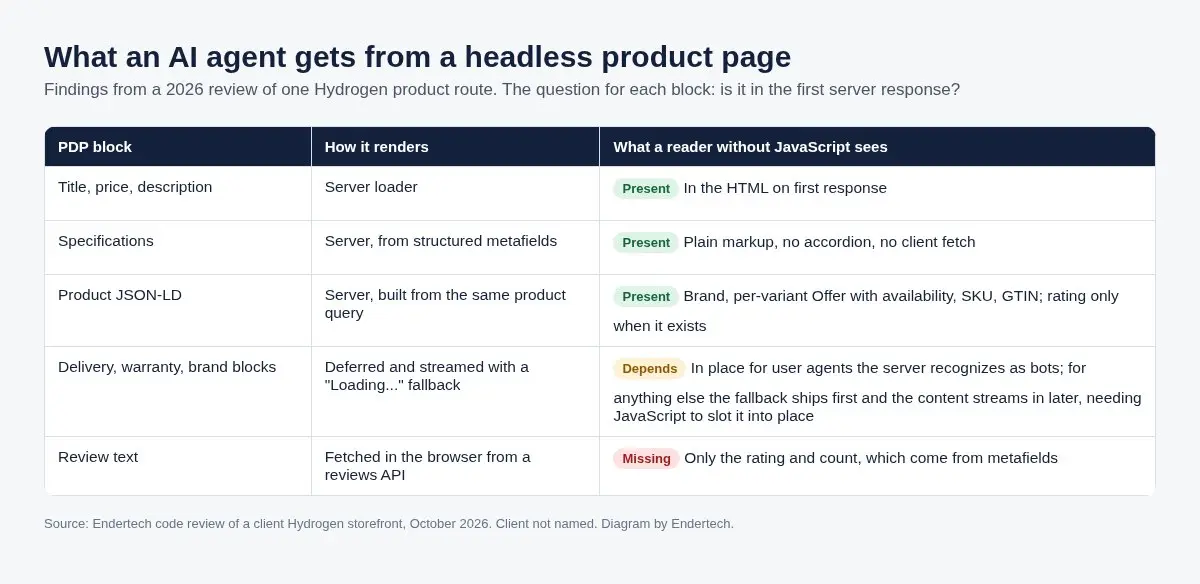
What a reader without JavaScript gets from one Hydrogen product route we reviewed in October 2026.
Diagram: Endertech
Present for everyone: title, price, description and specifications rendered as plain HTML from metafields, plus server-generated Product JSON-LD with one offer per variant and a rating only when real reviews exist.
Dependent on who was asking: delivery, warranty and brand blocks were streamed behind a placeholder, and the server waited for them only for recognized bots.
Missing for everyone: review text, which loaded in the browser from a reviews service. The rating and count were in the HTML. The reviews themselves weren't.
The fixes follow directly: render purchase-critical blocks for every user agent, and render at least a few recent reviews on the server if your reviews provider offers a server-side API. Shopify's Agentic admin lists reviews among its listing quality signals, and reviews are often the most persuasive content on the page.
A checklist for any product page
Compare raw HTML for a browser, a known crawler and an unknown user agent.
List every deferred or browser-fetched block and decide whether it affects a purchase. If it does, render it on the server.
Keep specifications in the HTML, even when they're inside a collapsed section.
Render some review text on the server, not only the rating.
Generate Product JSON-LD from the same data the page renders, with one offer per variant and ratings only when they exist.
Check headings. One H1, sensible levels and no hidden headings that also hide from assistive technology.
Test after every release. Deferred loading is easy to add in a refactor and hard to notice.
If you're planning a new build or a rebuild, our Shopify Hydrogen work starts from these checks.
How we know
We reviewed the product route of a production Hydrogen storefront, including its server entry, product loader and structured data module, on October 22, 2026. Shopify claims come from Shopify's Help Center and GEO Playbook, and the JavaScript fetch behavior from searchVIU's published test, all accessed the same day.
Limits
This is one storefront's route, and your stack may defer different blocks or detect bots differently. AI agents don't publish whether they run JavaScript or how long they wait, and the searchVIU result comes from a single test page, so we treat the first server response as the safe baseline rather than predicting each agent's behavior.
Last reviewed: October 22, 2026.
Sources
The GEO Playbook: How (and Why) to Optimize for AI Discovery, Shopify (accessed October 22, 2026).
Shopify Catalog and product discovery for agentic storefronts, Shopify Help Center (accessed October 22, 2026).
Data fetching in Hydrogen, Shopify developer documentation (accessed October 22, 2026).
Schema Markup and AI in 2025: What ChatGPT, Claude, Perplexity and Gemini Really See, searchVIU (accessed October 22, 2026).
Make your product pages readable to every reader
This is part of our series on Shopify's agentic storefronts. Earlier posts covered how AI direct checkout bypasses checkout customizations, what structured data does for SEO and AI search and Shopify category metafields for AI agents. If you want a readability audit of your product pages, talk with Endertech.
Frequently asked questions
Do AI shopping agents run JavaScript?
Agents don't publish whether they run JavaScript or how long they wait. The safe baseline is to put every buying fact in the first server response.
Does Shopify Catalog make the product page irrelevant for AI?
No. Shopify says AI channels can also find products through web crawling and indexing, and AI-referred shoppers often land directly on product pages.
How do I test what an AI agent sees on my Hydrogen store?
Fetch a product URL with a plain HTTP client using an unknown user agent, then search the raw HTML for price, specs, reviews, delivery terms and structured data.