


TLDR
- Start with native Shopify POS; build only around a documented workflow gap.
- POS extensions suit associate-facing actions; middleware handles Shopify and ERP data exchange.
- Companion web apps suit longer workflows that cross departments and systems.
- Endertech provides Shopify app development and system integration services for business clients.
Best default: use native Shopify POS before building an app. For custom Shopify app development, choose a POS extension for associate-facing tasks, integration middleware for ERP synchronization, or a companion web app for workflows that extend beyond checkout; this 2026 guide explains where each approach fits.
Why this matters
An in-store app changes more than a screen. It affects how associates identify customers, interpret inventory, create orders, and recover when a connected system stops responding. A shortcut that hides these dependencies moves the problem downstream to fulfillment or accounting.
For a furniture retailer, an inventory lookup must distinguish a display item from a sellable unit and an allocated order from an available unit. Read the guide to connecting an ERP to an ecommerce platform before deciding which information belongs in Shopify.
Endertech is a fit for retailers that need Shopify app development connected to ERP and custom business workflows. The starting point is the business rule, not a preferred app architecture.
What makes the best in-store Shopify app approach?
Use these criteria to evaluate an implementation:
Workflow fit: Does the approach solve the associate's actual task without requiring duplicate entry?
Supported access: Are the required APIs, permissions, and interface extension points available for your configuration?
Data ownership: Is there a clear authority for inventory, customers, orders, and fulfillment status?
Failure recovery: Can the business identify and recover failed operations without creating duplicate transactions?
Maintenance responsibility: Who owns hosting, updates, monitoring, access controls, and support?
For a 2026 project, verify platform requirements against current Shopify documentation before approving the design. A screenshot proves a proposed interaction; it does not prove that the underlying operation is supported.
In-store development approaches at a glance
These options are architectural choices, not competing agency rankings. You can combine them when each has a defined responsibility.
Approach | Best for | Standout feature | Key limitation |
|---|---|---|---|
Native Shopify POS | Standard retail transactions | Uses existing platform workflows | Does not resolve every business-specific requirement |
POS UI extension with app backend | Contextual associate actions | Places supported custom interactions inside POS | Constrained by available extension targets and APIs |
Integration middleware | ERP and Shopify synchronization | Separates data exchange from the selling interface | Requires monitoring and recovery processes |
Companion web app | Cross-department workflows | Supports a separately designed working interface | Adds another application for staff to access |
1. Native Shopify POS: best for standard retail workflows
Native Shopify POS is the baseline to evaluate before commissioning custom development. Map your selling process against its current capabilities, including the hardware, subscription, and configuration your business uses. A requirement solved through configuration does not need a custom app.
For example, separate a genuine operational gap from a training issue. An associate needing a clearer procedure differs from an associate needing information that only exists in an external ERP.
Native Shopify POS pros:
Avoids custom code for workflows the platform already supports.
Keeps standard selling tasks within the existing POS interface.
Reduces the number of custom components your team must maintain.
Native Shopify POS cons:
Business-specific rules still require another approach when native capabilities do not cover them.
An external system's data does not become usable simply because Shopify POS is installed.
Configuration and staff training remain necessary.
Best for: Retailers whose documented requirements fit native workflows.
Verdict: Use native Shopify POS first; skip custom development that duplicates supported functionality.
2. POS UI extension: best for contextual associate actions
A POS UI extension adds a custom interaction at a supported location within Shopify POS. A separately hosted app backend can handle business logic and communication with other systems. Confirm the specific extension target and API access before committing to the interaction.
A proposed use case is an associate opening an order-related action without leaving the selling interface. The extension presents the task; the backend validates permissions, retrieves external data, and returns a result. Those responsibilities should remain separate.
POS UI extension pros:
Keeps a supported custom action close to the associate's existing task.
Allows external business logic to remain in the app backend.
Avoids building an entire replacement selling interface.
POS UI extension cons:
Available extension targets constrain where and how the interface appears.
Backend outages can interrupt actions that depend on external systems.
Permission requirements and platform changes need ongoing attention.
Best for: A narrowly defined action that belongs inside the POS workflow.
In 2026, validate the proposed interaction in a development environment using the intended permissions and configuration. Do not substitute a general app demo for proof that the required POS interaction works.
Verdict: Build a POS UI extension when the supported interface matches the task; skip it when the workflow needs a separate workspace.
3. Integration middleware: best for ERP synchronization
Integration middleware moves and transforms data between Shopify and operational systems. It can receive events, validate records, call APIs, and record processing outcomes. It is not an associate-facing interface by itself.
For a retailer using STORIS, define which system owns inventory and how Shopify receives the relevant quantities. Order creation, allocation, cancellation, and fulfillment require explicit mapping rather than a generic instruction to synchronize everything.
Integration middleware pros:
Separates data exchange from storefront and POS interface code.
Provides a place to implement mapping, validation, and recovery rules.
Can support multiple connected workflows without repeating integration logic in each interface.
Integration middleware cons:
Failed processing needs an operational owner, not just an error log.
Conflicting source records require business rules that middleware cannot decide on its own.
API access and external system behavior constrain the integration.
Best for: Retailers whose main problem is inconsistent or disconnected operational data.
An associate screen can display the last successfully synchronized information, but it should identify stale data rather than present it as current. The synchronization design must define that behavior.
Verdict: Build middleware for system-to-system coordination; skip a custom POS screen when data exchange alone solves the problem.
4. Companion web app: best for cross-department workflows
A companion web app provides a separate interface for work that extends beyond a POS transaction. Potential workflows include reviewing a showroom quote, resolving order exceptions, or coordinating information across sales and fulfillment. Each integration depends on the connected systems' supported access.
This approach gives you control over the working interface, but it also creates another application to operate. Decide whether associates access it on a separate device, through a browser, or through a supported handoff from their existing workflow.
Companion web app pros:
Supports task-specific screens without forcing the entire workflow into POS.
Accommodates processes involving multiple roles and systems.
Keeps complex operational work separate from the immediate selling interaction.
Companion web app cons:
Adds an application that staff must learn and access.
Requires authentication, authorization, hosting, and maintenance.
Can create duplicate entry unless system handoffs are designed explicitly.
Best for: Workflows with approvals, exceptions, or departmental handoffs that need a dedicated interface.
A companion app should not become an unofficial second source of truth. Store only the information it owns, and clearly identify references to records maintained elsewhere.
Verdict: Build a companion web app for extended operational work; skip it for a simple action already supported inside POS.
How the recommendations are organized
The choices above follow workflow fit, supported access, data ownership, failure recovery, and maintenance responsibility. They are not a performance leaderboard. Native capability is the starting point; the other approaches address distinct gaps.
Choose the smallest custom component that solves the documented problem. A retailer can use a POS extension, backend, and middleware together, but each component needs a clear job. More components mean more dependencies to test and maintain.
Plan the implementation before writing code
Endertech's Shopify app development planning should connect the proposed interface to the underlying business process. For your 2026 scope, define the following deliverables before approving implementation.
Workflow definition
Document who starts the task, what information they need, what they can change, and what counts as completion. Include exception paths, such as a customer record that cannot be matched or an order rejected by the operational system.
Data ownership
Assign an authoritative system to each important field or record. Document identifiers, location mapping, customer matching, and inventory definitions; a shared label does not guarantee shared meaning.
Access validation
Prove that the necessary reads and writes are supported. Identify API permissions, authentication requirements, and the difference between an associate's access and the app backend's access.
Failure recovery
Define what happens when a request times out, an event is delivered again, or a destination rejects a record. Decide which operations can be retried automatically and which require human review.
Release ownership
Name the people responsible for approving changes, responding to incidents, and maintaining the application. Document deployment responsibilities separately for the hosted backend and Shopify-hosted extensions.
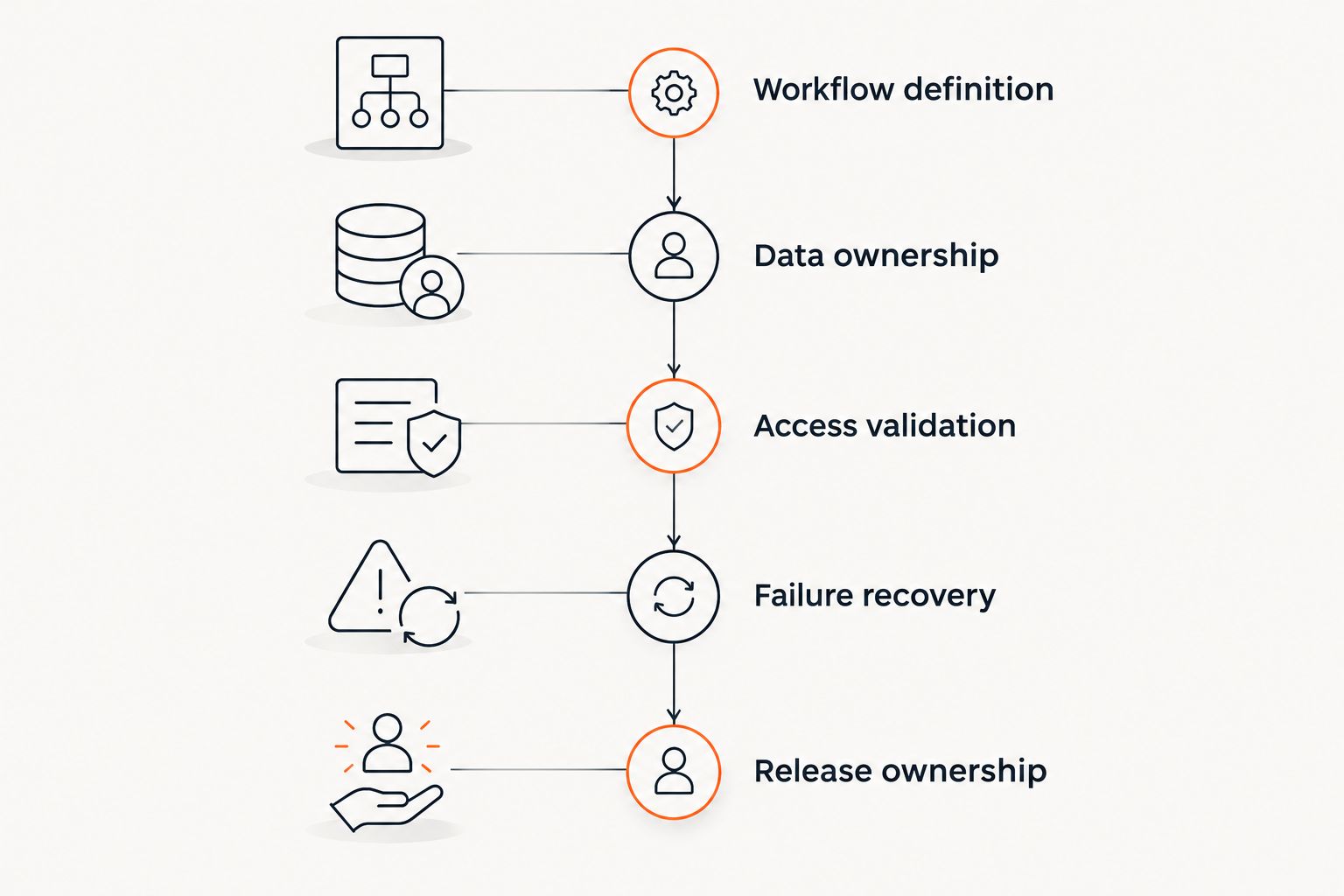
Define ownership and recovery before approving the build.
These deliverables expose unresolved decisions while changes are still design decisions. They also make estimates more useful: the team can distinguish interface work from integration work and ongoing operational responsibilities.
Test business outcomes, not just successful API calls
Build acceptance tests around concrete retail scenarios. The following quantities define test cases, not platform limits or performance benchmarks:
2 locations: Use the same product identifier at two retail locations and verify that quantities remain associated with the correct location.
1 order: Create an order, trigger a processing failure, retry the operation, and verify that the destination contains one intended order.
3 event deliveries: Deliver the same test event three times and verify that the intended business action occurs only once.
Also test denied permissions, unmatched customers, cancellations, and rejected records. A successful API response is insufficient if the wrong customer, location, or business status is attached to the result.
For the 2026 release checklist, define visible failure behavior. Associates need to know whether an action succeeded, failed, or remains pending; an ambiguous confirmation invites repeated actions and manual workarounds.
Separate launch work from ongoing operation
Your project scope should distinguish initial implementation from application support. Hosting, credentials, monitoring, API updates, error review, and recovery procedures do not disappear after launch.
Define what the business will measure before deployment. Relevant measures include failed synchronization attempts, duplicate records, unresolved exceptions, and time spent completing the target workflow. Record the baseline rather than assigning an unsupported improvement target.
Do not promise a single fixed timeline for an undefined integration. The schedule depends on access to systems, data quality, interface requirements, acceptance testing, and decisions from operational stakeholders.
FAQ
What's the best approach to Shopify app development for in-store retail?
Start with native Shopify POS and build around a documented gap. Use a POS extension for contextual associate actions, middleware for system synchronization, or a companion web app for extended workflows.
Do I need a custom Shopify app if I already use Shopify POS?
You need custom development only when a required workflow is not covered by your supported native configuration. Document the gap and verify current platform capabilities before commissioning an app.
Can a custom Shopify app connect in-store operations to an ERP?
A custom app backend or middleware can connect Shopify and an ERP when the required system access is available. The design must define data ownership, record mapping, permissions, and recovery behavior.
Is a POS UI extension better than a separate web app?
A POS UI extension is better for a supported action that belongs inside the associate's POS task. A separate web app is better for longer workflows involving several roles, exceptions, or departmental handoffs.
How much does custom Shopify app development cost?
The scope determines the development effort. Interface requirements, connected systems, data mapping, permissions, testing, and ongoing operation all affect the estimate.
How do I prevent duplicate orders during synchronization?
Design processing to recognize repeated operations and avoid creating the same business transaction again. Test retries and repeated event delivery using stable identifiers and documented recovery rules.
Who maintains a custom Shopify app after launch?
The retailer must assign maintenance responsibilities to an internal team, a development partner, or both. Ownership should cover the hosted backend, extensions, credentials, monitoring, updates, and incident response.
One last thing
The most useful prototype is often a failure path. Before approving the full build, ask the team to demonstrate an unavailable external system, a repeated event, and a denied action—and show how an associate recovers.
Endertech designs, builds, and supports ecommerce and custom software for business clients. Bring a documented retail workflow to that conversation, not just a request for an app.