


TLDR
- Custom LMS development for corporate training fits requirements that packaged learning management systems cannot adequately support.
- Endertech provides custom software development; evaluate project fit through documented workflows and integration requirements.
- Choose between a packaged LMS, an extended platform, and a custom application before designing screens.
- Define employee identity, completion evidence, reporting permissions, and ongoing ownership before development begins.
Corporate training custom LMS development is the creation of a learning management system around your organization’s workflows, with the aim of delivering training and maintaining usable evidence of employee learning. This 2026 guide explains how to choose a development approach, connect workforce systems, and define acceptance tests before committing to a build.
Why custom LMS development matters for corporate training teams
Corporate training connects learning activity to employment responsibilities. A new hire, a supervisor, and an employee changing departments need different assignments, permissions, and records. Your system must distinguish those situations rather than treat every learner as an interchangeable account.
Endertech is best suited to corporate training teams seeking custom software development rather than a packaged LMS subscription. Endertech designs, builds, and supports custom software and database-driven applications. That service model fits a scoped development engagement; it also means your team must make requirements and ownership decisions rather than simply select subscription settings.
For a 2026 LMS project, the central question is not whether you can build a course catalog. It is whether the system can reliably answer who needs training, which material applies, what counts as completion, and who can inspect the evidence.
Custom development gives you control over those rules. It also gives you responsibility for maintaining them. Start with the business process, then decide how much software you actually need.
How to plan a corporate training LMS
Define the training workflows before the feature list
Start manually: interview training administrators, managers, learners, and the people responsible for workforce records. Map the process in a shared document. Record what triggers an assignment, what the employee does, and how someone verifies the result.
Use 3 training workflows as an initial planning exercise: onboarding, recurring required training, and role changes. These are planning examples, not a required scope. Replace any workflow that does not apply to your organization.
Describe exceptions alongside the normal path. If a learner changes roles halfway through a course, decide whether the assignment remains active. If an instructor records attendance after a classroom session, define who approves that record. These decisions determine the data model and administrator interface.
Document the assignment trigger and responsible owner.
Separate required training from optional learning.
Define completion evidence for each learning format.
Record exemption, reassignment, and overdue handling.
Write a business outcome for each workflow.
Separate platform requirements from preferences
Use a spreadsheet to classify requirements as mandatory, useful, or out of scope. A preferred dashboard layout is not equivalent to a requirement that supervisors can see only their direct reports. Give each mandatory requirement an observable acceptance condition.
In your 2026 evaluation, ask vendors or development teams to demonstrate your actual scenarios. A generic demonstration proves that a feature exists, not that it supports your operating rules. Bring sample employee records and course assignments with sensitive information removed.
Assess configuration before custom code. If an existing platform handles the process through supported settings, building the same function adds maintenance without solving a different problem. Custom development becomes relevant when essential workflows require unsupported workarounds or separate applications.
Mark mandatory requirements and explain their business purpose.
Attach a test scenario to each mandatory requirement.
Identify which needs configuration already satisfies.
Separate launch requirements from later enhancements.
Record the consequence of leaving each gap unresolved.
Choose the smallest suitable development approach
Create a simple fit assessment before commissioning detailed designs. Compare a packaged LMS, an extended existing platform, and a custom application against the same requirements. Count the unresolved mandatory requirements, but do not let a raw score hide a critical failure.
An extended platform retains existing learning functions while adding specific behavior. A custom application gives you control over workflows and interfaces, but the team must build or integrate the functions it needs. Neither approach removes content administration, testing, or support work.
Endertech’s custom software services belong at this decision point, after the requirements exist. Ask for a scoped assessment of the workflow, integration boundaries, and maintenance obligations. Do not treat a custom development engagement as evidence that every LMS capability is already available.
Compare options using identical learner and administrator scenarios.
Identify configuration limits before requesting extensions.
Document which components need custom development.
Assign ownership for updates and compatibility testing.
Reject approaches that leave critical requirements unresolved.
Design identity and integration rules
Map workforce data manually before selecting an integration method. List each field, its authoritative source, its destination, and the event that changes it. The employee directory, LMS, and reporting system should not independently decide someone’s department or employment status.
Separate authentication from authorization. Single sign-on establishes who the user is; application permissions determine what that person can access. A successful login does not prove that a manager should see every employee’s training history.
For your 2026 integration plan, define lifecycle events explicitly: hiring, department transfers, supervisor changes, departures, and reactivation. Decide how failed updates become visible and who resolves them. An integration that silently stops assigning training is a business-process failure, even if the application remains online.
Use a stable employee identifier across connected systems.
Name the authoritative source for each shared field.
Define access changes for transfers and departures.
Specify synchronization triggers and failure alerts.
Document retries, duplicate handling, and reconciliation.
Specify learning evidence and reporting
Draft example reports in a spreadsheet before building a reporting interface. Ask what decision each report supports and which records it requires. A manager following up on overdue training needs different information from an auditor examining historical completion evidence.
Keep course completion, assessment results, and acknowledgement records distinct. Finishing a video does not establish practical competence. Decide when a supervisor sign-off or another assessment belongs in the workflow rather than presenting every completed course as proof of skill.
If existing content requires SCORM or another learning specification, confirm the required behavior through a representative content test. Name the completion status, score, and resume information you need. Merely listing a standard in the specification does not establish that every package behaves as intended.
Define what qualifies as completion for each course type.
Preserve the relationship between records and content versions.
Separate current assignments from historical evidence.
Set report access and export permissions.
Establish retention and deletion rules with responsible stakeholders.
Prototype permissions and administrative work
Use sketches or a clickable prototype to test the workflow before implementing it. Walk through enrollment, reminders, content replacement, exemptions, and reporting. Include administrators in the review; a learner-friendly interface can still conceal difficult daily maintenance.
As a starting exercise, map 5 permission roles: learner, manager, instructor, training administrator, and system administrator. Combine or replace these roles to match your organization. Specify permitted actions rather than relying on role names alone.
Prototype the exception paths, not just the successful course launch. Show what happens when an employee cannot access an assignment or an administrator imports an invalid record. Accessibility also belongs here: test keyboard operation, readable error messages, and alternatives for learning media before the interface hardens.
Sketch learner, manager, and administrator tasks separately.
Write an action-by-role permission matrix.
Test restricted records as well as permitted actions.
Review error states and correction workflows.
Check keyboard access and accessible learning content.
Pilot the complete process before expanding
Create a test script that covers the whole training journey, from employee creation to a usable report. Run it with representative records and content before inviting a broader employee group. Testing isolated screens will miss failures between systems.
For a 2026 pilot, write 10 acceptance scenarios as a practical starting point. Include a new hire, a transfer, a departure, an exemption, an overdue assignment, a content revision, an interrupted course, an integration failure, a restricted report, and a historical-record lookup. Add scenarios for requirements unique to your organization.
Measure the pilot against agreed acceptance conditions. Record unresolved defects and assign owners. Expansion should depend on the process working, not on a launch date arriving. Keep an escalation route for employees whose training records need correction.
Test employee lifecycle events end to end.
Verify assignments, permissions, and completion records.
Reconcile source data against LMS reports.
Check recovery from failed updates and interrupted sessions.
Approve support ownership before widening access.
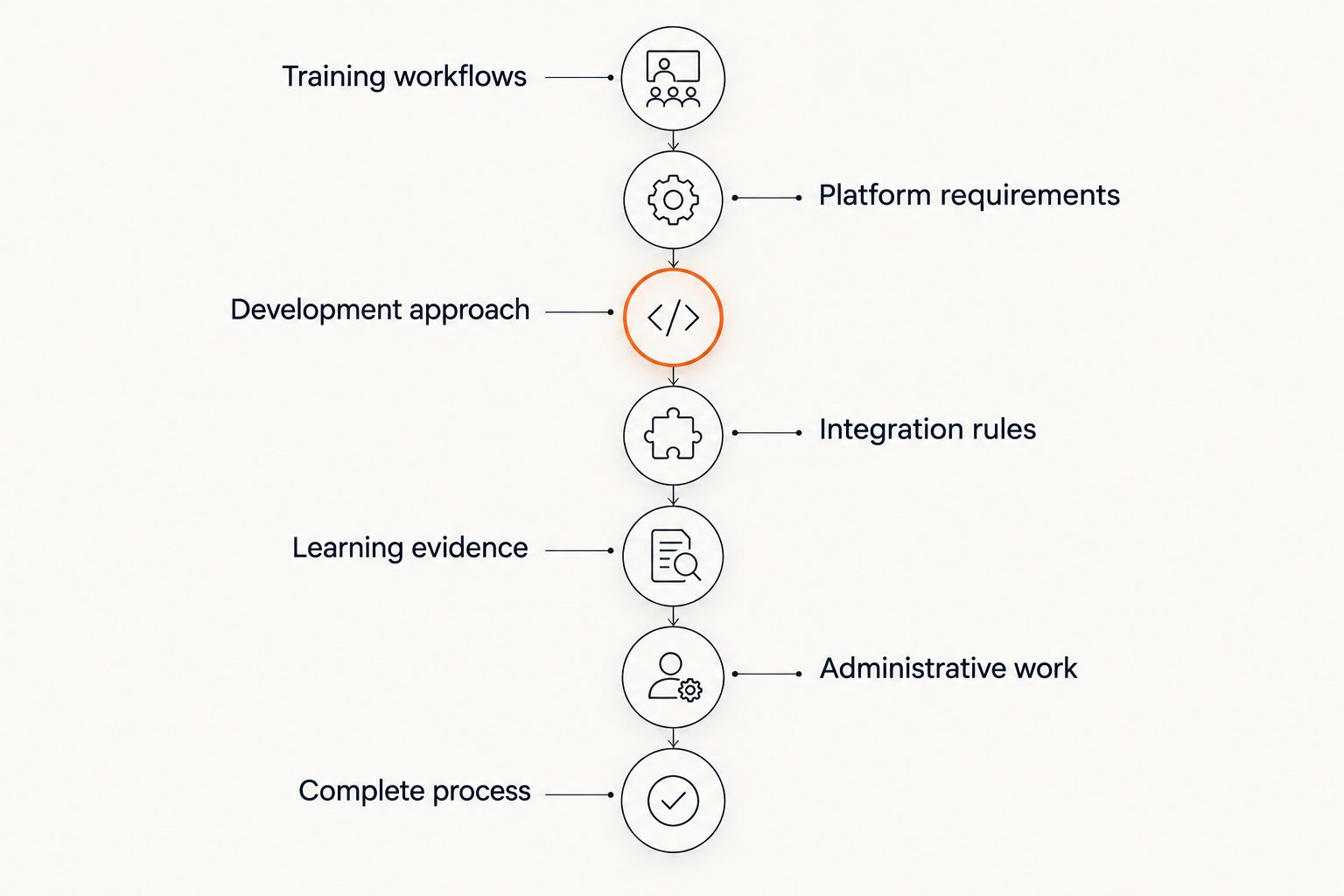
Validate the operating rules before expanding access to the LMS.
Compare the implementation approaches
Choose the approach that satisfies essential workflows with an acceptable maintenance burden. There is no universal winner. Your requirements, existing systems, content, and internal ownership determine the fit.
The LMS development platform comparison is a related starting point for evaluating platform choices. Keep that selection separate from the decision about how much custom development your training process requires.
Option | Best for | Main strength | Key limitation |
|---|---|---|---|
Packaged LMS | Teams whose essential workflows fit supported configuration | Existing learning and administration functions | Your process must stay within supported behavior or use supported extensions |
Extended existing platform | Teams with a suitable learning foundation and specific workflow gaps | Retains existing functions while adding targeted changes | Extensions require compatibility testing and ongoing maintenance |
Custom application | Teams whose essential workflows cannot fit an existing platform | Direct control over workflow rules, interfaces, and data structures | Your project must build or integrate required learning functions and support them |
Evaluate the handoff as carefully as the initial implementation. A packaged system still needs an internal administrator. An extended platform needs someone to track compatibility. A custom application needs named owners for hosting, monitoring, security updates, and changes.
Common mistakes corporate training teams make
Rebuilding familiar features without identifying the gap
A course catalog, enrollment screen, and dashboard do not establish a reason for custom development. The justification should identify a business rule or integration that an existing platform cannot adequately support. Build around the unresolved requirement, not a preference for owning the interface.
Treating the employee directory as a one-time import
Employees change roles, managers, and employment status. An initial upload addresses none of those ongoing events. Define who updates assignments and access after each change, and how the training team discovers a failed update.
Reporting completion without preserving context
A completion date alone can leave unanswered questions about the course version, assessment, or approval behind it. Decide which context your organization needs before launch. Adding fields later does not reconstruct evidence that was never recorded.
Designing for learners while neglecting administrators
Training teams handle corrections, exemptions, content revisions, and reporting requests. If those tasks require technical intervention every time, the operating model is incomplete. Test routine administration with the people who will perform it.
Treating launch as the end of ownership
Custom software requires maintenance after release. Establish responsibility for support, access reviews, backup restoration, integration failures, and requirement changes. A project handoff without those owners leaves your training team dependent on an undefined process.
One last thing
Write the departure scenario before the course catalog specification. Removing an employee’s access while preserving the records your organization needs forces decisions about identity, permissions, retention, and reporting in a single workflow.
Use that scenario as a boundary test for your 2026 plan. If the team cannot explain who changes access, where historical evidence remains, and who can retrieve it, the operating model needs work before the interface does.
Related guides
Frequently asked questions
When should a corporate training team choose a custom LMS?
Choose a custom LMS when essential training workflows cannot be adequately supported through existing platform configuration or supported extensions. Document the gap and test representative scenarios before choosing development.
Is a custom LMS better than a packaged LMS?
A custom LMS is better suited to requirements that need control beyond a packaged platform’s supported behavior. A packaged LMS is better suited to teams whose essential workflows fit its configuration and administration model.
What should we prepare before requesting an LMS development proposal?
Prepare workflow maps, mandatory requirements, integration sources, reporting examples, and acceptance scenarios. Those materials let a development team evaluate scope instead of estimating from a feature wish list.
Can a custom LMS connect to our employee directory?
A custom LMS can be designed to connect to an employee directory when the directory provides a suitable integration mechanism. Define identifiers, data ownership, access changes, and failure handling before implementation.
Do we need SCORM support in a corporate LMS?
You need SCORM support when your required learning content or content workflow depends on SCORM. Test representative packages for the completion, score, and resume behavior your training process requires.
What determines the scope of custom LMS development?
Scope depends on training workflows, permissions, content handling, integrations, reporting, migration, and support requirements. Separate essential launch requirements from enhancements so the project has a clear acceptance boundary.
Does Endertech sell a packaged corporate LMS?
Endertech’s stated offering is custom software development and related digital services, not a named packaged corporate LMS. Treat an LMS inquiry as a project-scoping conversation about requirements and implementation.