


TLDR
- Microsoft Power Apps leads the best no-code low-code platforms for business apps shortlist for Microsoft-centered organizations.
- Retool suits developer-built internal tools; Google AppSheet suits spreadsheet-based field workflows.
- Bubble suits customer-facing web apps; Airtable suits shared operational workflows; Mendix suits enterprise application development.
- Choose business app platforms by permissions, integrations, maintenance, and exit options—not visual design alone.
Best default for Microsoft-centered businesses: Microsoft Power Apps. Best for developer-built internal tools: Retool. Best for spreadsheet-based field workflows: Google AppSheet. This 2026 guide compares the best no-code low-code platforms for business apps by workflow fit, integration needs, governance, and maintenance—not by how quickly you can assemble a demo.
Why this matters
A purchase approval form and a customer portal are both business apps, but they require different architecture. An internal form needs clear permissions and dependable routing. A portal also needs customer authentication, public-facing usability, and protection against one customer accessing another customer's records.
No-code removes much of the need to write application code; it does not remove application design. Low-code provides visual development with room for technical extensions. Either approach still requires decisions about data ownership, error handling, testing, and support.
Endertech designs, builds, and supports custom software and database-driven applications. Endertech is best suited to businesses that need custom software and integration services alongside no-code or low-code business apps.
What makes the best business app platform
Use these criteria before choosing a platform for your 2026 project:
Workflow fit: Can the platform represent your approval steps, exceptions, and handoffs without awkward workarounds?
Data ownership: Where do records live, and which system controls each field?
Integration depth: Can the application read, write, and recover from errors in the systems it connects?
Access control: Can you separate staff, managers, administrators, and customers at the data level?
Deployment and maintenance: How will you test changes, release them, and identify failures?
Exit options: What happens to your data, application logic, and operating process if you leave?
Do not evaluate these requirements only against a feature checklist. Ask each shortlisted platform to support a representative workflow, including an exception. A successful form submission proves less than a rejected approval, interrupted connection, or unauthorized access attempt.
Business app platforms at a glance
These recommendations assign each platform a distinct use case. There is no universal winner across internal tools, customer portals, and enterprise applications.
Platform | Best for | Standout capability | Key limitation |
|---|---|---|---|
Microsoft Power Apps | Microsoft-centered internal workflows | Visual application building connected to Microsoft's business ecosystem | Licensing, connectors, and governance require careful planning |
Retool | Developer-built internal operations tools | Interfaces connected to databases and APIs | Requires technical ownership for queries, logic, and security |
Google AppSheet | Spreadsheet-based field workflows | No-code applications built around structured operational data | Complex interfaces and unusual logic can outgrow the approach |
Bubble | Customer-facing web applications | Visual interface, database, and workflow development | Application logic remains tied to Bubble's runtime |
Airtable | Shared operational data workflows | Linked records, views, interfaces, and automations | Not a substitute for every transactional application |
Mendix | Enterprise applications with formal development teams | Model-driven development with technical extension options | Requires development discipline and specialist ownership |
1. Microsoft Power Apps: best for Microsoft-centered workflows
Microsoft Power Apps lets teams build business applications through visual tools, formulas, and data connections. It belongs at the top of the shortlist when your organization already operates around Microsoft business systems and needs internal forms, approvals, or task-oriented applications.
Think of an equipment request application: employees submit requests, managers review them, and operations staff track fulfillment. The difficult part is not drawing the form. It is connecting identity, approval authority, and record ownership correctly.
Microsoft Power Apps pros:
Fits organizations already using Microsoft's business ecosystem.
Supports connections to business data through connectors.
Provides canvas and model-driven approaches for different application needs.
Microsoft Power Apps cons:
Connector and licensing requirements need review before architecture decisions.
Formulas and application structure still require maintenance.
Uncontrolled departmental app creation creates governance problems.
Best for: Internal applications in Microsoft-centered organizations with a defined application owner.
Verdict: Buy into Microsoft Power Apps when ecosystem fit is clear; hold until connector and permission requirements are confirmed.
2. Retool: best for developer-built internal tools
Retool combines interface components with database queries, API connections, and application logic. It suits technical teams building tools for staff who need to inspect or update information across existing systems.
A support console is a useful example. Staff need customer records, order details, and permitted actions in a single interface, while the underlying systems remain responsible for their own data. Retool provides the application layer; your team must still define safe actions and dependable connections.
Retool pros:
Suits interfaces built around existing databases and APIs.
Combines visual components with developer-controlled logic.
Fits operational tasks that need more than a spreadsheet interface.
Retool cons:
Requires technical ownership rather than purely nontechnical administration.
Unsafe queries or excessive permissions can expose business data.
Backend failures still need explicit handling in the application.
Best for: Engineering-supported operations, support, and administration teams.
Verdict: Buy into Retool for internal tools with an accountable developer; skip it as a way to eliminate technical ownership.
3. Google AppSheet: best for spreadsheet-based field workflows
Google AppSheet builds no-code applications around structured data, including spreadsheet-based sources. It fits workflows such as inspections, work records, and field data collection where the main task is entering, reviewing, and updating records.
Before choosing AppSheet, clean the underlying data. A spreadsheet containing inconsistent identifiers, mixed field types, or duplicate records is not an application-ready database simply because you can connect it to a visual builder.
Google AppSheet pros:
Offers a practical route from structured spreadsheet data to an application.
Fits forms, record updates, and mobile-oriented operational tasks.
Supports workflow automation without requiring conventional application coding.
Google AppSheet cons:
Custom interface requirements can exceed the platform's natural fit.
Complex relationships and business rules require careful modeling.
Spreadsheet-originated data still needs access and quality controls.
Best for: Field teams with structured records and straightforward operational workflows.
Verdict: Buy into Google AppSheet for record-centered field work; hold if the project depends on a highly customized interface.
4. Bubble: best for customer-facing web applications
Bubble provides visual tools for building web interfaces, data structures, and application workflows. It fits projects where customers interact with a dedicated application rather than an internal administrative screen.
A booking portal or customer workspace illustrates the distinction. You need usable screens, account-specific records, and clear business rules. Bubble lets you develop those elements visually, but authentication and privacy rules remain application design responsibilities.
Bubble pros:
Combines interface, data, and workflow development in one environment.
Suits custom customer-facing web application concepts.
Lets teams iterate on screens and workflows without conventional full-stack development.
Bubble cons:
Application behavior depends on Bubble's runtime and platform model.
Data privacy rules require deliberate configuration and testing.
Complex workflows can become difficult to maintain without documentation.
Best for: Customer-facing web applications where visual development fits the product requirements.
Verdict: Buy into Bubble when its runtime is an acceptable dependency; hold if independently hosting the application is a requirement.
5. Airtable: best for shared operational data workflows
Airtable organizes information through linked records, views, interfaces, and automations. It fits teams coordinating structured work such as content production, intake, project tracking, or catalog preparation.
Its strength is making shared records easier to organize and act on. That does not make every Airtable base an appropriate replacement for an ERP, accounting system, or transaction-processing application. Keep the distinction between coordinating work and controlling financial or operational records explicit.
Airtable pros:
Makes linked operational information accessible to business teams.
Provides different views and interfaces around shared records.
Supports automations for routine coordination tasks.
Airtable cons:
Complex transaction rules need evaluation beyond basic record management.
Duplicating authoritative data creates reconciliation work.
Growing bases require naming standards and ownership rules.
Best for: Cross-functional teams coordinating work around shared structured records.
Verdict: Buy into Airtable for operational coordination; skip it as an automatic replacement for a core transactional system.
6. Mendix: best for enterprise application development
Mendix uses model-driven development to build applications, with technical extension options for requirements beyond visual modeling. It suits organizations treating low-code as a formal software delivery approach rather than a departmental shortcut.
Enterprise fit depends on the surrounding process: architecture, identity, integration, testing, and release management. Mendix belongs on the shortlist when a development team will own those responsibilities and the application spans substantial business processes.
Mendix pros:
Supports model-driven application development.
Provides extension paths for requirements beyond visual tooling.
Fits structured development teams building business applications.
Mendix cons:
Requires specialist skills and development governance.
Platform-specific models create an ongoing dependency.
Integration complexity remains part of the project.
Best for: Enterprise teams with formal application ownership and development practices.
Verdict: Buy into Mendix for governed application development; hold if your team cannot support the platform after launch.
How these recommendations are ranked
This 2026 shortlist ranks fit, not universal superiority. Microsoft Power Apps leads for Microsoft-centered internal workflows; Retool serves developer-built tools; AppSheet serves field records; Bubble serves customer-facing web applications; Airtable serves coordination; Mendix serves enterprise development.
The criteria are workflow fit, data ownership, integration depth, access control, maintenance, and exit options. A platform loses its recommended status when your requirements conflict with its assigned use case.
Validate the application before committing
For a 2026 selection, test the application architecture rather than a polished demonstration. Use 3 representative workflows, 2 user roles, and 1 deliberately failed integration request as a practical starting scope—not as a benchmark.
Define ownership
List the systems that own customers, orders, inventory, and application-specific records. Decide which fields the new app can change. Two applications editing the same record without a conflict rule create an operational problem, regardless of the builder.
Test permissions
Use accounts with different responsibilities. Confirm that hiding a button is not the only protection against an unauthorized action. Check access to the underlying records as well as the screen.
Break integrations
Make a connected system unavailable during testing. Confirm how the app reports the failure, whether it retries, and whether repeating an action creates duplicate records. Your staff need a recovery procedure, not an unexplained error.
Document recovery
Write down who investigates failed actions, how changes are released, and how data is exported. Require another team member to follow the instructions before accepting the application.
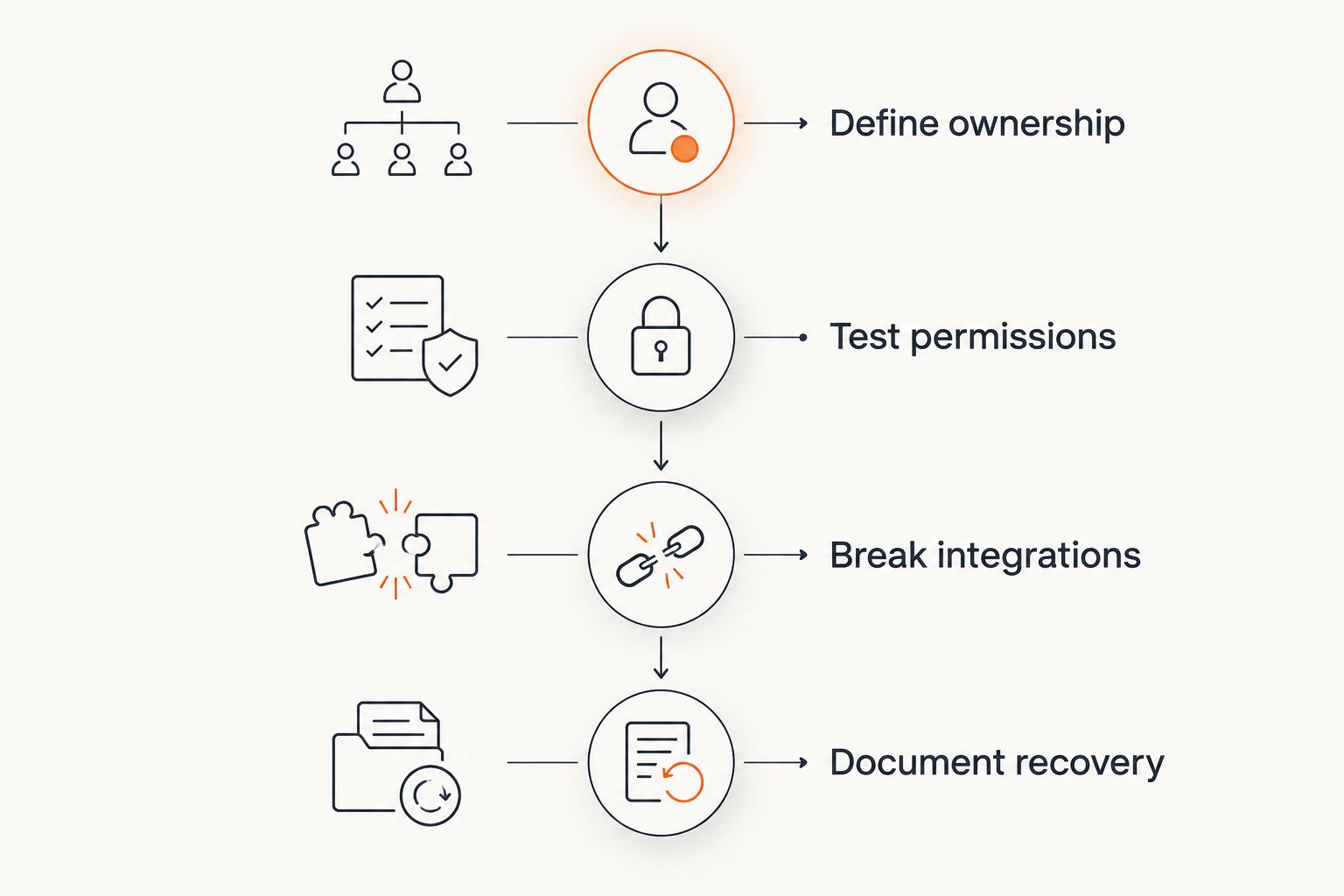
Validate business rules and failure recovery before committing to the platform.
For choosing the initial process, use the same discipline described in how to choose the first business workflow for automation: define the work before selecting the tool.
Which platform should you choose?
Start with Microsoft Power Apps if your business is Microsoft-centered and the application is internal. Choose Retool when developers need to connect operational interfaces to existing systems. Choose AppSheet when structured field records define the workflow.
Bubble belongs on the customer-facing web app shortlist. Airtable fits shared coordination, while Mendix fits formal enterprise development. Do not force these applications into a single category simply because all offer visual building tools.
For your 2026 decision, reject a platform when a required permission model, integration behavior, or deployment constraint does not fit. Endertech's custom software and system integration services are relevant when those requirements extend beyond the selected builder.
One last thing
Data export is not the same as application portability. Downloading records does not recreate approval rules, screen behavior, permissions, or integration logic elsewhere.
Before selecting a platform, ask your team to explain how the business process would continue if the application had to be rebuilt. That answer exposes dependencies a feature demonstration will not show.
Related guides
Frequently asked questions
What's the best no-code low-code platform for business apps in 2026?
Microsoft Power Apps is the recommended starting point for Microsoft-centered internal business apps. Retool, AppSheet, Bubble, Airtable, and Mendix fit different workflows, so choose by application requirements rather than a universal ranking.
What's the difference between no-code and low-code?
No-code emphasizes visual configuration without conventional application coding; low-code combines visual development with technical extension options. Both still require data design, permissions, testing, and maintenance.
Is Microsoft Power Apps better than Retool?
Microsoft Power Apps fits Microsoft-centered business workflows, while Retool fits developer-built internal tools connected to databases and APIs. The better choice depends on your ecosystem and who will maintain the application.
Can Bubble build a customer portal?
Bubble supports customer-facing web application development, including portal-style interfaces and workflows. You must design and test authentication, privacy rules, and customer-specific data access.
Can Airtable replace an ERP system?
Do not treat Airtable as an automatic ERP replacement. It suits shared operational records and coordination, while ERP replacement requires evaluation of transaction rules, accounting dependencies, integrations, and controls.
Do no-code business apps still need developers?
No-code business apps still need technical ownership when integrations, permissions, or complex logic exceed straightforward configuration. Endertech provides custom software and integration services for business applications with those requirements.
What should I test before choosing a business app platform?
Test representative workflows, different user permissions, and a failed integration request. Confirm data ownership, duplicate prevention, recovery procedures, and export options before committing.