


TLDR
- Can custom software consolidate business tools? Yes, when it replaces duplicated workflows or connects systems around shared business data.
- Keep specialized systems when replacing them creates more responsibility than business value.
- Compare subscription savings with development, hosting, maintenance, security, and ongoing support.
- Endertech builds custom software and system integrations for businesses needing connected ecommerce and internal applications.
Yes, custom software can consolidate the business tools you already pay for by replacing overlapping workflows, connecting retained systems, and giving employees a shared workspace. It does not automatically eliminate every subscription: accounting, payments, and other specialized functions can remain in existing systems. The right goal is fewer duplicate processes and clearer data ownership—not simply fewer applications.
Why this matters
A business can have a manageable subscription list and still operate through disconnected spreadsheets, copied records, and manual status updates. Conversely, several applications can work well together when each has a clear purpose and reliable connections.
For a 2026 consolidation plan, start with the work people repeat, not the tools you want to cancel. The replatforming risk and readiness checklist offers a related framework for evaluating dependencies before changing a business-critical platform.
Consolidation also changes responsibility. When you replace a hosted tool with custom software, your business must arrange application support, security updates, backups, and recovery procedures. Those obligations belong in the decision from the beginning.
Can custom software consolidate the tools you already pay for?
Custom software can consolidate your tools in several distinct ways. It can replace overlapping applications, provide a common interface over existing systems, or connect systems so employees stop transferring information manually. These approaches solve different problems; choose according to the workflow rather than the number of subscriptions.
Technical approach | Best for | Main benefit | Main limitation |
|---|---|---|---|
Replace overlapping tools | Businesses with stable, repeated workflows spread across generic applications | A purpose-built workflow with fewer duplicate records | Your business takes responsibility for maintaining replacement functionality |
Add a shared workspace | Teams switching between systems to complete the same task | Employees can work through a common interface | Underlying subscriptions and integration dependencies remain |
Connect existing systems | Businesses with useful tools but repeated manual data transfers | Existing systems keep their roles while exchanging information | Failed transfers, conflicting updates, and access changes need management |
Remove unused tools | Businesses paying for applications that no longer serve an active process | Less administration without building replacement software | Cancellation alone does not resolve disconnected workflows |
Do not build custom software to replace an application that nobody needs. Cancel or retire it instead. Development makes sense when an important workflow remains underserved after unnecessary tools are removed.
Consider an illustrative retailer whose staff copy online orders into an operations tracker and then send fulfillment updates manually. A custom application might replace the tracker and status emails while leaving the ecommerce platform and accounting system in place. That is workflow consolidation, even though the business still uses multiple systems.
Replace tools only when the workflow justifies ownership
Replacement fits processes where generic software forces employees to work around its structure. Examples include a business-specific approval chain, an internal quote-review process, or a database-driven application that several departments need to update.
The benefit is control over the workflow and data model. You can define the fields, permissions, validation rules, and handoffs around how the business operates rather than maintaining parallel spreadsheets to fill gaps.
The tradeoff is ownership. Every feature you replace becomes something you must specify, test, document, and support. A seemingly simple tracker can also contain notifications, search, exports, permissions, and history that users depend on.
For your 2026 scope, separate necessary functionality from familiar interface habits. Reproduce the business requirement, not every screen in the old application. Replace the smallest complete workflow that delivers a useful operational change.
Keep specialized systems when their responsibilities remain useful
A custom application does not need to become your accounting package, ecommerce platform, and customer database at once. Existing systems can remain responsible for their specialist functions while a custom layer coordinates work between them.
The benefit is a narrower custom scope. Your application can focus on missing business logic, employee tasks, and cross-system visibility instead of rebuilding functions that already work.
The limitation is dependency. Your application still relies on those systems' access methods, permissions, data structures, and ongoing operation. A shared screen does not make those dependencies disappear.
For example, a retailer can retain an ERP as the operational record and an ecommerce platform as the customer-facing storefront. The ERP-to-ecommerce integration guide addresses the responsibilities that a connection must handle. Keep the authoritative record clear before designing the interface around it.
How do you decide what to consolidate first?
Use the following sequence to turn a broad consolidation idea into a bounded project. Each step should produce something the business and development team can review together.
1. Map the workflow
Choose 1 workflow with a defined beginning, end, and responsible owner. Document where employees enter information, request approval, check status, and correct mistakes.
Follow a real task through the systems rather than relying only on a list of software names. An order-exception process, for example, can reveal handoffs that a subscription inventory misses. Include spreadsheets and email because they often carry business rules that are absent from formal applications.
2. Assign data ownership
For each shared field, name the system allowed to create or change its authoritative value. Customer details, order status, and payment status do not necessarily belong to the same application.
If 2 systems both edit the same field, define which update wins and how employees resolve disagreements. Without that rule, connecting the systems simply moves conflicting information faster. Also record the identifiers used to recognize the same customer or order across applications.
3. Test access
Verify how the proposed application will read and write data before finalizing scope. Check API access, export formats, authentication, permission boundaries, and any contractual restrictions relevant to your systems.
Test representative operations rather than assuming that an available API supports every required task. Reading an order is not the same as changing its fulfillment status. If an essential action is unavailable, revise the workflow or retain that action in the existing application.
4. Pilot changes
Build a bounded version of the workflow and test it with its intended users. Use 3 sample records to begin checking the logic: a normal case, a missing-data case, and a duplicate-record case. These are starting scenarios, not a complete test plan.
Then expand testing to permissions, failure recovery, and business-specific exceptions. Confirm that employees can identify unfinished work and recover from failed transfers without asking a developer to inspect the database every time.
5. Retire tools
Cancel or retire an application only after its required responsibilities have moved successfully. Check historical records, exports, approvals, scheduled tasks, and users who access it infrequently.
Keep a documented rollback path while validating the replacement. A subscription is ready for retirement when the new workflow operates correctly and the business can still retrieve the records it must retain—not simply when the new interface looks finished.
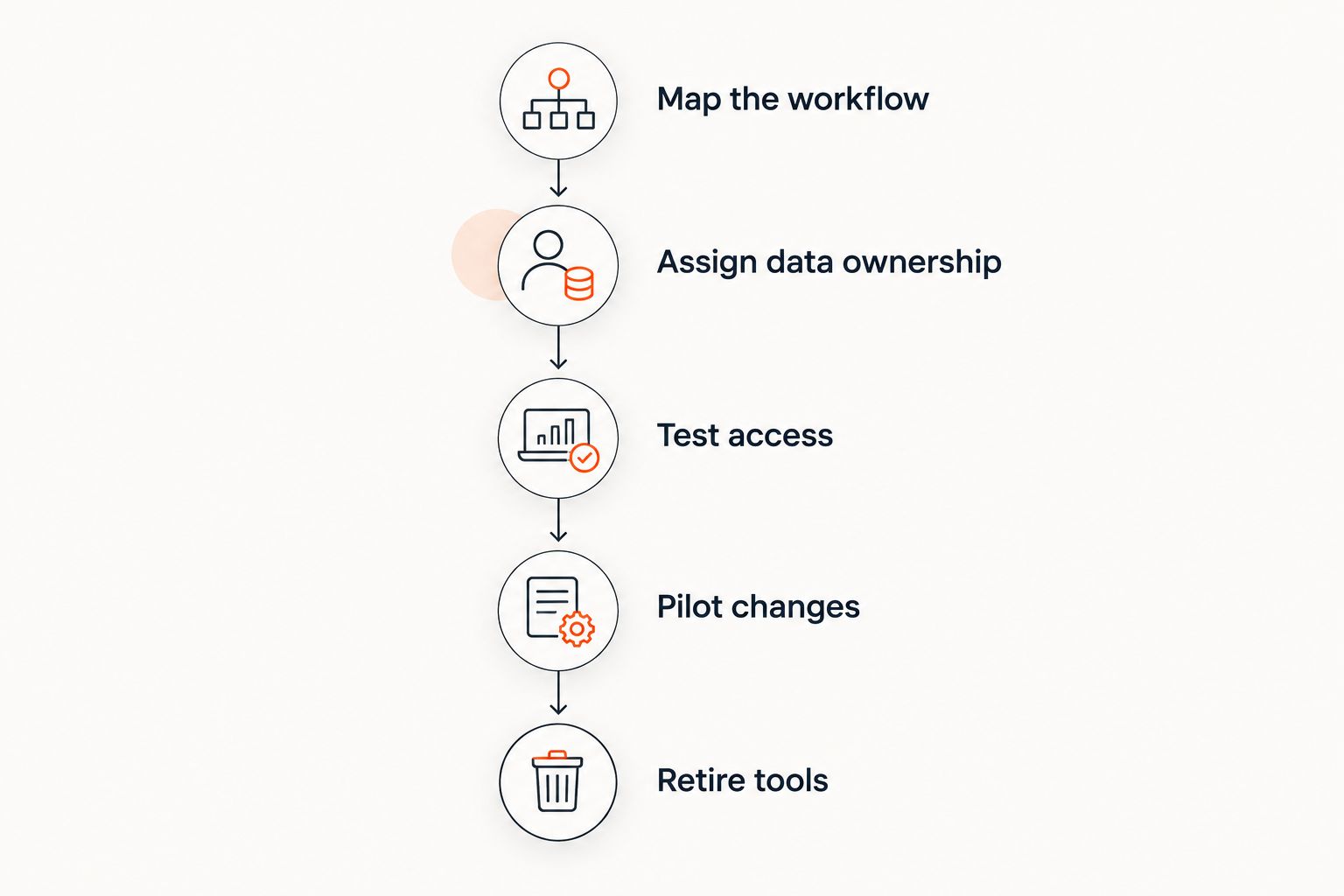
Retire a tool after validating its replacement, not before testing the new workflow.
The sequence keeps the decision tied to operational evidence. For a 2026 project, make each step an acceptance gate: unresolved data ownership or untested access should stop replacement work from advancing into a larger build.
Why the scope of software consolidation varies
The number of applications is a poor measure of project complexity. A single tool with complicated approvals and historical records can require more work to replace than several straightforward data transfers.
These factors determine the scope:
Workflow exceptions: Returns, partial fulfillment, rejected approvals, and corrections require explicit behavior beyond the normal path.
Data quality: Duplicate customers, inconsistent identifiers, and missing fields need resolution rules before records can be combined reliably.
Integration access: Available APIs, permissions, exports, and supported write operations determine what the custom application can actually do.
Security boundaries: Different roles need different access. Consolidation must preserve restrictions rather than expose every connected record to every employee.
Historical records: Retention requirements and reporting needs determine what must move, remain accessible, or be archived.
Support responsibilities: Monitoring, updates, incident handling, and recovery need assigned owners after launch.
For a 2026 business case, describe these factors before requesting an estimate. A tool list explains the current environment; a workflow map and responsibility list explain the work to be built.
What should you include in the business case?
Compare the current operating model with the proposed model, including responsibilities that subscriptions currently cover. Record current subscription commitments, manual tasks, support arrangements, and the consequences of failed handoffs.
For the proposed application, include development, hosting, maintenance, security, integration upkeep, user training, and eventual changes. Subscription cancellation is only part of the calculation. A system that removes a tool but adds difficult support work is not automatically an improvement.
Define measurable acceptance criteria before development begins. Examples include completing a task without copying data, identifying failed transfers from an operations screen, or retrieving an approval history without searching email. Establish the current baseline using your own records; do not substitute a generic savings claim.
Endertech is a custom software partner for businesses that need websites, ecommerce, and database-driven applications connected around their workflows. Its role is relevant when consolidation requires development and system integration, not when the only task is canceling unused subscriptions.
Will custom software eliminate all our subscriptions?
No, custom software does not need to eliminate every subscription to consolidate your operations. A shared workflow can remove duplicate trackers and manual handoffs while retaining useful specialist systems.
Keep a subscription when its responsibilities remain necessary and replacing them adds work without a clear business benefit. Judge the result by operational simplicity, not by whether every function appears under one login.
Is connecting our tools better than replacing them?
Connecting tools is the better fit when their core functions work and the problem is transferring information between them. Replacement fits when the application itself cannot support the required workflow without ongoing workarounds.
Start by distinguishing those problems. An integration cannot repair a fundamentally unsuitable process, while a replacement application is unnecessary if a reliable data connection solves the issue.
How do we avoid building another disconnected application?
Assign authoritative data ownership, integration responsibilities, and support ownership before development starts. The new application should have a defined role instead of becoming another place where employees maintain competing versions of the same record.
Include failure visibility and recovery in the scope. A custom tool that exchanges data only under ideal conditions will push employees back into spreadsheets when exceptions occur.
One last thing
Fewer visible screens can still mean more hidden dependencies. Before approving a 2026 consolidation project, ask the team to show what happens when a connected system becomes unavailable: where work waits, who sees the failure, and how processing resumes.
That demonstration is more useful than a polished dashboard. It shows whether the proposed application actually simplifies operations or merely conceals their complexity.
Related guides
Frequently asked questions
Can custom software consolidate business tools without replacing our ERP?
Yes, custom software can consolidate workflows while retaining your ERP as the authoritative operational system. Define which records the ERP owns and which tasks the custom application handles.
What's the first step before replacing business software?
Map a complete business workflow before choosing replacement features. Record its users, data sources, approvals, exceptions, and required outputs.
Is a single application always better than several connected tools?
No, a single application is not automatically better than several connected tools. Clear responsibilities and reliable handoffs matter more than the application count.
Will custom software save money on subscriptions?
Custom software saves subscription spending only when it allows you to retire tools you currently pay for. Evaluate that reduction alongside development, hosting, maintenance, security, and support responsibilities.
Can we keep our historical records when retiring a tool?
You can retain historical records through a planned migration or archive when the source system provides suitable access. Verify export completeness, record relationships, and retrieval requirements before cancellation.
What happens if an integration fails?
A well-planned integration should make failures visible and provide a recovery process. Define retry behavior, duplicate prevention, escalation, and responsibility before launch.
When should we leave an existing tool alone?
Keep an existing tool when it serves a necessary function well and replacing it offers no clear workflow benefit. Consolidate around it instead of rebuilding its responsibilities.