


TLDR
- Custom software vs off the shelf software is a workflow-fit decision, not a contest between flexibility and convenience.
- Off-the-shelf systems suit established workflows; custom web applications suit requirements that configuration cannot meet.
- Integration keeps useful systems while adding missing workflows, but introduces dependencies and monitoring responsibilities.
- Endertech provides custom software and system integration services for businesses needing application development or connected operations.
Custom software can replace an off-the-shelf system when you can define, build, and maintain the business functions it currently handles. Build around a workflow that needs different rules; buy when an existing product fits; integrate when the gap sits between systems. Replacement also transfers responsibility for security, support, data migration, and ongoing changes to your business and its development partner.
Custom software vs off-the-shelf systems for business operations
The central question is whether your business needs different software or better-connected software. A product that handles its own job correctly does not necessarily need replacement because staff copy information into another system. That problem calls for an integration assessment first.
For a 2026 software decision, compare these approaches against the same workflow, data requirements, and operating responsibilities:
Approach | Best for | Main strength | Main limitation |
|---|---|---|---|
Off-the-shelf software | Established workflows that match a product's supported configuration | Existing functions without building the application yourself | Your requirements must fit its supported features and extension methods |
Custom software | Business-specific rules that available products cannot accommodate | Direct control over application behavior and development priorities | Development, testing, security, and maintenance need explicit ownership |
Hybrid approach | Useful existing systems with missing connections or workflows | Preserves working functions while adding targeted capabilities | Failures and changes can cross application boundaries |
When your issue is disconnected operational data, start with what an ecommerce–ERP integration must handle. Replacing either application is a separate decision from connecting them.
Why this matters
Software selection determines where employees do their work, which records they trust, and who resolves problems. A new interface alone does not fix unclear ownership of orders, inventory, customer records, or approvals. Those decisions belong in the requirements before implementation begins.
For example, consider a retailer whose staff enter delivery instructions into a separate spreadsheet after processing an order. The gap might be a missing field, an unsupported approval process, or an unavailable connection between systems. Each diagnosis leads to a different solution; replacing everything before identifying the gap expands the project without resolving the underlying question.
When should you choose off-the-shelf software?
Choose off-the-shelf software when its supported workflows meet your requirements without critical workarounds. Test that fit with actual tasks, not a feature checklist. A product can advertise approvals while lacking the exception handling your operations team needs.
Ask a vendor to demonstrate a normal transaction and a difficult one. For an order-management workflow, that means checking corrections, cancellations, partial fulfillment, permissions, and reporting—not just creating an order. Document which requirements work through configuration and which need extensions or separate applications.
The advantage is that you are not responsible for creating every application function. The limitation is that you cannot assume control over the vendor's roadmap, deployment schedule, or supported interfaces. Available features and contractual responsibilities require verification for the specific product.
For a 2026 evaluation, examine data export alongside daily usability. You need to understand whether an export includes relationships, attachments, history, and identifiers—not merely whether an export button exists. That distinction matters when connecting another application or leaving the system later.
Best for: businesses whose processes fit supported product behavior and whose teams can accept the product's constraints.
When should you choose custom software?
Choose custom software when documented business rules cannot be handled adequately through an existing product's supported configuration or integrations. The justification should identify the missing behavior and its operational consequence. Disliking an interface is not enough to justify rebuilding the functions behind it.
A hypothetical application might route an approval according to customer terms, fulfillment location, and order exceptions. If those rules are essential and unsupported elsewhere, custom development lets you express them directly. It also requires decisions about who can change rules, how changes are tested, and how historical decisions remain understandable.
Control is the principal benefit. Responsibility is the principal tradeoff. Your project needs permission management, error handling, backups, deployment procedures, documentation, and a support arrangement—not just screens that reproduce the current spreadsheet.
Endertech is a fit for business clients that need custom software, system integration, or platform modernization. Treat the development brief as a definition of operational responsibilities, not simply a list of requested pages.
Best for: businesses with specific application requirements and a clear owner for the software after launch.
When should you keep existing software and add a custom layer?
Choose a hybrid approach when existing applications perform their core jobs, but a connection or business-specific workflow is missing. A custom layer can coordinate work without becoming the accounting system, storefront, or operational database itself.
For example, a custom portal could collect information and send an approved transaction to an existing system. The design must identify which application owns the final record and how users see a rejected submission. Otherwise, the portal creates another place where staff must reconcile conflicting information.
The benefit is a narrower replacement scope. The drawback is dependency: an external interface change, expired credential, or failed message can interrupt the workflow. Define monitoring, retry behavior, and reconciliation before relying on the connection.
For accounting-related requirements, review whether a web application can integrate with accounting software. Keeping accounting in its existing system can preserve that function while a custom application handles the surrounding operational work.
Best for: businesses that need targeted application behavior while retaining useful existing systems.
Why the right approach varies
The choice changes with the work you need the software to perform. In 2026, use these factors to distinguish an application problem from a process or integration problem:
Workflow fit: Determine whether supported configuration handles the required steps, exceptions, and permissions.
Data ownership: Identify which system controls each record and which applications only display or update it.
Integration access: Verify the interfaces, authentication methods, and permissions needed for the proposed connection.
Change ownership: Assign responsibility for requirements, releases, vendor changes, and maintenance.
Operational continuity: Define how staff work during an outage and how records are reconciled afterward.
Exit requirements: Confirm how usable data, documentation, and access transfer if an application or partner changes.
A workflow that changes frequently needs an explicit change process whichever approach you choose. Custom development does not remove governance, and buying software does not eliminate implementation work.
How do you decide what to build, buy, or integrate?
Use the same evaluation sequence for every candidate. The goal is to turn a broad request such as replacing our operations software into a bounded decision with observable acceptance criteria.
1. Map the workflow
Start with a task people actually perform. Record its trigger, required information, participants, decisions, exceptions, and final result. Include work done outside the application, such as email approvals or spreadsheet corrections.
Separate an essential business rule from a habit inherited from the current system. A workflow map should explain why a step exists. Rebuilding unnecessary steps in a new application preserves the problem under a different interface.
2. Test product fit
Translate the workflow into scenarios and demonstrate them in the proposed product. Mark each requirement as supported, configurable, dependent on an extension, or unsupported. Do not accept a future roadmap item as present functionality.
For a 2026 project brief, record the product version and configuration you assessed. This makes the decision traceable when features or integration conditions change during procurement.
3. Assign data ownership
Name the authoritative system for customers, products, orders, inventory, and financial records where relevant. Then specify which direction each update travels and how conflicting changes are handled.
For example, if an operational system controls inventory, a storefront needs defined rules for receiving updates and handling stale information. Giving both systems unrestricted authority creates a reconciliation problem rather than solving an integration problem.
4. Prove the dependency
Test the uncertain component before committing to the full application. That could mean authenticating against an external interface, transferring a representative record, or checking whether a required field is accessible.
A successful test should verify failure handling as well as the normal path. Ask what happens when a request times out, a credential expires, or the receiving system rejects data. A connection that works once is not yet an operational workflow.
5. Define acceptance
Write acceptance criteria that describe observable behavior. Replace a requirement such as easy approvals with a statement identifying who approves, what information they see, and what happens after approval or rejection.
Include permissions, audit history, data validation, and recovery where the workflow requires them. These details let business stakeholders judge whether the application works without reviewing source code.
6. Plan support
Assign an owner for incidents, access changes, updates, and documentation. Clarify who can approve changes and how staff report problems with enough context for investigation.
Support belongs in the build-or-buy decision because it affects whether the solution remains usable. An application with no maintenance owner is unfinished operational planning, even if development is complete.
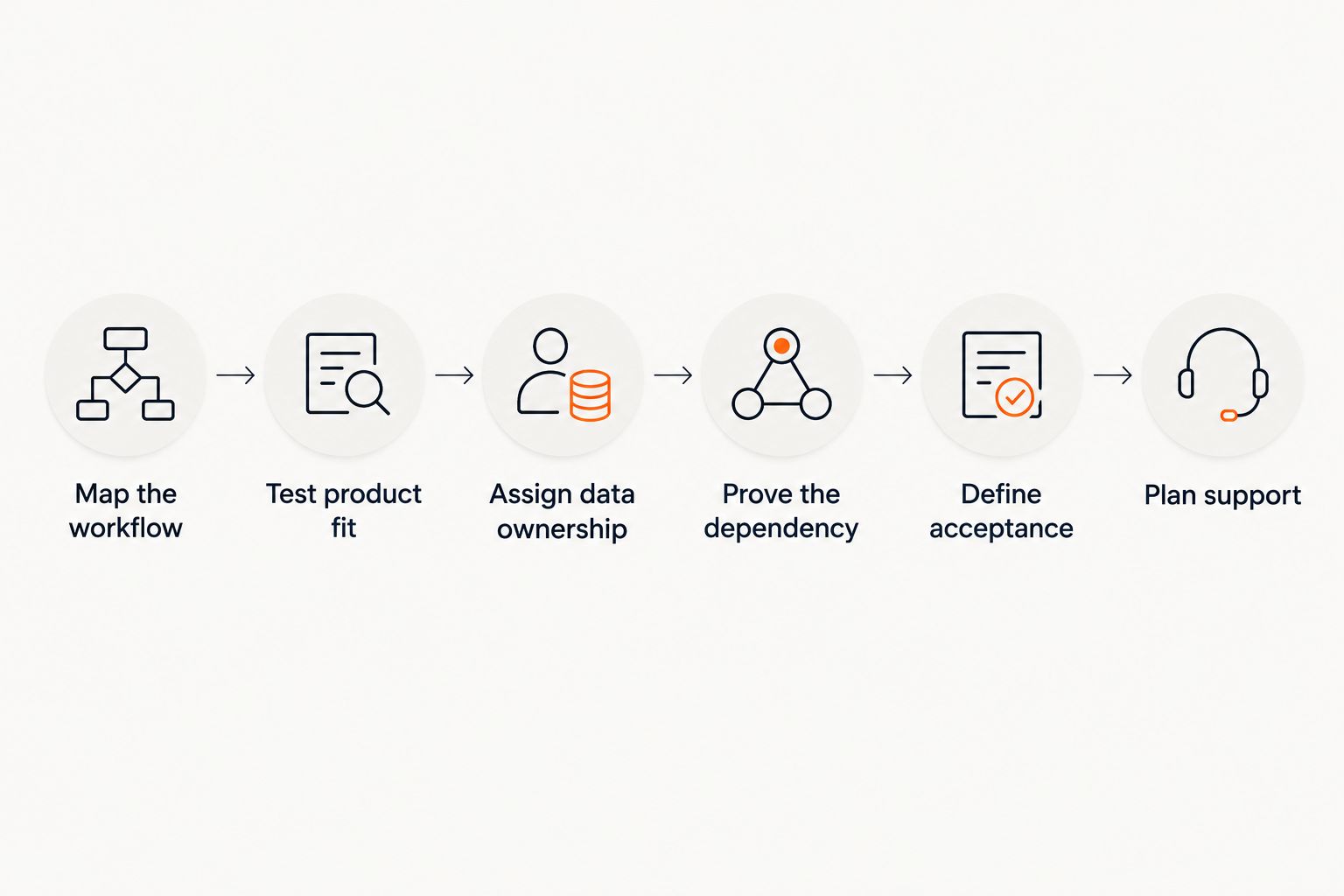
Verify workflow fit and dependencies before committing to implementation.
How do you replace software without losing operational control?
Plan replacement around business continuity, not only the launch date. A replacement needs a defined boundary: which functions move, which remain, and which records must stay available. Retiring an application does not remove the need to access its history.
Separate migration from application development
Inventory the records you need to transfer, including relationships and attachments. Map source fields to destination fields and define how invalid or incomplete records are handled. Preserve identifiers where connections and historical references depend on them.
Then reconcile the migrated data against the source using checks appropriate to those records. Opening the new application successfully does not prove that its order history or customer relationships transferred correctly.
Design cutover and rollback together
Specify when the old system stops accepting changes and when the new one becomes authoritative. If both remain active temporarily, define how updates stay consistent and who resolves differences.
Rollback also needs data rules. Restoring the old application is not enough if users have already entered transactions into the replacement. Decide how those transactions will be preserved or reconciled before cutover begins.
Measure the workflow, not enthusiasm
Choose measures tied to the original problem: duplicate entries, reconciliation exceptions, failed transfers, or time spent completing a task. Establish a baseline before implementation and use the same definition afterward.
For a 2026 rollout, staff feedback helps explain the measurements, but it does not replace them. A cleaner screen is useful only if the required work remains accurate and manageable.
Can a custom web app replace an entire business system?
A custom web app can replace an entire system when its scope includes every required function and operational responsibility. Browser access does not limit an application to a lightweight role. The practical question is whether replacing the whole system is justified by the requirements.
Start with the smallest boundary that solves the documented problem. Expand only when retaining the existing system creates a specific constraint you cannot address through configuration or integration.
Is custom software always more flexible?
Custom software gives you control over implemented behavior, but flexibility depends on architecture, documentation, and the ability to change it safely. Hard-coded rules and undocumented dependencies make a custom application difficult to modify.
Evaluate flexibility through a realistic change request. Ask how a new approval rule would affect permissions, stored records, integrations, and tests—not just how quickly someone can edit a screen.
Do you need to rebuild a process before automating it?
You need to clarify the process before automating it, not necessarily rebuild it. Resolve unclear decisions, ownership, and exceptions first. Otherwise, software executes an ambiguous process more consistently without making it correct.
One last thing
Ask who owns the record before asking who builds the screen. An interface can display an order correctly while the underlying systems disagree about its status. That disagreement is an ownership and synchronization problem, not a design problem.
Write the authoritative system and correction process beside each important record type in your brief. This small planning step gives configuration, integration, and custom development proposals a shared basis for evaluation.
Related guides
Frequently asked questions
What's the main difference between custom software and off-the-shelf software?
Custom software is built around defined requirements; off-the-shelf software provides existing functions that you configure and adopt. The decision turns on workflow fit, integration needs, and who owns ongoing maintenance.
Can custom software work with the systems we already use?
Custom software can work with existing systems when those systems provide suitable integration access. Verify available data, permissions, authentication, and failure handling before committing to the design.
Is off-the-shelf software enough for business operations?
Off-the-shelf software is enough when its supported behavior meets your operational requirements. Test normal work and exceptions rather than relying only on a feature list.
Who maintains a custom business application after launch?
A designated internal team or development partner maintains a custom business application after launch. Your agreement should assign responsibility for incidents, security updates, releases, backups, and documentation.
Should we replace software just because staff use spreadsheets?
Spreadsheet use alone does not justify replacing software. Determine whether the spreadsheet fills a configuration gap, connects systems, or handles a genuinely unsupported workflow.
What should we check before switching business software in 2026?
Before switching business software in 2026, check workflow fit, data ownership, migration requirements, integrations, support responsibilities, and rollback procedures. Validate the uncertain dependencies before committing to replacement.