


TLDR
- Your ecommerce replatforming checklist should require evidence for data migration, integrations, checkout, SEO, and launch recovery.
- Endertech supports ecommerce platform migrations and custom integrations for business clients.
- Block launch when payments, order routing, inventory accuracy, or recovery procedures remain unverified.
- Separate platform migration from optional redesign work so launch decisions stay tied to operational readiness.
An ecommerce replatforming checklist should verify business requirements, data mapping, integrations, search visibility, checkout, and launch recovery before you switch stores. For a 2026 migration, readiness means each critical workflow has an owner, test evidence, and an agreed response if it fails. A finished storefront is not proof that orders, inventory, or customer records will move correctly.
What belongs in an ecommerce replatforming checklist?
Your checklist needs acceptance criteria, not just tasks. Start with the business processes the new store must preserve, then document how you will prove they work. For a Magento-to-Shopify project, the products, customers, orders, and integrations data-mapping guide addresses a central dependency: deciding what each source record becomes in the destination.
For help planning and running the move itself, see our ecommerce migration services. For furniture retailers connecting STORIS to Shopify, see our work on Shopify and STORIS integration and furniture retail ecommerce.
Use this readiness table as your working structure. Assign a named person to every gate; a department name alone leaves the decision unclear.
Readiness gate | Evidence required | Reason to block launch |
|---|---|---|
Business requirements | Approved workflows and acceptance criteria | Essential purchasing or fulfillment behavior is unsupported |
Data migration | Reconciled records and documented exceptions | Products, customers, or order references cannot be trusted |
Integrations | Tested messages, error handling, and reconciliation | Paid orders or inventory updates fail without detection |
Search visibility | URL map, redirects, crawl checks, and tracking tests | Valuable pages disappear or redirect incorrectly |
Checkout | Successful and failed transaction tests | Customers cannot complete valid purchases reliably |
Operations | Documented procedures and access checks | Staff cannot fulfill, refund, or support orders |
Launch recovery | Cutover instructions and tested recovery procedures | The team cannot contain or reverse a critical failure |
A gate passes when its evidence is accepted, not when its task is marked complete. Keep unresolved exceptions visible next to the launch decision.
Why this matters
Replatforming changes more than the storefront. It changes how your business captures orders, identifies customers, publishes products, and communicates with operational systems.
Consider a retailer whose checkout works but whose warehouse receives an incorrect product identifier. The customer sees a successful purchase while staff face a fulfillment problem. A useful checklist follows the transaction beyond the confirmation page.
For your 2026 project plan, separate essential business continuity from optional improvements. A new navigation structure and a new order-routing integration need different acceptance criteria, even when both belong to the same release.
How do you assess replatforming readiness?
1. Define requirements
Write down what customers and staff must accomplish. Include product discovery, account access, purchasing, fulfillment, cancellations, returns, and reporting where those processes apply to your business.
Convert broad requirements into observable outcomes. Instead of saying that wholesale ordering must work, specify the relevant account permissions, purchasing rules, approval steps, and destination for the resulting order. Do not assume your existing platform’s behavior will transfer automatically.
For each requirement, record:
The business owner who approves it.
The current behavior and required destination behavior.
The systems involved.
The test that proves acceptance.
The consequence of failure.
Preserve required outcomes, not every historical customization. An old workaround deserves a business review before it becomes a new development requirement.
2. Map data
Create a field-level mapping for products, variants, categories, customers, addresses, and order history where these records are in scope. Specify identifiers, transformations, required values, and records that will be excluded.
Record counts help detect omissions, but they do not establish correctness. A product can exist in the destination while carrying the wrong variant relationship, tax classification, or image association. Check representative records and important relationships alongside totals.
Your 2026 migration workbook should also identify who owns each data source. If an ERP controls inventory and the storefront controls editorial descriptions, document that distinction before building synchronization rules.
Treat customer access separately from customer record migration. Confirm the destination’s supported account transition process, and prepare customer communications when the login experience changes. Never assume copying an email address preserves an existing authentication method.
3. Test integrations
Follow each critical transaction through every connected system. For an order, verify the destination record, customer association, product identifiers, fulfillment status, and any downstream accounting or marketing events included in scope.
The ERP-to-ecommerce integration guide provides a useful companion for defining those boundaries. Your checklist should identify the system that owns each field and the direction in which updates travel.
Test failures as deliberately as successful messages:
A receiving system rejects a record.
A message arrives more than once.
Updates arrive in an unexpected order.
A connection becomes unavailable.
Staff correct a record after synchronization fails.
Define how the integration detects, records, retries, and reconciles failures. Automatic retries need duplicate protection; repeating an order message must not create another order. Staff also need a visible exception queue and a clear recovery procedure.
4. Preserve search
Inventory current URLs before changing the site structure. Connect each relevant old URL to its intended destination, and distinguish genuine replacements from pages you are intentionally retiring.
An HTTP 301 status code identifies a permanent redirect. Use permanent redirects for moved pages, but send visitors to relevant replacements rather than directing every retired URL to the homepage. Redirects preserve a route; they do not make unrelated content equivalent.
An HTTP 404 status code indicates that a requested resource was not found. Review unexpected missing pages, particularly URLs with search traffic, external links, or active campaign use. For intentionally removed content without a replacement, document the decision rather than inventing a destination.
An HTTP 200 status code indicates a successful response, not that a page is ready for search. Also inspect page content, canonical tags, indexability, internal links, structured data where used, and XML sitemaps.
For a 2026 launch, compare the destination against a dated pre-migration baseline. Test analytics events as well: changed tracking can obscure whether a post-launch decline reflects customer behavior or missing measurement.
5. Validate checkout
Build test cases around the ways your customers actually buy. Include applicable discounts, delivery choices, taxes, account types, payment methods, and product restrictions without assuming every store needs the same scenarios.
Follow successful purchases into operations. Verify that the order appears where staff expect it, carries the correct amounts and identifiers, and produces the required customer communications.
Then test rejected payments, abandoned payment attempts, cancellations, and refunds. Use supported test environments and methods; do not improvise transactions that create unnecessary customer or financial risk.
Document expected results before testing. A screenshot of a confirmation page is useful evidence, but it does not prove that fulfillment or financial records are correct.
6. Prepare operations
Have the people who manage the store perform their normal tasks in the destination. Test product updates, order handling, customer support, refunds, and exception resolution where relevant.
Confirm access by role. Staff need enough permission to do their jobs without sharing unrestricted administrator credentials. Record who manages access when responsibilities change.
Prepare operating instructions that explain actions and consequences, not just button locations. If staff change inventory manually, they need to know whether another system will overwrite that change.
Training is complete when staff can perform the workflow and resolve its expected exceptions. Attendance at a demonstration is not the same as operational readiness.
7. Rehearse launch
Write the cutover procedure in execution order. Include final exports, data updates, integration changes, storefront switching, validation, customer communications, and the people authorized to make decisions.
Rehearse the procedure against a suitable test environment. Record missing permissions, unclear dependencies, and steps that require manual intervention. Resolve those issues before the live launch.
Use the rehearsal to establish the real sequence of work. Do not assign a migration window simply because a familiar calendar slot is available.
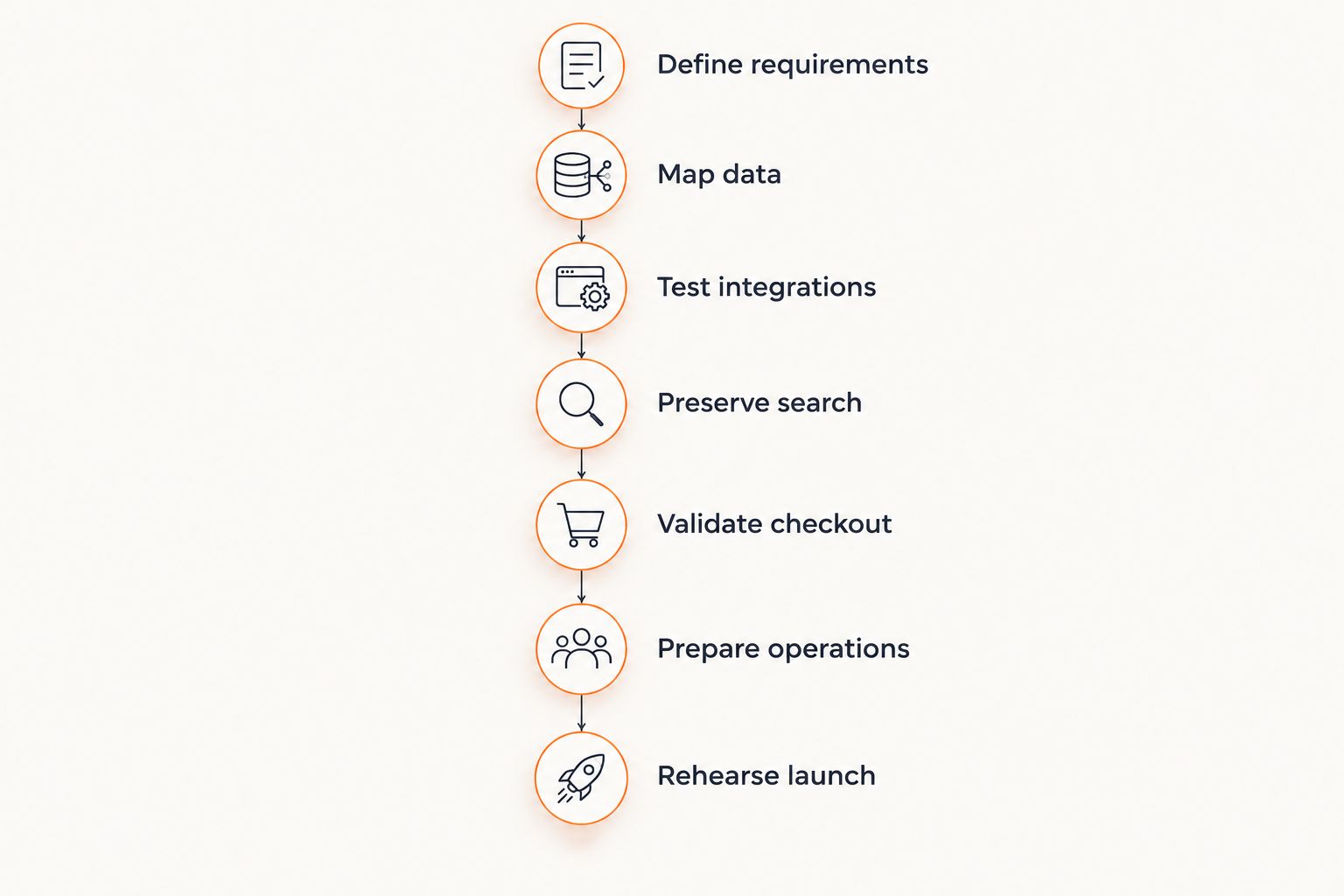
Launch readiness includes operational testing and rehearsal, not just a finished storefront.
Why does ecommerce replatforming risk vary?
Risk depends on the behavior you must preserve and the number of dependencies involved. Use these factors to decide where discovery and testing need more attention:
Catalog structure: Product variants, bundles, relationships, and specialized attributes require explicit mapping and validation.
Customer workflows: Different account permissions, purchasing rules, and approval processes expand the acceptance criteria.
System dependencies: ERP, warehouse, accounting, and marketing connections introduce message ownership and recovery requirements.
Search changes: New URLs, rewritten content, and revised navigation need separate checks rather than a redirect-only approach.
Historical data: Imported orders and customers need defined scope, identifier handling, and destination behavior.
Release scope: Combining migration with extensive redesign or new workflows makes failures harder to isolate.
These factors do not establish a universal project duration. They establish the questions your estimate must answer. Resolve uncertain dependencies before treating a launch date as committed.
When should you block an ecommerce replatforming launch?
Block launch when an essential customer or operational workflow fails and no accepted workaround exists. Payment failures, missing order exports, incorrect inventory ownership, and inaccessible staff functions belong in that decision.
Separate blockers from issues that have a documented, acceptable workaround. Record the impact, approving owner, temporary procedure, and condition for removing the workaround. A minor display issue and a lost paid order should never share the same priority simply because both are open tickets.
For the 2026 launch decision, use one issue register across business and technical teams. Different lists create different pictures of readiness.
Can you roll back after customers place orders?
Rollback becomes a data-reconciliation problem once the new store accepts live transactions. Switching the storefront back does not automatically transfer new orders, payments, customer changes, or inventory movements into the previous system.
Define which system remains authoritative during cutover and how you will preserve transactions if recovery is needed. Separate storefront reversal from integration recovery and financial reconciliation; these actions have different consequences.
Include explicit decision triggers and authority in the recovery plan. Someone must be empowered to stop order intake, pause synchronization, or restore a previous configuration when a critical workflow fails.
Should you redesign while replatforming?
Redesign belongs in the migration scope when it serves an agreed requirement, but optional redesign work should not obscure continuity testing. Keep baseline purchasing and operational workflows identifiable so you can distinguish migration defects from new design decisions.
If a navigation change alters category URLs and product discovery, test both search continuity and customer journeys. The change is not merely visual. Its acceptance criteria need to reflect those dependencies.
Where does an implementation partner fit?
Endertech is a fit for business clients that need ecommerce migration and custom integration work together. The agency designs, builds, and supports ecommerce stores and custom software applications.
An implementation partner can help connect business requirements to data mappings, integration behavior, and testable acceptance criteria. Your business still owns decisions about purchasing rules, operational exceptions, and acceptable launch risk; those decisions cannot be delegated to code alone.
FAQ
What should an ecommerce replatforming checklist include?
An ecommerce replatforming checklist should include requirements, data mapping, integrations, SEO, checkout testing, operations, and launch recovery. Each critical item needs an owner, acceptance criteria, and evidence before approval.
How do I know my store is ready to replatform?
Your store is ready to replatform when essential workflows pass agreed tests and unresolved exceptions have approved handling procedures. A finished design or completed import is not enough.
Can I migrate customer accounts without changing how customers log in?
Account migration does not guarantee an unchanged login experience. Confirm the destination platform’s supported authentication transition and communicate any required customer action.
Will replatforming hurt my organic search traffic?
Replatforming can affect organic search when URLs, content, indexing signals, or internal links change. Relevant redirects and pre-launch checks reduce avoidable problems but do not guarantee unchanged rankings.
How long does ecommerce replatforming take?
The schedule depends on catalog structure, data quality, integrations, customer workflows, and release scope. Build the schedule from resolved requirements and rehearsed migration steps rather than a generic duration.
Do I need to move all my historical orders?
You need a defined retention and access plan, not an automatic decision to import every historical order. Decide which records support customer service, reporting, and applicable recordkeeping requirements, then verify how the destination handles them.
Can Endertech help with ecommerce migration and integrations?
Endertech provides ecommerce, custom software, system integration, and platform modernization services. A useful project brief identifies the current systems, required workflows, migration scope, and launch constraints.
One last thing
Your most useful final test is not another homepage review. Ask staff to trace a purchase through payment, order routing, fulfillment, and the applicable cancellation or refund process, including a controlled failure.
Approve the launch from that evidence. A store that looks finished can still leave an order stranded between systems.