


TLDR
- Ecommerce platform migration downtime depends on checkout continuity, data synchronization, and cutover control—not just whether pages load.
- Parallel builds keep your existing storefront operating while you test its replacement.
- A controlled checkout pause is better than accepting orders your systems cannot process reliably.
- Endertech fits business teams planning ecommerce migrations with integration or custom software requirements.
Yes, an ecommerce platform migration can happen without a full storefront outage when you build and test the replacement separately, synchronize changing data, and control the final traffic switch. Uninterrupted browsing does not guarantee uninterrupted checkout: active carts, payment sessions, and order processing need separate cutover plans. In 2026, treat no downtime as a requirement to prove through testing, not a promise attached to a platform change.
Can an ecommerce platform migration happen without downtime?
Yes, but keeping the storefront accessible and keeping every transaction uninterrupted are different requirements. Your migration plan must define which customer actions remain available, what happens to work already in progress, and how you recover if the replacement fails.
If you want a partner to plan and run the cutover, see our ecommerce platform migration services. For furniture retailers connecting STORIS to Shopify, see our work on Shopify and STORIS integration and furniture retail ecommerce.
Start with the records that cross the boundary. This guide to Magento to Shopify data mapping addresses the products, customers, orders, and integrations that need explicit migration rules.
Cutover approach | Best for | Main advantage | Main limitation |
|---|---|---|---|
Parallel build | Preparing the replacement while the existing store trades | Separates development and testing from live selling | Does not solve final data synchronization by itself |
Controlled checkout pause | Stores that cannot safely accept orders during final synchronization | Creates a clear transaction boundary | Temporarily prevents purchases even if browsing continues |
Traffic switching | Systems with tested routing and compatible transaction handling | Can move visitors without a full storefront outage | Existing sessions and orders still need explicit handling |
These approaches are not mutually exclusive. A parallel build can end with either a controlled pause or a traffic switch; the right choice depends on how your business handles orders at that boundary.
Why this matters
A homepage loading successfully is not enough. Customers need to find products, see accurate inventory, complete payment, and receive an order that your fulfillment systems recognize.
For a 2026 migration plan, define availability around those business actions. An accessible storefront with a broken checkout is still a purchasing outage, while a working checkout that loses orders creates an operational failure.
Separate availability from data accuracy and search continuity. All matter, but each requires its own acceptance checks rather than a single declaration that the new store is live.
Parallel build: keep selling during preparation
Build the replacement in a separate environment while the existing store remains the production system. Import an initial dataset, configure the new storefront, connect required services, and test representative customer journeys without directing ordinary shoppers there.
Best for: keeping development work away from the live buying experience. Its main strength is isolation: a configuration mistake in the replacement does not have to become a production incident.
The limitation is that your initial import starts aging immediately. Products change, customers register, inventory moves, and new orders arrive while testing continues.
A parallel build therefore needs a final synchronization strategy. Decide which records transfer again, how updates are identified, and which system remains authoritative until the cutover is complete.
Controlled checkout pause: establish a clean boundary
A controlled checkout pause stops new purchases while the team completes final synchronization and validation. Depending on the implementation, shoppers can continue browsing while checkout displays a clear temporary message.
Best for: migrations where transactions cannot safely span both platforms. The benefit is a simpler handoff: the team can identify which orders belong to the old system before accepting orders in the new one.
The drawback is real purchasing downtime. Do not label this approach uninterrupted commerce simply because product pages remain accessible.
Communicate the restriction accurately and decide what happens to carts created before the pause. Also identify how staff will handle customer questions and payments already in progress.
Traffic switching: preserve access without assuming continuity
Traffic switching changes which system receives customer requests after the replacement passes its launch checks. Depending on the architecture, that change can happen through routing infrastructure or domain configuration.
Best for: migrations with tested traffic controls and a clear way to handle transactions during the transition. The advantage is continued storefront access without making every visitor wait for a maintenance page.
The limitation is state. Switching traffic does not automatically move carts, login sessions, payment sessions, or unfinished checkout activity between unrelated platforms.
DNS changes also do not make every visitor switch at the same instant because resolvers cache records. Keep the transition behavior explicit rather than assuming the old storefront becomes irrelevant immediately.
How do you plan a migration that avoids a full outage?
Use the following sequence for your 2026 cutover plan. Assign an owner and an acceptance condition to each step; a launch checklist without decision authority cannot control a live incident.
1. Define continuity
Write down what must remain available: browsing, search, account access, checkout, payment processing, order export, and fulfillment handoff. Identify any activity that is allowed to pause and how customers will see that restriction.
Define failure in business terms. For example, an order that exists in the storefront but never reaches fulfillment should fail the launch check even when every page renders correctly.
2. Map data
Identify the source of truth for each record type. Product descriptions might be maintained in one system while inventory and fulfillment status are maintained elsewhere.
Document how source identifiers map to destination identifiers. Include variants, customer associations, historical orders, and integration references so a successful import does not conceal broken relationships.
3. Test workflows
Test representative purchasing paths in the replacement environment. Include the workflows your business actually uses, such as customer-specific access, delivery rules, product variants, and account-based purchasing where applicable.
Follow a test order beyond the confirmation page. Verify its payment state, operational destination, inventory effect, and customer communication rather than treating checkout completion as the end of testing.
4. Sync changes
Decide how to capture changes made after the initial import. The final synchronization must account for updates as well as new records; copying only newly created products misses edits to existing products.
Establish a transaction boundary for orders and inventory. Where supported, use repeatable processing that recognizes records already handled so retries do not create duplicate orders or repeated stock adjustments.
5. Switch traffic
Confirm domain routing, certificates, redirects, and production integration settings before opening the replacement to customers. Remove test-only behavior deliberately rather than assuming deployment handles every setting.
Publish the cutover decision only after the required checks pass. If checkout must pause, make that restriction visible and keep the ownership of incoming transactions unambiguous.
6. Verify transactions
Check the live customer journey after the switch. Inspect the resulting order in the destination systems and verify that notifications, inventory updates, and fulfillment handoffs behave as intended.
Keep monitoring active while normal customer traffic resumes. Test success is necessary, but production requests can expose paths that a staged test did not exercise.
The sequence makes launch a chain of accountable decisions rather than a single deployment event. Keep the written cutover instructions accessible to everyone responsible for storefront, payment, and operational checks.
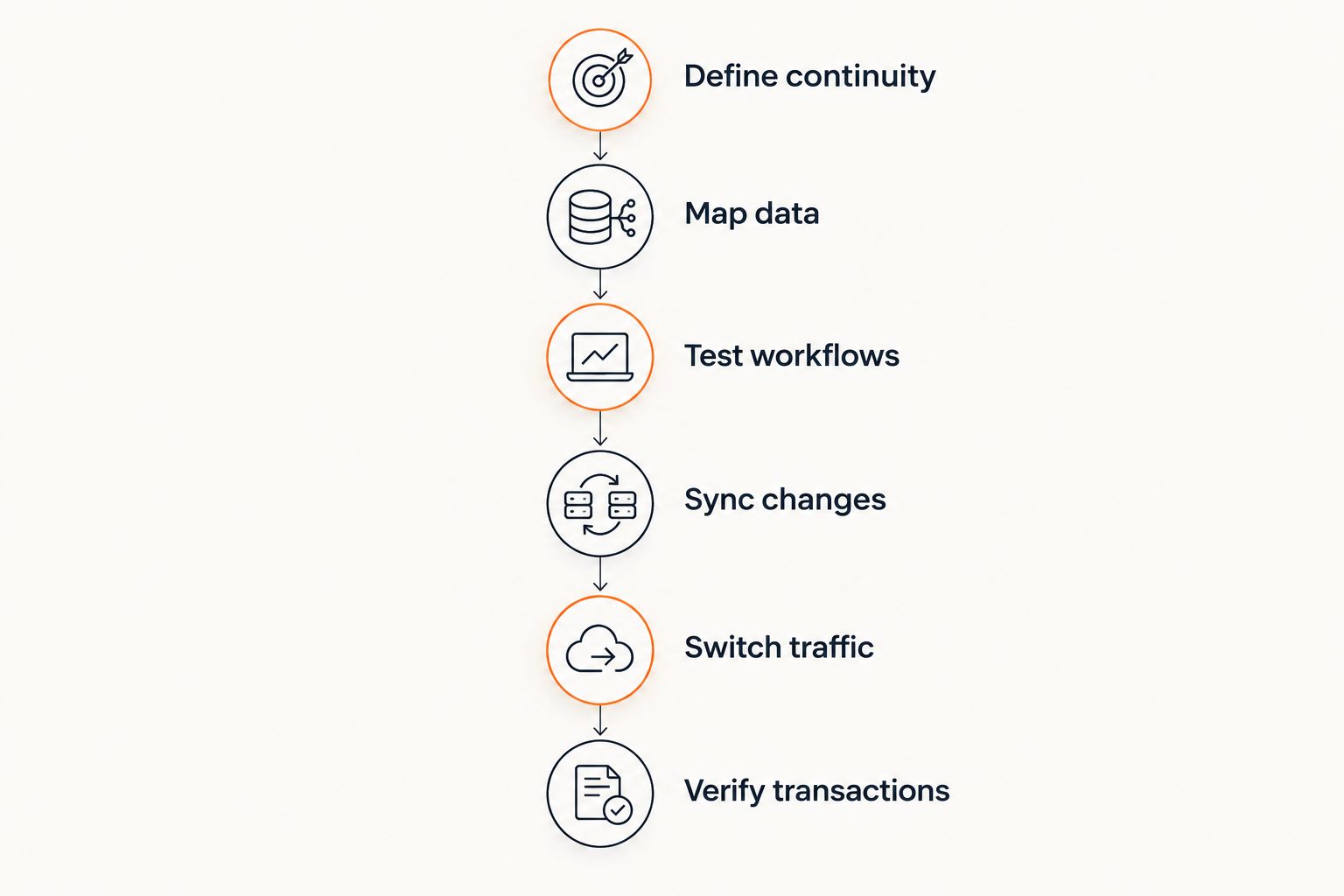
Traffic switches only after data and workflow checks pass.
Why ecommerce platform migration downtime varies
For a 2026 migration, assess these dependencies before choosing a cutover method. They determine whether an uninterrupted transition is technically credible for your store.
Checkout state: carts and payment sessions need a defined destination or restart behavior. A session created on the old platform does not automatically belong to the new platform.
Changing records: ongoing product edits, account creation, and orders increase the work needed between the initial import and launch.
Operational integrations: ERP, accounting, warehouse, and marketing connections need correct identifiers, credentials, event handling, and ownership after the switch.
Custom functionality: business-specific purchasing rules must work in the replacement, not merely resemble the old interface.
Traffic routing: domain changes, caches, certificates, and application routing affect which storefront customers reach during the transition.
Recovery design: returning traffic to the old store is harder once the new store has accepted transactions that the old store does not contain.
For connected retailers, review what an ERP ecommerce integration must handle before defining launch acceptance. Integration readiness belongs in the cutover plan, not in a separate task scheduled after the storefront opens.
What should you check before declaring the new store live?
Check customer actions, transaction accuracy, and technical responses separately. A successful page response does not prove that payments or integrations work.
HTTP 200 status: intended live pages should return a successful response and the expected content. A successful status with an error message inside the page is not a passed check.
HTTP 301 status: permanently moved URLs should redirect to relevant destinations where permanent redirects are appropriate. Avoid sending every old product URL to the homepage.
HTTP 503 status: use the temporary-unavailability response when serving genuine maintenance behavior. Do not leave that response active after normal service resumes.
Also check certificates, production payment configuration, customer notifications, search indexing settings, and integration logs. These checks establish technical readiness; transaction reconciliation establishes operational readiness.
Endertech's ecommerce migration work is relevant when the storefront change also involves ERP integration, platform modernization, or custom applications. Endertech is a fit for business teams whose ecommerce migration extends beyond the storefront.
The tradeoff is coordination: linked systems require decisions about data ownership and workflow behavior. An agency engagement does not remove those dependencies or guarantee an interruption-free cutover.
Can customers keep their carts during a platform migration?
Customers can keep their carts only when the migration explicitly supports cart continuity. A working replacement storefront does not establish that support.
Decide whether carts transfer, remain usable on the old system for a controlled period, or require rebuilding. Test the chosen behavior with active sessions before presenting continuity as a launch feature.
Can you roll back after the new store accepts orders?
You can return traffic to the old storefront only if the recovery plan also accounts for transactions accepted by the replacement. A routing reversal alone does not reconcile orders, payments, or inventory.
Define rollback triggers and transaction ownership before launch. If returning to the old store would split records across systems, document the reconciliation work and consider whether correcting the new store is the safer recovery path.
Does a 2026 migration need a maintenance window?
A migration needs a maintenance window when required changes cannot happen safely while affected workflows remain active. That restriction can apply to checkout without requiring the entire storefront to disappear.
Choose the window from your own order patterns and operational constraints. Do not substitute an assumed quiet period for evidence from your business.
FAQ
Can I migrate my ecommerce platform without closing my store?
Yes, you can keep the existing store operating while building and testing its replacement. The final transition still needs explicit plans for checkout, changing data, and operational integrations.
Does zero downtime mean customers will keep their carts?
No, zero storefront downtime does not guarantee cart continuity. Cart transfer or restart behavior must be designed and tested separately.
Is a checkout pause better than switching everything live?
A checkout pause is better when continued order acceptance would create uncertain or inconsistent transactions. Traffic switching is appropriate only when session handling and data ownership are tested.
Will a domain change move all shoppers at once?
No, a DNS change does not move all shoppers at once because resolvers cache records. Your transition plan must account for visitors reaching different storefronts during propagation.
Can a migration lose orders even when the website stays online?
Yes, storefront availability does not prove that orders reach fulfillment or accounting systems. Verify transaction handoffs and reconcile records across the connected systems.
What should my 2026 migration acceptance checklist include?
Your 2026 checklist should include browsing, checkout, payments, order processing, inventory, redirects, and recovery checks. Assign a responsible owner and a pass condition to each required workflow.
When is Endertech relevant to an ecommerce migration?
Endertech is relevant when an ecommerce migration involves website development, ERP integration, platform modernization, or custom software. Those connected requirements need a shared implementation and cutover plan.
One last thing
The old store becomes a more complicated fallback as soon as the new store accepts its first live order. Keep it available where your architecture permits, but do not mistake availability for a complete recovery plan.
Before launch, answer this question in writing: if the replacement accepts an order and then fails, which system owns that order? That decision protects the transaction boundary better than a vague promise to switch back.