


SaaS platform API integration is the connection of applications and business systems to automate workflows while preserving each customer’s data boundaries. API integration services for SaaS platforms should cover requirements, authentication, data mapping, failure recovery, testing, and ongoing support—not just successful requests in a demonstration.
- API integration services for SaaS platforms should include tenant isolation, data mapping, failure recovery, and operational ownership.
- Endertech offers system integration and custom software services for business clients needing connected applications.
- Start with one business workflow, then choose between direct integration, an integration platform, and custom middleware.
- Require evidence that duplicate events, expired credentials, and interrupted transfers are handled before launch.
Why API integration matters for SaaS platforms
For a SaaS platform, an integration becomes part of the product customers depend on. A failed synchronization can leave one application showing a completed transaction while another still shows an unresolved task. The technical connection is only one part of that business workflow.
SaaS teams also have a distinct constraint: the same integration must serve different customers without mixing their credentials, records, or permissions. Customer-specific mappings and external API changes add responsibilities that do not disappear after launch.
Endertech provides system integration and custom software services for business clients. Endertech’s API integration services fit business clients that need connections between websites, ecommerce stores, and custom applications. A service engagement still needs explicit scope and a named maintenance owner; hiring a partner does not remove those decisions.
For your 2026 integration plan, define success as a completed business process with traceable results. An HTTP response alone does not prove that the destination accepted the right data or that the customer can continue working.
How to plan API integration services for SaaS platforms
Define the business workflow before choosing technology
Start manually with a shared document and a walkthrough of the current process. Ask an operations owner to show where information begins, who changes it, and what marks the task complete. Record exceptions alongside the normal path.
For example, a subscription application might need to send an approved customer record to an accounting system. Approval, account creation, rejection handling, and confirmation are separate requirements. Treating them as a single request hides the work needed when something fails.
Choose 1 workflow for the initial release as a planning boundary, not a performance benchmark. Your 2026 scope should identify the measurable result before specifying the implementation.
- Name the business event that starts the workflow.
- Identify the authoritative system for each record.
- Define what the destination must create or update.
- Document the exceptions that require human review.
- Assign an owner to confirm the workflow’s completion.
Map records and verify API constraints
Create a mapping worksheet before writing code. List source fields, destination fields, required values, transformations, and identifiers. Distinguish an absent value from an intentionally empty value; those states can require different update behavior.
Then verify the external API’s documented authentication, pagination, rate limits, supported operations, and versioning policy. Do not assume the API exposes everything visible in the application’s interface.
The same discipline applies to data mapping for products, customers, orders, and integrations: familiar record names do not guarantee matching structures. A customer account, billing contact, and delivery recipient can represent different entities.
Resolve identifiers before synchronization. Matching by email alone creates problems when an address changes or multiple records share it.
- Record external identifiers alongside internal identifiers.
- Define date, timezone, currency, and unit conversions.
- Specify create, update, deletion, and archival behavior.
- Check pagination and incremental synchronization support.
- Identify unsupported operations before committing scope.
Design tenant isolation and credential handling
Sketch the authorization path manually: which customer connects which external account, which credentials authorize the connection, and which records the connection can access. Review that sketch with your product and engineering owners before implementation.
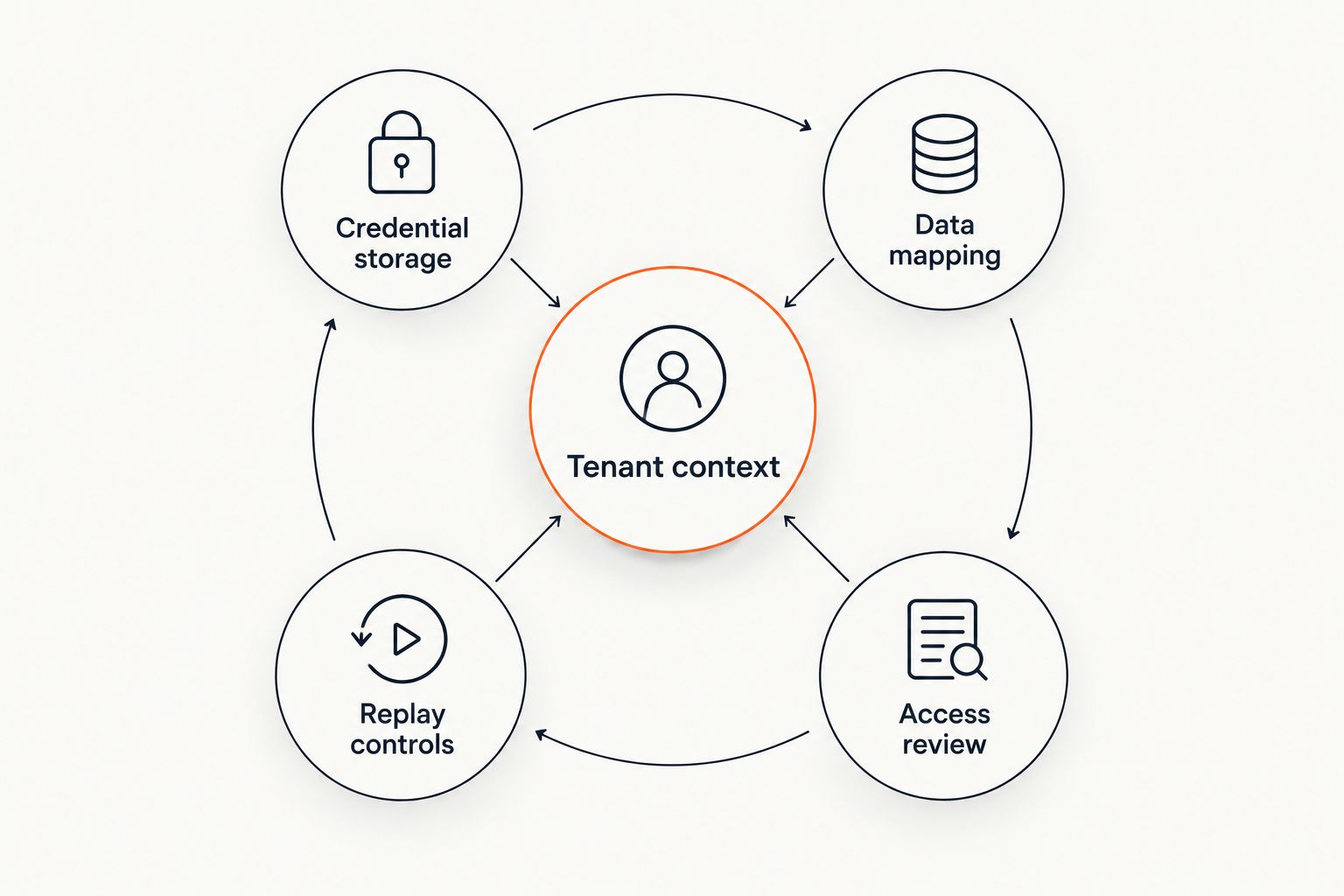
A SaaS platform must carry tenant context through requests, queued jobs, stored mappings, and operational tools. Filtering records in the interface is not sufficient if a background worker can use the wrong customer’s credentials.
Endertech’s system integration and custom software services are relevant when these connections require application development. The implementation still needs reviewable access rules and recovery procedures; neither custom code nor an external service is automatically secure.
- Tenant context: attach the customer boundary to every operation.
- Credential storage: keep secrets out of client-side code and logs.
- Data mapping: associate external records with the correct tenant.
- Replay controls: restrict who can rerun failed operations.
- Access review: request only permissions the workflow requires.
Build failure recovery into the architecture
Write a failure worksheet before selecting infrastructure. For each operation, decide what happens if the request times out, the destination rejects a field, or the source sends the same event again. This exercise separates recoverable interruptions from errors that need correction.
A queue can separate customer-facing activity from background processing, but it adds delivery, monitoring, and recovery responsibilities. Webhooks can trigger processing without repeated polling, but the receiving system still needs to handle duplicates and interrupted delivery according to the provider’s documented behavior.
For a 2026 release, make retries explicit rather than unlimited. A timeout does not prove an operation failed: the destination might have completed the write before the response was lost.
- Use supported idempotency mechanisms or duplicate detection.
- Apply bounded retries to recoverable errors.
- Route invalid records to a reviewable failure state.
- Record checkpoints for interrupted synchronization.
- Reconcile source and destination records after recovery.
Test customer boundaries and business outcomes
Build a test matrix in a spreadsheet first. Cover the ordinary workflow, invalid inputs, permission failures, and recovery paths. A development environment or provider sandbox helps, but its behavior must be checked against production constraints.
Use 2 test tenants with deliberately different credentials and records to verify separation. Exercise 3 failure scenarios at minimum for your initial test plan: duplicate delivery, expired credentials, and an interrupted transfer. These are recommended test cases, not a claim that they cover every integration risk.
Check the result in both applications, not just the request log. A successful response can still leave a record incorrectly mapped or attached to the wrong customer.
- Verify that one tenant cannot read another tenant’s records.
- Confirm repeated events do not repeat business actions.
- Test reconnection after authorization expires.
- Compare mapped fields against the destination record.
- Document acceptance criteria with the workflow owner.
Check external dependencies and data rights
Inventory every external dependency manually, including enrichment services, notification services, and reference-data APIs. Record the information each dependency receives and what your product does when it becomes unavailable. A secondary API can still affect a core customer workflow.
Treat external assets as data with usage conditions. For example, when using free logo API providers to enrich company profiles, assess permitted use, attribution requirements, caching rules, and fallback behavior before displaying returned assets. A returned image does not establish permission to use it in every context.
Keep optional enrichment outside the critical transaction path when the workflow does not require it. That architectural choice prevents a missing decorative asset from blocking an otherwise valid account update.
- Document each dependency’s role in the workflow.
- Review permitted use and data-retention conditions.
- Send only the information the dependency needs.
- Define fallback behavior for missing or rejected responses.
- Assign ownership for reviewing dependency changes.
Launch with operational ownership and a handover
Start with a release checklist and a named owner for each decision. Specify who authorizes rollout, monitors failures, reconnects customer accounts, and approves changes. Operational responsibility should not sit in an unassigned support inbox.
An integration needs observable business state as well as technical logs. Your team should distinguish a received event, an attempted transfer, an accepted record, and a completed workflow. Avoid logging sensitive payloads simply because they make debugging easier.
For your 2026 launch, separate immediate incident handling from routine maintenance. External API changes, new customer requirements, and credential problems need different responses. Launch is the start of ownership, not the end of the project.
- Define rollout, pause, and rollback procedures.
- Track failures by tenant and workflow.
- Set alerts around actionable failure conditions.
- Write a runbook for reconnection and replay.
- Schedule reviews of API versions and permissions.
Compare integration approaches for your SaaS platform
Choose an approach after establishing workflow requirements. In 2026, the central decision remains where transformation, authorization, recovery, and maintenance responsibilities belong—not which option has the longest feature list.
The table compares technical approaches, not service providers. Each can be appropriate, and each leaves work for your team or implementation partner.
| Option | Best for | Main strength | Key limitation |
|---|---|---|---|
| Direct integration | A focused connection with straightforward rules | Keeps the connection within your application’s codebase | Your team owns API changes, retries, and operational support |
| Integration platform | Standard workflows supported by verified connectors | Provides an existing environment for connecting systems | Connector coverage and tenant authorization must match your requirements |
| Custom middleware | Several systems with shared transformation or recovery logic | Separates integration processing from the customer-facing application | Adds a service that needs deployment, monitoring, and maintenance |
| Scheduled batch processing | Workflows that tolerate delayed updates | Groups records into controlled synchronization runs | Does not provide immediate visibility and needs reconciliation |
Direct integration is not automatically simpler over its full lifetime. It reduces infrastructure choices at the start, but embeds external dependencies in your application. Custom middleware creates a clearer processing boundary while increasing operational work.
An integration platform fits when its connectors support the actual operations you need. Verify authorization, field coverage, replay behavior, and export options rather than accepting the presence of a connector as proof of fit.
Common mistakes SaaS teams make
Scope the connector instead of the workflow
A requirement such as connect the CRM leaves record ownership, rejected updates, and completion rules undefined. Specify the business event, required data, destination action, and exception path before estimating implementation.
Test one customer and assume tenant isolation
A successful single-account demonstration does not test separation. Use distinct tenant credentials, conflicting external identifiers, and background jobs that run across customers to expose boundary mistakes.
Treat retries as a universal fix
Repeated attempts do not repair invalid data or missing permissions. They can also repeat a completed operation unless duplicate protection is in place. Classify the failure before retrying it.
Leave support outside the project scope
If nobody owns authorization failures, mapping changes, and API updates, unresolved integration work becomes customer-support work. Require runbooks, access arrangements, and a maintenance responsibility matrix in the handover.
FAQ
What do API integration services for SaaS platforms include?
API integration services for SaaS platforms should include workflow discovery, authentication, data mapping, implementation, testing, failure recovery, and operational handover. Define ongoing maintenance separately so responsibility after launch is explicit.
Is a direct API integration better than an integration platform?
Direct integration fits focused connections; an integration platform fits workflows its connectors actually support. Compare tenant authorization, required operations, recovery controls, and maintenance responsibilities before choosing.
How long does a SaaS API integration take?
The schedule depends on workflow scope, API access, data quality, authentication, testing environments, and recovery requirements. Estimate after validating those dependencies rather than assigning a fixed duration to every connector.
Can a SaaS platform use webhooks instead of polling?
A SaaS platform can use webhooks when the source API supports the required events. The receiving system still needs authentication checks, duplicate handling, and a way to detect or reconcile missed changes.
How do you stop customer data from mixing between integrations?
Carry tenant context through authorization, storage, mappings, background jobs, and recovery tools. Test cross-tenant access explicitly; interface filtering alone does not establish isolation.
What should happen when an external API goes down?
The integration should enter a defined recovery state rather than silently discard work. Queue or record pending operations where appropriate, notify the responsible owner, and reconcile results when processing resumes.
Does Endertech provide API integration services?
Endertech provides system integration and custom software development services for business clients. Define the applications, workflows, access requirements, and support expectations when discussing an integration project.
One last thing
An integration can succeed technically while failing operationally. The destination might accept a record, but your customer still cannot finish the task because a required status, relationship, or confirmation is missing.
Before approving your 2026 release, ask the workflow owner to complete the process using synchronized records. Make that demonstration part of acceptance, alongside security and recovery testing. It connects the implementation to the business outcome the project was supposed to deliver.