


TLDR
- Plan SEO as a launch requirement: inventory every URL with traffic or links and map each one to its closest Shopify match.
- Use 301 redirects and test every one with a crawl. Headless Hydrogen stores need the app to apply admin redirects.
- Carry over titles, meta descriptions, copy, structured data, and alt text, and rebuild internal links to the new URLs.
- Submit the sitemap on launch day and monitor Search Console for at least 90 days against a dated baseline.
- Ask your agency how it builds, tests, and monitors the redirect map before you sign.
You can migrate to Shopify without losing SEO if you treat search as a launch requirement with its own evidence. That means a complete URL map with 301 redirects, carried-over metadata and structured data, rebuilt internal links, and a sitemap submitted on launch day. It also means watching Search Console for weeks after go-live. This checklist is for the person buying the migration. Use it to check a plan, and to question the agency that will run it.
If you are still deciding whether to replatform at all, start with our replatforming risk and readiness checklist. It covers data, integrations, checkout, and recovery. This post goes deep on one gate from that list: search.
Why Shopify migrations lose rankings
Rankings drop after a migration when Google finds old URLs that no longer lead anywhere useful. They also drop when the new pages say less than the old ones did. Shopify makes some of this more likely because its URL structure is fixed.
Products live under
/products/.Categories become collections under
/collections/.Content pages live under
/pages/, and blog posts under/blogs/.
So almost every URL on a WooCommerce, nopCommerce, Magento, or BigCommerce store will change. That is normal. The risk comes from changing URLs without a plan for every page that earns traffic or links.
Google also needs time. Its site move guidance says most pages on a medium-sized site can take a few weeks to move, and larger sites take longer. A short dip can be expected. A slide that keeps going after a month usually points to missing redirects or thinner pages.
The 2026 SEO migration checklist
Each item below names what to check and the proof you should ask to see. A task marked done is not proof. A spreadsheet, a crawl report, or a test result is.
1. Inventory every URL that matters
Build the list from more than one source. Export indexed pages and top landing pages from Google Search Console. Pull landing pages with revenue from analytics. Crawl the live site. Add the pages that other sites link to most.
Proof to ask for: one sheet with every old URL, its traffic and revenue, and a priority. Category pages and content pages with search value should be on it, along with products.
2. Map each old URL to its closest match
Every URL with traffic or links needs a destination that answers the same question. A retired product should point to its replacement or to the collection it belonged to. Sending everything to the homepage throws away most of the value those pages earned.
Filtered and faceted URLs need a decision. Decide which filter pages deserve their own collection and which should consolidate. Our Magento to Shopify SEO guide walks through layered navigation in detail.
Proof to ask for: the redirect map, with the reason for any URL that will return a 404 on purpose.
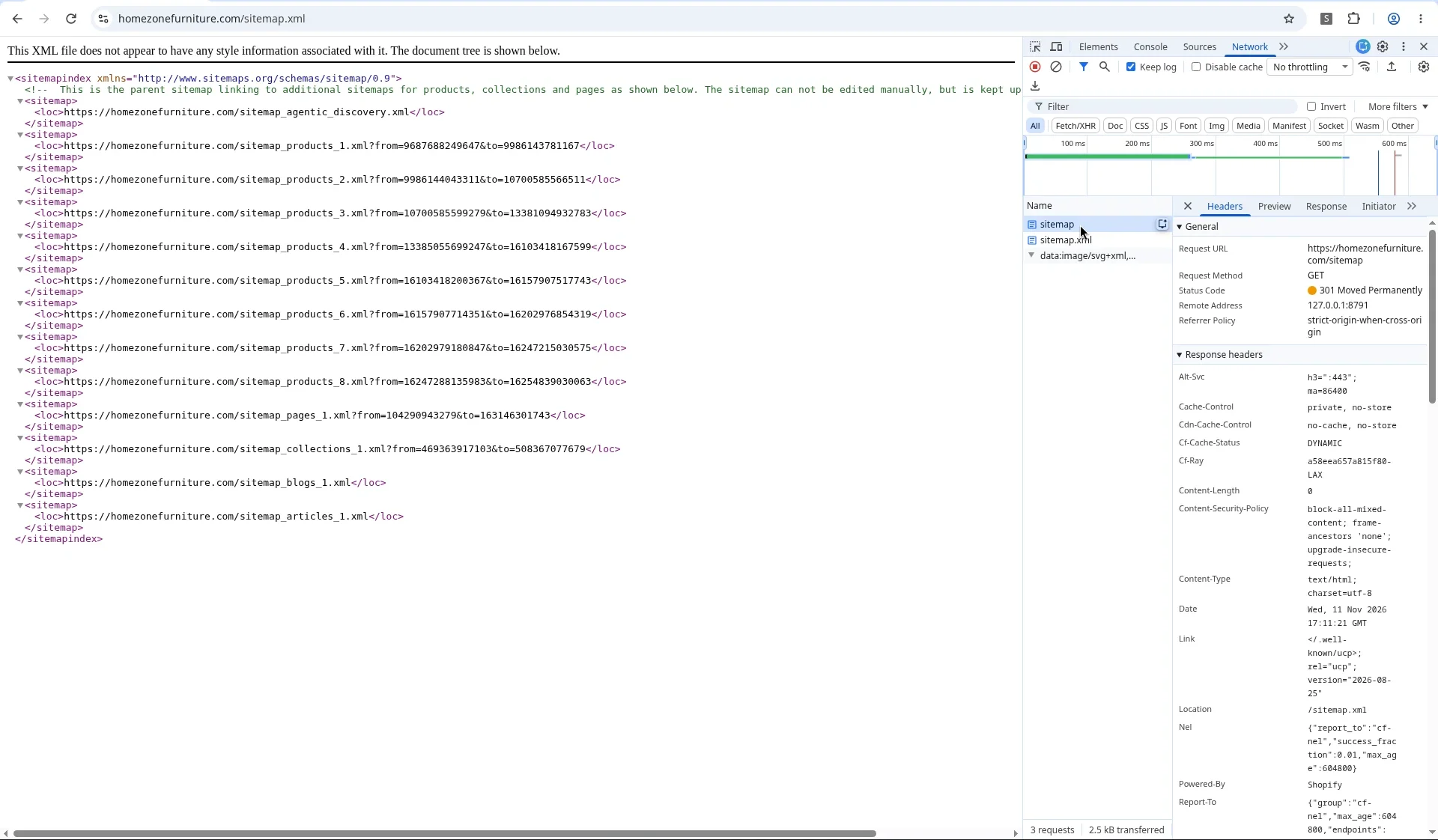
How to check a redirect's status code in DevTools. Open the Network tab, load the URL, and read Status Code and Location. Here Home Zone's /sitemap returns a 301 to /sitemap.xml.
3. Use 301 redirects, and test the status code
Shopify stores redirects in its URL redirects list in admin, and you can import them in bulk from a CSV. When you change a product or collection handle, Shopify offers to create the redirect for you. Leave that box checked.
Headless stores need extra care. On headless Hydrogen storefronts we support, redirects saved in Shopify admin did not run on their own. Shopify Plus support confirmed this to our team. The app has to look them up, and we have had to fix redirects that returned a temporary 302 instead of a permanent 301. Our post on headless storefront SEO covers the other signals a headless build has to send itself.
Proof to ask for: a crawl of every old URL, showing a 301 to the right page for each one. Spot checks in a browser are not enough.
4. Carry over titles, descriptions, and headings
Your title tags, meta descriptions, and H1s are part of why pages rank. Export them from the old platform and import them into Shopify's search engine listing fields. Then check the templates, because a new theme can override them or print the store name twice.
Keep body copy at least as complete as before. Product descriptions, specs, and collection intro text often get trimmed during a redesign. That makes a page weaker even when the redirect is perfect.
On the Berríos Furniture move from nopCommerce to Shopify, the plan mapped titles, meta descriptions, and headers during migration. It paired that with 301 redirects from the old nopCommerce URLs. Berríos also runs in Spanish and English, so the content model had to fit their translation workflow.

The Berríos storefront language menu, with Español and English options.
5. Rebuild structured data
Structured data tells search engines and AI assistants what a page is about. Product pages should output Product markup with price, availability, and reviews where you show them. Breadcrumbs and Organization markup help too. Most Shopify themes ship some of this, but apps and theme edits can duplicate or break it.
Check it with Google's Rich Results Test on real product and collection pages before launch. Our post on what structured data does for SEO and AI search explains which types matter most.
Proof to ask for: a Rich Results Test pass for each main template.
6. Rebuild internal links and navigation
Redirects catch visitors who use old links. Your own site should not depend on them. Update menus, footer links, breadcrumbs, and links inside product descriptions and blog posts so they point straight at the new URLs.
Catalog structure matters here. On Home Zone Furniture's move from nopCommerce and eSTORIS to Shopify, the old catalog had duplicate product pages and inconsistent variants. We restructured URLs, collections, and redirects so search engines and customer bookmarks kept working. We rebuilt the catalog around variants and standardized attributes.
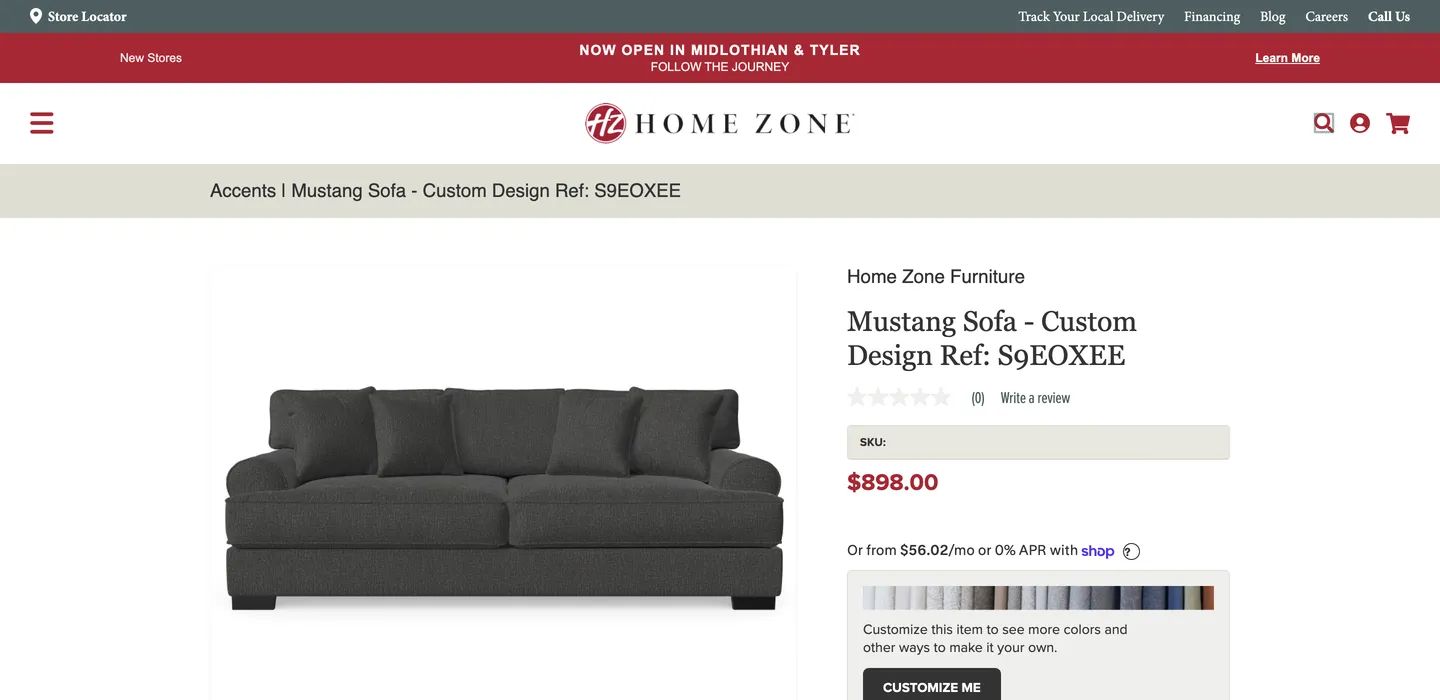
Home Zone Furniture on Shopify. The migration replaced duplicate product pages with one record per product and variant.
Proof to ask for: a crawl of the new site showing no internal links that hit a redirect or a 404.
7. Keep images and alt text
Product images can bring in image search traffic, and alt text helps both search and accessibility. Migrate images at full quality and keep the alt text. If the old alt text is empty or repeats the file name, this is a good time to write real descriptions.
Variant images need a plan of their own. A shopper who picks a fabric should see that fabric. Search engines get a clearer picture of the catalog at the same time.
8. Submit the sitemap and watch Search Console
Shopify builds sitemap.xml for you and updates it as you add products. Submit it in Search Console on launch day. Keep the old property verified too, and use the Change of Address tool if the domain changes.
Check robots.txt as well. Shopify lets you edit it with a robots.txt.liquid template. Make sure staging rules or password protection did not follow you to launch.
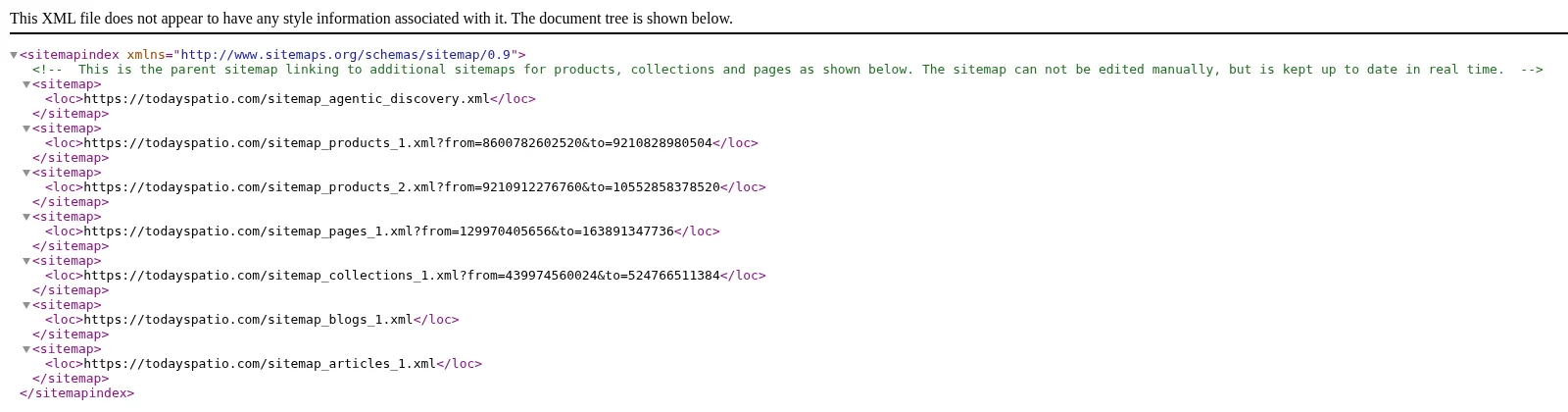
The Shopify sitemap index on Today's Patio. Shopify generates it and splits it into child sitemaps by content type.
9. Check page speed before and after
Speed is part of page experience. Record Core Web Vitals for your main templates before the move, using PageSpeed Insights or the Search Console report. Run the same checks on the new site. Apps add scripts, so review each one you install against what it costs in load time.
10. Monitor for at least 90 days
Launch day is the start of the SEO work. In the first week, check Search Console every day for 404 spikes, crawl errors, and pages that dropped out of the index. After that, compare clicks and rankings for your top pages each week against the dated baseline from step 1.
Analytics need a check too. If tracking breaks during the move, a drop in reported sales might be a measurement problem. Test purchase events and landing page tracking before you trust any report.
Proof to ask for: a written monitoring plan with an owner, a schedule, and a list of what triggers a fix.

The Outdoor Seating collection on Today's Patio, with filters and subcategory links on the Shopify catalog we rebuilt after the WooCommerce move.
What good results look like
SEO preservation is one part of a migration. It protects the traffic you have while the new store does its job. In our migrations, the clients who grew afterward kept search signals intact and improved the catalog at the same time.
Today's Patio moved from WooCommerce to Shopify. We rebuilt a complex catalog of sets, finishes, and fabrics with Shopify metafields, so products are easier to find on the site and in search. Online revenue grew about 175% year to date compared with their first digital year.
Home Zone Furniture moved from nopCommerce and eSTORIS to Shopify, with redirects and structured metadata planned to protect rankings. They saw about 127% year-to-date net sales growth on the new foundation.
Berríos Furniture moved from nopCommerce to Shopify with mapped metadata and 301 redirects. In the anniversary window, revenue grew about 13%, with orders and sessions up about 10%.
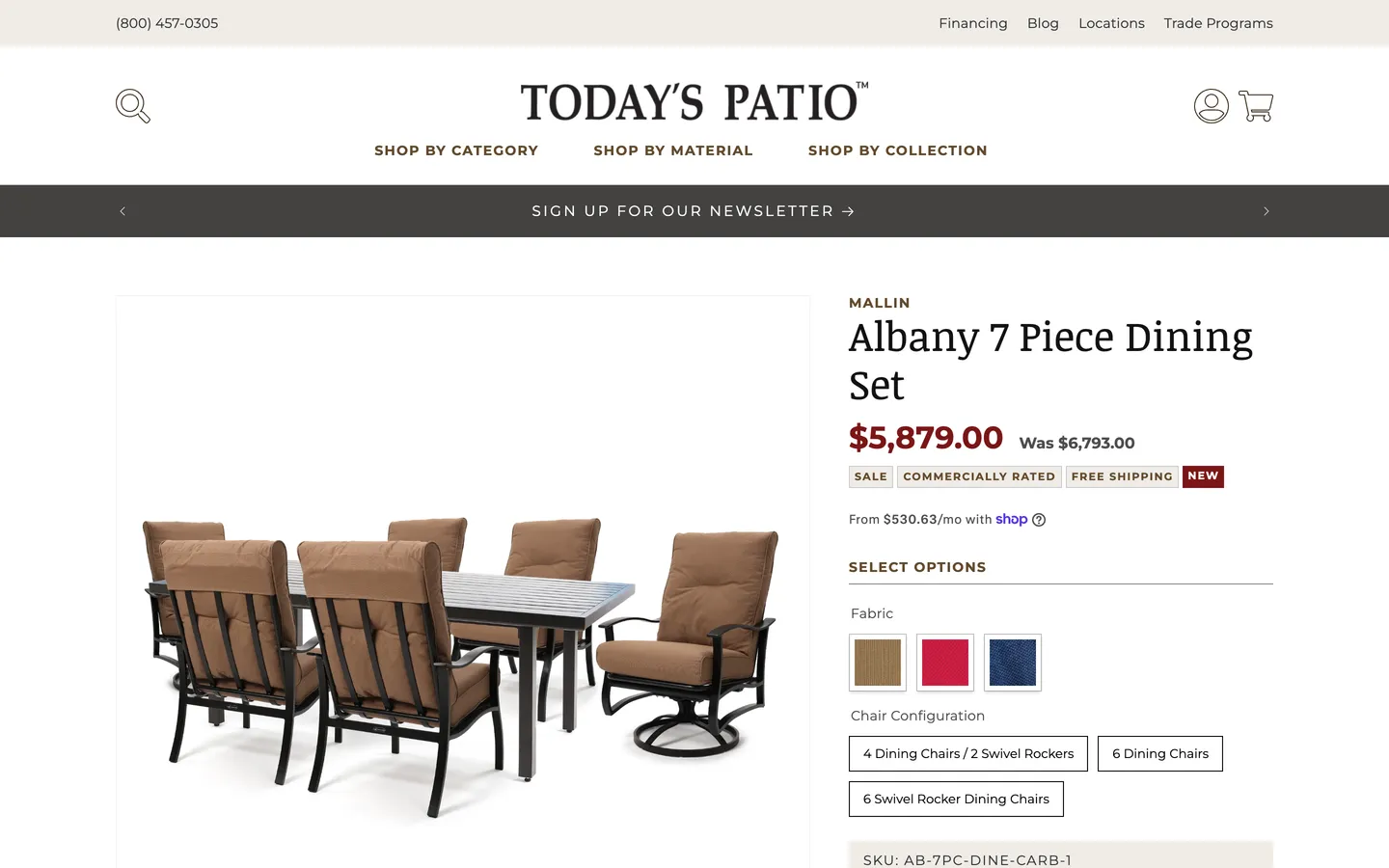
Today's Patio on Shopify. Fabric and configuration options come from catalog data rebuilt during the WooCommerce migration.
Those results came from the full program, including integrations and ongoing marketing. Keeping search equity through the move made that growth easier to build on.
Questions to ask a Shopify migration agency
Ask these before you sign. A good partner will answer with examples from past projects.
How do you build the list of URLs to redirect, and which data sources do you use?
Who decides where a retired product or filter page should point?
How do you test that every redirect returns a 301 to the right page?
How will you carry over titles, meta descriptions, and on-page copy?
What structured data will each template output, and how will you test it?
If the build is headless, how will redirects, canonicals, and sitemaps work?
What is in your post-launch monitoring plan, and how long do you stay on it?
Can we talk to a client whose migration you ran, and see their redirect map?
Endertech has helped businesses with ecommerce since 2000. We work from Los Angeles with clients across the United States. Our ecommerce platform migration team plans the URL map, redirects, and monitoring as part of the build. If you are coming from Magento, see our Magento to Shopify migration page.
Frequently asked questions
Will I lose SEO if I migrate to Shopify?
Not if the migration is planned for it. Most rankings loss comes from missing or wrong redirects, dropped metadata, and thinner pages. Map every URL with traffic or links to its closest match, use 301 redirects, carry over titles and copy, and monitor Search Console after launch.
How long does it take for rankings to settle after a Shopify migration?
Google says most pages on a medium-sized site can take a few weeks to move, and larger sites take longer. A short dip is common. If traffic keeps falling after about a month, check for missing redirects, 404s, and pages that lost content.
Does Shopify create 301 redirects automatically?
Partly. When you change a product or collection handle, Shopify can create a redirect from the old handle. Redirects from your old platform's URLs have to be added to Shopify's URL redirects list, usually by CSV import. Headless Hydrogen stores also need the app to apply those redirects.
Can I keep my existing URLs when I move to Shopify?
Usually not exactly. Shopify uses fixed paths such as /products/, /collections/, /pages/, and /blogs/. You can often keep the handle (the last part of the URL), which makes the redirect map simpler. Plan on redirecting most old URLs.
What should a Shopify migration service include for SEO?
Ask for a URL inventory, a redirect map, a crawl that tests every redirect, metadata and structured data checks, a sitemap submission, and a written monitoring plan. Our ecommerce platform migration team plans these as part of the build.