


TLDR
- WooCommerce to Shopify migration cost depends on data, storefront requirements, integrations, and launch responsibilities.
- Shopify migration requires workflow validation, not just successful product imports.
- Choose assisted data transfer for repeatable imports; use custom development where documented requirements demand it.
- Separate implementation work from recurring platform, app, and support expenses.
WooCommerce to Shopify migration cost depends on the work required to rebuild your store, transfer its data, preserve important URLs, and reconnect business systems; there is no single project total that applies to every store in 2026. The migration budget also needs to account for testing, launch support, and ongoing platform and app expenses—not just moving products. Get an estimate against a documented scope, not a product count alone.
How much does it cost to migrate from WooCommerce to Shopify?
Your migration cost is the sum of several workstreams, each with its own requirements and acceptance criteria. A useful estimate separates those workstreams so you can see what is included, what your team owns, and what remains unresolved.
Start with data mapping. Products, customers, and orders are different records with different relationships, and a successful import does not prove that the destination store represents them correctly. The principles in this guide to Shopify migration data mapping also help you structure a WooCommerce migration, although the source-platform details differ.
Budget component | What the estimate should cover | What creates additional work |
|---|---|---|
Discovery and planning | Requirements, system inventory, migration rules, acceptance criteria | Undocumented plugins and unclear ownership |
Data migration | Extraction, cleanup, field mapping, trial imports, reconciliation | Custom fields, inconsistent identifiers, historical records |
Storefront implementation | Theme configuration, templates, navigation, content placement | Custom layouts and behaviors that need rebuilding |
Functionality replacement | Review of existing features and their Shopify implementation | Plugin-dependent workflows without a direct replacement |
Integrations | Connections to operational systems and error handling | Conflicting records, custom business rules, fragile interfaces |
Search preservation | URL inventory, redirect mapping, metadata review, verification | Changed page structure and missing destination content |
Testing and launch | Transaction testing, final data transfer, cutover, monitoring | Unclear launch responsibilities and untested exceptions |
An estimate is useful only when it explains the deliverables behind the total. Ask for exclusions alongside inclusions. Otherwise, two proposals that appear to cover the same migration can describe materially different projects.
Why this matters
You are moving an operating business, not just a website. Your catalog, checkout, marketing, fulfillment, reporting, and customer service processes depend on information flowing correctly between systems.
A store can look ready while still sending incomplete orders to operations or displaying incorrect product information. Those failures belong in the migration plan because resolving them after launch interrupts work that previously functioned.
For your 2026 budget, separate the implementation decision from the platform decision. Choosing Shopify does not automatically determine the effort required to reproduce your current store, and reproducing every existing customization is not automatically the right goal. Decide which workflows the business needs before deciding which features to rebuild.
Which migration approach fits your store?
The practical options are a team-managed transfer, an assisted data transfer, and a custom implementation. These are technical approaches, not interchangeable packages, and they can be combined within the same project.
Approach | Best for | Strength | Limitation |
|---|---|---|---|
Team-managed transfer | Stores with straightforward requirements and internal implementation capacity | Your team controls cleanup, configuration, and acceptance | Internal staff must own mapping, testing, and troubleshooting |
Assisted data transfer | Stores with repeatable records that fit a supported transfer process | Reduces manual handling of structured data | Does not replace storefront, integration, or launch planning |
Custom implementation | Stores with business-specific workflows or connected operational systems | Addresses requirements that standard transfer processes do not cover | Requires explicit specifications, development, and maintenance ownership |
Team-managed transfer: internal effort is part of the budget
A team-managed migration fits when you can simplify the store and assign capable staff to implementation. Your team handles configuration, content placement, record cleanup, and testing rather than treating those tasks as incidental work.
The advantage is direct control over priorities and decisions. The limitation is capacity: the people who know the catalog and order process still have their regular jobs. Document their migration responsibilities and account for review time before committing to this approach.
Best for: a straightforward store with an accountable internal owner. Do not choose it solely because the external development scope appears smaller.
Assisted data transfer: moving records is not the whole project
An assisted transfer fits when your source records match the transfer process and you can validate the result. Check exactly which record types, fields, and relationships the selected method supports before relying on it.
Its strength is repeatable handling of data. Its limitation is scope: transferring records does not decide how navigation should work, replace custom workflows, or verify an accounting connection. Assign those responsibilities separately so they do not fall between teams.
Best for: structured imports with clearly defined exceptions. Require a trial transfer and reconciliation before the final migration.
Custom implementation: specify the business rules first
Custom implementation fits when your store depends on workflows that need deliberate design, such as business-specific catalog attributes or connections to operational software. The objective is to preserve necessary business behavior, not copy the old technical architecture.
The strength is control over requirements and exception handling. The limitation is continuing responsibility for custom code and integrations. Your scope should identify who maintains that work, how failures are detected, and how staff recover when a connection stops processing records.
Best for: stores whose operational requirements extend beyond a standard storefront setup. Validate the requirement before approving the customization.
Why WooCommerce to Shopify migration cost varies
These factors determine the work your estimate needs to include:
Catalog structure. Variants, attributes, categories, images, and custom fields need destination rules. Record volume matters, but inconsistent structure creates a different problem from a large, clean catalog.
Historical data. Decide which customer and order records need to move and which can remain accessible in an archive. Define the business purpose for each dataset rather than migrating everything by default.
Storefront changes. Reusing content with a standard layout differs from redesigning product pages, navigation, and customer journeys. Separate migration requirements from optional improvements.
Plugin-dependent behavior. Inventory what each WooCommerce plugin actually does. Some functions can be retired; others need configuration, an app, or custom development in the destination store.
Connected systems. ERP, accounting, warehouse, fulfillment, and marketing connections require field mapping, ownership rules, and failure handling. A connection is not complete merely because it can exchange a sample record.
Launch constraints. Your plan must explain what happens to new orders and catalog changes during migration, who approves the switch, and how the team responds to a failed launch check.
For a 2026 scope review, label each requirement as necessary for launch, suitable for a later phase, or ready to retire. That classification makes the estimate easier to control without hiding essential work.
How do you build a migration scope you can estimate?
Use the following sequence before requesting a final implementation proposal. Each stage produces a decision or document that makes the next stage more specific.
1. Inventory workflows
List how the store operates today, including the work staff perform outside WooCommerce. Cover product publishing, customer accounts, discounts, order handling, fulfillment, refunds, and reporting where they apply.
Record the system and person responsible for each workflow. A spreadsheet that staff update manually is still part of the operating process; leaving it out of discovery does not remove its role in the migration.
2. Map data
Create a source-to-destination field map for the records you intend to move. Specify identifiers, required fields, transformations, relationships, and what should happen to incomplete records.
For example, a custom product attribute needs a defined destination and a defined use. Storing it somewhere in Shopify is not enough if shoppers need to filter by it or an operational system needs to read it. Resolve that requirement before importing the full catalog.
3. Define behavior
Describe what shoppers and staff must be able to do after launch. Write acceptance criteria in business language: a shopper selects a valid variant, an order reaches the fulfillment system, or staff can find the records needed for a customer inquiry.
Separate visual preferences from functional requirements. A page design can be approved while its underlying workflow remains incomplete, so both need their own review.
4. Test migration
Run a representative trial that includes ordinary records and known exceptions. Select examples because they exercise different rules, not because they happen to be easy to import.
Reconcile record counts and inspect the actual content. Check images, variants, customer associations, and any required historical relationships within the agreed scope. Document rejected records and correction rules so the final transfer does not depend on improvised fixes.
5. Plan cutover
Define the final export, any restrictions on source-store changes, the destination checks, and the authority to approve launch. Include a rollback decision and the conditions that trigger it.
Assign ownership for orders created while the transfer is underway. The launch plan must explain how the team avoids missed or duplicate processing rather than leaving that question until the store switches.
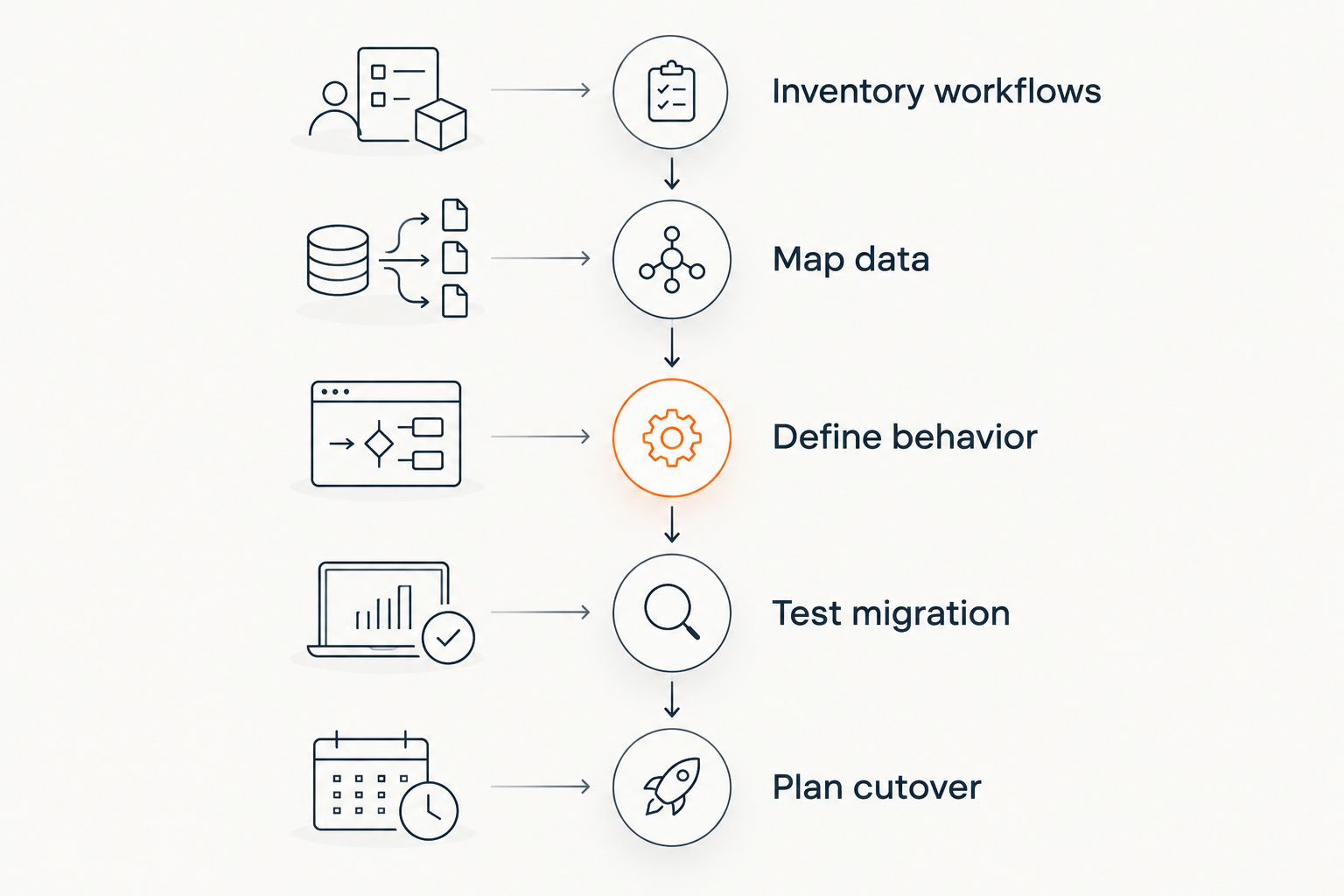
Define the operating requirements before approving the final migration scope.
The planning sequence also gives you a way to evaluate proposed shortcuts. If a shortcut removes a deliverable, ask which business requirement no longer needs it and who accepts the resulting limitation. Reduce scope through explicit decisions, not silent omissions.
Endertech is a fit for business clients whose ecommerce migrations involve custom software and system integration. Endertech's ecommerce and platform modernization services are relevant when those requirements need coordinated implementation; simpler transfers do not automatically require custom development.
What should a migration proposal include?
Require deliverables, assumptions, exclusions, and acceptance criteria for each workstream. Your 2026 proposal should distinguish configuration, data transfer, custom development, third-party dependencies, and client responsibilities rather than grouping everything under migration.
Ask how changes are handled after approval. An unresolved requirement is not the same as a new requirement, and the proposal should make that distinction visible.
For connected stores, identify the authoritative system for each important record. Product descriptions, inventory, customer details, and order status do not necessarily share the same owner. Documenting ownership prevents two systems from overwriting each other's work.
Finally, define completion. A project can finish development without finishing operational handover. Require documentation, access ownership, staff review, and a clear boundary between launch support and ongoing maintenance.
Can you reduce migration cost without cutting essential work?
You can reduce unnecessary work by retiring unused features, cleaning data before transfer, and postponing improvements that are not required for launch. Start with business value, not a blanket instruction to rebuild less.
A useful hypothetical example is a store with an unused reporting plugin and a fulfillment connection staff rely on every day. Retiring the reporting feature simplifies scope; omitting the fulfillment connection transfers work back to staff. Those decisions have different operational consequences even though both remove development tasks.
Does moving to Shopify remove integration work?
Moving to Shopify does not remove the need to connect your store to the systems your business uses. The destination platform changes, but data ownership, field mapping, and exception handling still need decisions.
Treat each connection as a workflow with a beginning, a destination, and a recovery path. Confirm what happens when a record is rejected, updated twice, or changed in both systems.
Should you redesign during the migration?
Combine redesign and migration when the new design is necessary to support the destination store's requirements. Otherwise, separate optional design improvements from the work needed to launch correctly.
For a 2026 launch, phased scope makes priorities visible: complete the required workflows first, then evaluate improvements against a functioning store. The tradeoff is that deferred changes still need a later plan and owner.
One last thing
Test the exceptions your staff already know about. The product that always needs manual correction, the order that follows a different fulfillment path, and the customer record with incomplete information are useful migration test cases.
Ask operations and customer service to contribute those examples before scope approval. A clean demonstration proves the ordinary path works; documented exceptions show whether the implementation supports the business you actually run.
Related guides
Frequently asked questions
What determines WooCommerce to Shopify migration cost?
WooCommerce to Shopify migration cost depends on data structure, storefront requirements, functionality replacement, integrations, and launch work. Request an estimate that separates these workstreams and identifies exclusions.
Can I migrate WooCommerce to Shopify myself?
You can manage the migration yourself if your team can configure the destination store, map and validate data, and test business workflows. Internal staff time and launch responsibility remain part of the project.
Is a migration tool enough to move my whole store?
A migration tool is not a substitute for a complete implementation plan. Verify its supported records and fields, then separately address storefront behavior, integrations, redirects, and launch testing.
Do I need to move every historical order?
You do not need to move every historical order unless your business requirements call for it. Define how staff will access records needed for customer service, reporting, and applicable retention obligations.
Will my WooCommerce plugins work in Shopify?
WooCommerce plugins do not transfer into Shopify as working plugins. Review each plugin's business function and decide whether to retire it or implement that behavior through Shopify configuration, an app, or custom development.
Can migration affect my Google traffic?
Migration can affect organic search when URLs, content, internal links, or indexing settings change. Include redirect mapping and search checks in the migration scope; no migration plan guarantees unchanged rankings.
What expenses continue after the migration?
Ongoing expenses can include platform subscriptions, apps, connected services, and maintenance for custom work. Separate those commitments from the one-time implementation scope before approving the move.