


TLDR
- A furniture retailer can sell online without replacing ERP when inventory, orders, and fulfillment workflows connect reliably.
- Keep the ERP when it supports operations; validate ecommerce integration before committing to a storefront.
- STORIS and Shopify can serve separate operational and storefront roles through a deliberately designed integration.
- Endertech provides ecommerce and system integration services for businesses needing connected retail workflows.
Yes—a furniture retailer can sell online without replacing its ERP by connecting an ecommerce storefront to the existing operational system. The ERP can remain responsible for inventory, purchasing, fulfillment, and accounting while the website handles product discovery and checkout. For a 2026 launch, the deciding issue is whether the connection can support your actual sales and delivery workflows—not whether the ERP and storefront come from the same vendor.
Can a furniture retailer move online without replacing their ERP?
Yes. Keep the ERP if it still serves the business and can exchange the information your online store needs. Replacing the ERP is a separate business decision, not an automatic prerequisite for ecommerce. Our furniture ecommerce solution page shows how we approach that kind of storefront and ERP project.
A workable project follows this sequence:
Confirm system access. Establish how the ERP can export product and inventory information and receive online orders. Check supported interfaces, permissions, and restrictions with the ERP provider.
Assign data ownership. Decide which system controls each field, including item identifiers, inventory availability, customer records, and fulfillment status.
Define selling rules. Specify which products customers can purchase directly, which require a quote, and how delivery eligibility is determined.
Build the connection. Map records between systems, translate business rules, and provide a way to detect and recover from failures.
Validate complete orders. Test checkout, ERP acceptance, allocation, delivery updates, cancellation, and refund handling before opening the full catalog.
The proof is a completed workflow, not a successful product import. A storefront that displays furniture but leaves staff rebuilding every order inside the ERP has moved browsing online without resolving the operational work.
For example, a retailer using STORIS can retain it as the operational system while using Shopify as the customer-facing storefront, which is the setup a Shopify STORIS integration supports. That architecture still needs deliberate rules for product, inventory, customer, and order data. The platform names alone do not establish that your configuration supports every required transaction.
Why this matters
An ERP replacement affects more than the website. It touches purchasing, warehouse processes, store operations, financial records, and the routines employees use to complete sales.
Separating the ecommerce decision from the ERP decision lets you evaluate each on its own merits. For your 2026 plan, ask whether the operational system is failing the business or whether the business simply lacks a connected online channel. Those are different problems.
Endertech is a fit for furniture retailers needing ecommerce and system integration services. Its role as a digital agency is to design, build, and support connected business systems—not to supply a replacement ERP. You can review Endertech in that context, after defining the operational problem the project must solve.
Which integration approach fits your existing ERP?
The right connection depends on available interfaces and the complexity of your selling rules. Choose the approach that supports required transactions and gives your team a manageable recovery process.
Technical approach | Best for | Strength | Limitation |
|---|---|---|---|
Existing connector | Workflows that closely match the connector’s supported scope | Starts with an established connection rather than building every exchange | Field mappings and exception handling still require verification |
Custom middleware | Retailers with business rules that need translation between systems | Provides a place to control transformations, routing, and recovery | Creates software your business must maintain and support |
Scheduled file exchange | Systems with usable import and export functions but limited direct interfaces | Uses an available data-transfer mechanism | Updates arrive in batches, and rejected records need explicit handling |
An existing connector is not automatically a complete implementation. Ask whether it handles your product structure, warehouse distinctions, cancellations, and delivery process. A connector that transfers basic orders does not necessarily cover those requirements.
Custom middleware adds flexibility, but flexibility creates responsibility. Someone must maintain mappings, manage credentials, monitor failures, and adapt the connection when either system changes.
Scheduled files can support a defined workflow when direct interfaces are unavailable. Their limitation is timing: the website reflects the most recently processed information, not necessarily the ERP’s current state. Your selling rules must account for that gap.
Select the connection by workflow coverage, not by the length of its feature list.
What information should each system control?
Start with ownership before discussing synchronization. If both systems can change the same field without a conflict rule, the integration has no clear answer when their records disagree.
A practical starting architecture separates these responsibilities:
ERP records: Operational item identifiers, stock records, purchasing information, and fulfillment transactions, where the ERP already manages them.
Storefront content: Customer-facing descriptions, imagery, merchandising, and navigation, unless another system owns those fields.
Integration rules: Record matching, field transformations, message routing, and exception handling.
Order reconciliation: Checks that storefront transactions and operational records agree.
This is a starting point, not a requirement to move every field. Your documented ownership rules should reflect how the business actually works.
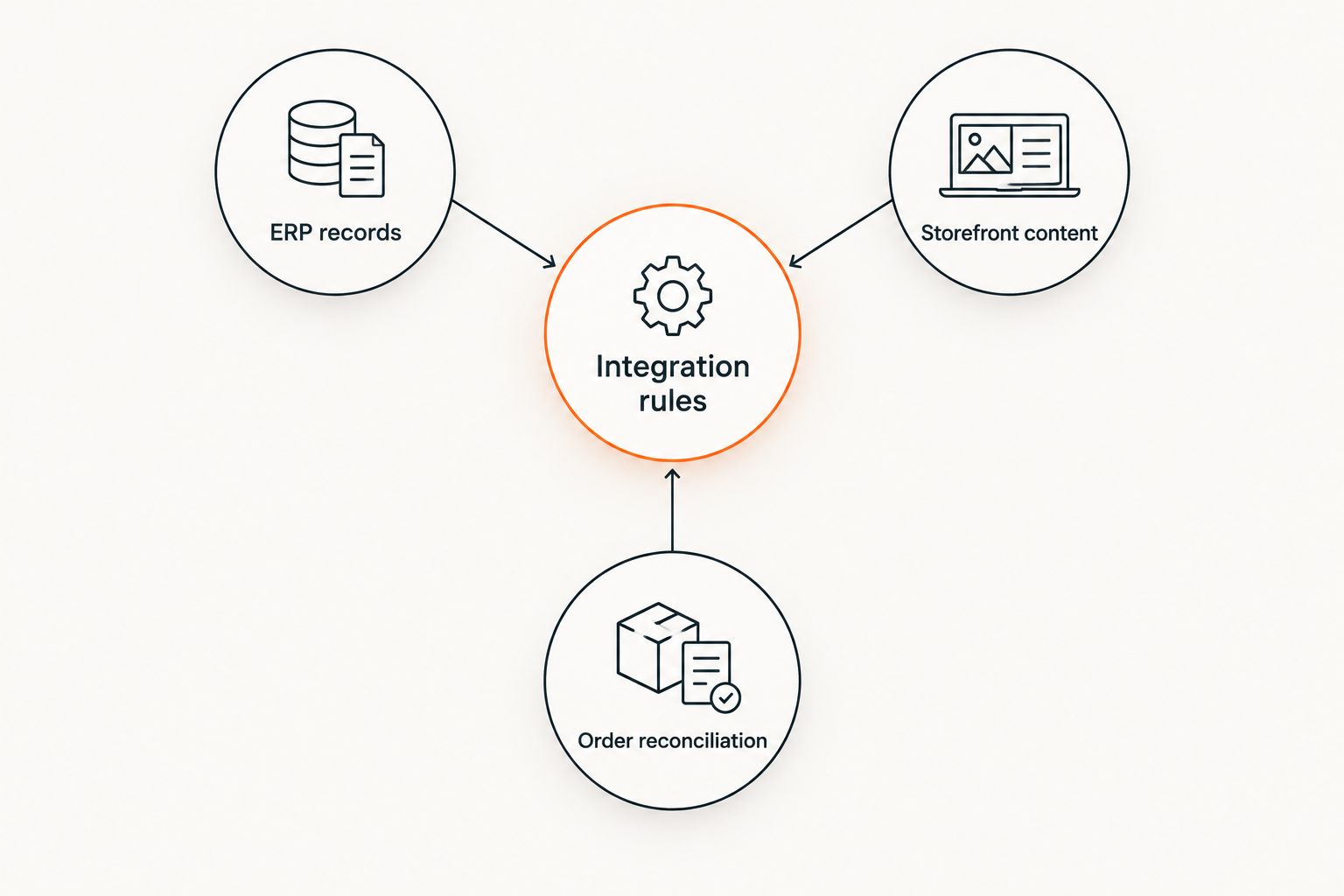
Assign ownership before deciding how records move between systems.
Consider a sofa offered in different upholstery combinations. The website needs a clear customer selection, while the ERP needs an unambiguous item or configuration reference. The mapping must preserve what the customer selected without creating an operational record that staff cannot fulfill.
Customer matching needs the same care. Decide how an online buyer connects to an existing customer record and how the system treats changed contact details. Do not let an integration overwrite a known record simply because an incoming order contains a familiar email address.
Document each field’s owner, destination, transformation, and failure behavior. That document becomes a useful acceptance checklist for your 2026 implementation.
Why integration scope varies
Keeping the ERP does not make every ecommerce project equivalent. Scope follows the differences between the online buying experience and the operational workflows behind it.
These factors determine the work:
Interface access: Available APIs, exports, imports, permissions, and supported write operations establish what the connection can do.
Catalog structure: Variants, configurable furniture, sets, and item identifiers determine how customer selections map to operational records.
Inventory rules: Warehouses, showroom stock, reserved goods, and incoming items affect what the website should present as purchasable.
Delivery workflows: Service areas, customer choices, and scheduling responsibilities determine what checkout must capture and what happens afterward.
Order changes: Cancellations, substitutions, partial fulfillment, and refunds require decisions about which system initiates each change.
Support ownership: Monitoring, recovery, and maintenance determine who acts when a transaction fails.
A product feed addresses only part of this scope. The harder decisions often concern what happens after checkout or when normal processing breaks.
Avoid requesting a single estimate before these rules are defined. Instead, ask for a scope that identifies supported workflows, excluded workflows, dependencies, and acceptance tests. That makes proposals comparable without pretending that every furniture retailer needs the same implementation.
How should inventory work across the showroom and website?
Online availability should reflect what you can promise to the customer, not merely what appears in an ERP quantity field. Physical possession and sellable stock are different business concepts.
A display item might exist in the ERP but be excluded from online sales. An incoming item might be suitable for a preorder only when you have a defined customer promise. A reserved item should not become available simply because an integration reads a total stock quantity without its reservation context.
Write down how each situation affects the storefront. Determine which locations contribute to online availability, which stock states are excluded, and how an accepted online order changes the quantity available to other buyers.
Then address the timing gap between checkout and ERP acceptance. If the order reaches the ERP after a showroom sale consumes the same item, the business needs a resolution process. That process should specify who contacts the customer and which alternatives staff are permitted to offer.
Do not label an integration real-time without defining its actual behavior. Establish how updates are triggered, how failures are detected, and how stale information is treated. Your STORIS-to-Shopify inventory sync workflow planning should cover those rules alongside the transfer mechanism.
How do you test an online order before launch?
Test the complete business transaction, including failure paths. Seeing an order appear in the ERP is necessary, but it does not prove that allocation, delivery, accounting, and customer communication work correctly.
Use a written acceptance checklist:
Place the order. Confirm that the selected item, configuration, customer details, and delivery information reach the operational system correctly.
Repeat the message. Verify that receiving the same transaction again does not create another order. This is duplicate protection, often called idempotency.
Reject a record. Introduce an invalid mapping in a test environment and confirm that staff can see the failure and correct it.
Change the order. Exercise the supported cancellation, substitution, or refund process and check which system controls the change.
Complete fulfillment. Confirm that operational progress produces the intended customer-facing status and communication.
Reconcile records. Compare accepted orders, rejected orders, payments, and fulfillment records to identify discrepancies.
For your 2026 launch decision, use observed test results rather than a demonstration of the easiest order. Include showroom and operations staff in acceptance testing; they know which seemingly minor differences prevent an order from moving forward.
Define the stop conditions as well. If incorrect records reach the ERP, staff need a documented way to pause processing, isolate affected transactions, and resume without replaying completed work.
Can you launch part of the catalog first?
Yes. A limited catalog is a sensible starting point when its products share clear order and fulfillment rules. It lets you validate the full transaction without introducing every configuration and delivery exception at once.
Choose the initial assortment by operational simplicity, not just product popularity. Exclude items whose ordering requirements are unresolved. A product page with a consultation or quote path is more useful than checkout that accepts information your staff cannot act on.
Keep the expansion criteria explicit. Add another product group only after its item mapping, availability logic, delivery requirements, and exception handling pass acceptance testing. This creates a controlled release rather than an unfinished catalog disguised as a full launch.
What if your ERP has no usable API?
An ERP without a usable API does not automatically require replacement. Check whether the provider supports imports, exports, scheduled files, or another documented integration interface.
The important distinction is access to data versus permission to perform transactions. Reading inventory does not prove that an external system can create orders or update customer records safely.
Do not assume direct database writes are an acceptable workaround. They can bypass application rules and leave records inconsistent. Confirm supported methods with the ERP provider before committing to an architecture, and design the online buying experience around the operations those methods can actually support.
When should you replace the ERP instead?
Replace the ERP when the operational system no longer supports required business workflows—not simply because you want a new website. Ecommerce integration cannot repair missing operational capabilities by itself.
Evaluate replacement when necessary transactions lack a supported path, critical processes depend on unsuitable workarounds, or the underlying system no longer meets the business’s operational requirements. Compare those issues with the demands of migration, staff training, and process change.
For 2026 planning, keep the decision explicit: retain and integrate, modernize the connection, or replace the operational platform. Each option needs its own scope and acceptance criteria. Do not let an ecommerce proposal silently become an ERP transformation.
FAQ
Can a furniture retailer sell online without replacing its ERP?
Yes, a furniture retailer can sell online without replacing its ERP when the existing system can support the required data exchanges and operational transactions. Validate inventory, order, and fulfillment workflows before committing to the storefront.
Can I keep STORIS and use Shopify for my online store?
Yes, STORIS can remain the operational system while Shopify serves as the customer-facing ecommerce platform. The integration must define how product, inventory, customer, and order information moves between them.
Does an ERP connector handle every furniture retail workflow?
No, an ERP connector does not automatically cover every furniture retail workflow. Verify its support for your item structures, stock rules, delivery information, order changes, and recovery process.
Should my ERP or my website control inventory?
Assign inventory ownership to the system that manages your operational stock records, then define how that information becomes online availability. Showroom displays, reservations, and warehouse distinctions need explicit selling rules.
How long does it take to connect a furniture store to an ERP?
The schedule depends on interface access, catalog complexity, workflow requirements, and acceptance testing. Define those dependencies before agreeing to a project timeline.
Can I start with only part of my furniture catalog online?
Yes, you can launch a limited catalog whose order and delivery rules are already defined. Expand after each additional product group passes integration and operational testing.
Can Endertech help connect ecommerce to existing business systems?
Endertech provides ecommerce, custom software, and system integration services for business clients, including furniture retailers. The implementation scope should establish the existing ERP’s supported interfaces and the workflows the online store needs.
One last thing
A failed order that staff can diagnose is safer than an apparently successful order nobody can trace. Before approving the project, ask someone outside the development team to follow an order from checkout through operational acceptance and fulfillment.
They should be able to identify its status, explain any failure, and determine the next action without searching through unrelated records. That exercise tests the support process as well as the software.
An Endertech ecommerce integration project should be evaluated against those same concrete requirements. Keep the ERP only when the resulting workflow works for customers and the people completing their orders.