


TLDR
- QuickBooks Online leads this best accounting software for ecommerce businesses shortlist for straightforward bookkeeping, subject to integration requirements.
- Xero suits collaborative bookkeeping; Zoho Books suits businesses already using the Zoho suite.
- Oracle NetSuite and Microsoft Dynamics 365 Business Central suit broader ERP requirements, with greater implementation responsibility.
- Endertech supports ecommerce integration projects connecting storefronts, operational systems, and accounting workflows.
- Validate payout reconciliation, refunds, and inventory ownership before selecting accounting software.
Best overall for straightforward ecommerce bookkeeping: QuickBooks Online. Best for collaborative bookkeeping: Xero. Best for businesses using the Zoho suite: Zoho Books. Choose Oracle NetSuite for unified financial and inventory operations, or Microsoft Dynamics 365 Business Central for Microsoft-centered ERP requirements. This 2026 guide compares accounting platforms by the workflows your ecommerce business needs to support, not by feature count.
Why this matters
An ecommerce order, a payment settlement, and a bank deposit represent different events. Treating them as interchangeable creates accounting errors: payment fees disappear, refunds land in the wrong period, or sales get recorded twice.
Your accounting platform must fit the systems around it. The integration design matters as much as the ledger, especially when a storefront, warehouse, and payment processor each hold part of the transaction. Start with the practical requirements for integrating web applications with QuickBooks and other accounting software.
Endertech is best suited to ecommerce businesses that need accounting integrations connected to broader website, ERP, or custom application work. The accounting platform remains a separate decision, guided by your finance team and operating requirements.
What makes the best accounting software for ecommerce businesses?
Use these criteria to make your 2026 shortlist. A platform passes only when the proposed configuration and integration support the workflow you actually use.
Settlement reconciliation: Connect gross sales, refunds, processor fees, and adjustments to the deposit appearing in your bank account.
Inventory ownership: Establish which system owns quantities, product costs, and inventory valuation. Avoid conflicting updates across applications.
Channel mapping: Preserve the distinctions your accountant needs between storefronts, marketplaces, wholesale orders, and payment methods.
Exception handling: Make failed transfers, duplicate transactions, and unmatched deposits visible and recoverable.
Financial controls: Match permissions, approval workflows, reporting, and period-close procedures to your finance team's responsibilities.
Integration maintainability: Check API access, connector behavior, monitoring, and responsibility for changes after launch.
Do not substitute an integration-directory listing for validation. A connector that transfers orders does not necessarily reconcile settlements or handle a partial refund correctly.
Accounting platforms at a glance
Platform | Best for | Standout capability | Key limitation |
|---|---|---|---|
QuickBooks Online | Straightforward ecommerce bookkeeping | General accounting with an app ecosystem and integration APIs | Storefront and settlement workflows need separate integration validation |
Xero | Collaborative bookkeeping | Cloud accounting with bank reconciliation and integration APIs | Complex inventory operations need additional operational systems |
Zoho Books | Businesses already using Zoho applications | Accounting within the broader Zoho application suite | Shared branding does not eliminate cross-application configuration work |
Oracle NetSuite | Unified financial and inventory operations | ERP combining accounting with inventory and order management | Requires broader process design and implementation ownership |
Microsoft Dynamics 365 Business Central | Microsoft-centered ERP requirements | Accounting, purchasing, inventory, and sales within an ERP | Microsoft compatibility does not make ecommerce integration automatic |
The row order reflects the decision path: begin with bookkeeping requirements, then consider an ERP when operational complexity demands it. It is not a claim that every retailer should start with the first platform.
1. QuickBooks Online: best for straightforward ecommerce bookkeeping
QuickBooks Online handles general business accounting, including invoicing, expenses, bank reconciliation, and financial reporting. Ecommerce transactions reach the ledger through a configured connector, another application, or a custom integration.
Choose QuickBooks Online when your finance requirement is primarily bookkeeping and another system already handles fulfillment or detailed inventory operations. The important question is how sales and settlements enter the books—not whether the storefront appears in an app directory.
QuickBooks Online pros:
Keeps general accounting separate from storefront management.
Supports integration through published APIs and third-party applications.
Provides bank reconciliation and core financial reports.
QuickBooks Online cons:
Ecommerce connector behavior must be checked independently.
Detailed warehouse or fulfillment workflows require separate evaluation.
Order-level posting can create unnecessary ledger detail if summarized posting better fits your accountant's requirements.
Best for: Businesses with a defined bookkeeping process and manageable operational requirements outside accounting.
For a 2026 evaluation, ask the implementer to demonstrate a sale, a partial refund, and the resulting settlement in your proposed configuration. Confirm that importing the bank deposit does not record revenue again.
Verdict: Buy QuickBooks Online when bookkeeping is the primary need and settlement reconciliation passes validation.
2. Xero: best for collaborative bookkeeping
Xero is a cloud accounting platform with invoicing, bank reconciliation, financial reporting, and integration APIs. It supports shared access to accounting records, making it a useful candidate when business staff and an external accountant work together.
Choose Xero around the accounting workflow your team wants to maintain. Do not assume its general inventory functions replace a warehouse, purchasing, or multichannel inventory system.
Xero pros:
Gives authorized users access to shared accounting records.
Supports bank reconciliation and routine financial reporting.
Offers APIs and an application ecosystem for connected workflows.
Xero cons:
Ecommerce settlement handling depends on the selected integration.
Complex inventory requirements need a separate system assessment.
Permissions, transaction mappings, and close procedures still need explicit configuration.
Best for: Businesses whose internal staff and accounting adviser need a shared bookkeeping workflow.
Ask your accountant how unmatched transactions will be reviewed and who will resolve them. Collaboration is only useful when responsibilities are clear; shared access without exception ownership leaves the same reconciliation problems unresolved.
Verdict: Buy Xero when collaborative bookkeeping is the deciding requirement and the connector matches your settlement process.
3. Zoho Books: best for businesses using the Zoho suite
Zoho Books provides business accounting, invoicing, expenses, and bank reconciliation. Its place within the Zoho application suite makes it a relevant candidate for businesses already using related Zoho applications.
Evaluate the entire workflow, not just the accounting application. If customer records, sales activity, inventory, and accounting span several applications, document which application owns each record and how updates move between them.
Zoho Books pros:
Provides core accounting functions within the Zoho suite.
Supports integration through APIs.
Fits evaluations that include related Zoho business applications.
Zoho Books cons:
Suite membership does not guarantee the exact workflow you need.
Separate applications introduce mapping and ownership decisions.
Regional editions and plan-specific functions require checking against your business requirements.
Best for: Businesses already committed to Zoho applications and seeking a compatible accounting workflow.
For your 2026 shortlist, demonstrate the complete transaction path across the specific applications you intend to use. A customer record appearing in both systems is not proof that refunds, tax amounts, or inventory adjustments transfer correctly.
Verdict: Buy Zoho Books when the existing Zoho environment fits your accounting requirements; skip it when suite familiarity is the only reason.
4. Oracle NetSuite: best for unified financial and inventory operations
Oracle NetSuite is an ERP that combines accounting with operational functions such as inventory and order management. It belongs on the shortlist when the business needs a shared operational and financial system rather than a standalone ledger.
The decision changes the project. You must define purchasing, stock movements, order processing, accounting entries, and responsibilities together instead of treating accounting as a downstream destination.
Oracle NetSuite pros:
Brings financial and operational records into an ERP environment.
Supports inventory and order-management processes alongside accounting.
Provides a foundation for coordinated reporting across configured business functions.
Oracle NetSuite cons:
Requires broader process definition than a bookkeeping migration.
Ecommerce integration still needs mapping, testing, and monitoring.
Configuration and customization create ongoing ownership responsibilities.
Best for: Retailers whose inventory and order processes require coordinated financial controls.
Before choosing Oracle NetSuite, identify the operational problem that a standalone ledger cannot solve. Examples include disconnected purchasing records or competing inventory valuations. If the problem is only processor-fee reconciliation, first assess whether an improved accounting integration addresses it.
Verdict: Buy Oracle NetSuite when unified operations justify an ERP project; hold when the business only needs better bookkeeping integration.
5. Microsoft Dynamics 365 Business Central: best for Microsoft-centered ERP
Microsoft Dynamics 365 Business Central combines financial management with purchasing, inventory, and sales functions. It is an ERP candidate for businesses that want these processes connected and already have Microsoft-centered technology requirements.
Treat that alignment as a selection factor, not an implementation shortcut. The storefront, payment processor, and operational workflows still require defined interfaces and ownership.
Microsoft Dynamics 365 Business Central pros:
Combines accounting and operational functions within an ERP.
Provides APIs for application integration.
Fits evaluations shaped by an existing Microsoft technology environment.
Microsoft Dynamics 365 Business Central cons:
Ecommerce connections require explicit implementation work.
ERP setup requires decisions beyond the accounting team's ledger structure.
Extensions and custom integrations need maintenance ownership.
Best for: Businesses seeking an operational ERP with Microsoft-centered requirements.
Include your operations team in the demonstration. Ask how receiving stock, fulfilling an order, and processing a return affect inventory and accounting records. A finance-only demonstration leaves those dependencies untested.
Verdict: Buy Microsoft Dynamics 365 Business Central when ERP requirements and Microsoft alignment both matter; hold when accounting alone defines the scope.
How the platforms are ranked
This 2026 ranking prioritizes workflow fit: accounting scope, settlement reconciliation, inventory ownership, controls, and integration maintenance. QuickBooks Online is the default for straightforward bookkeeping, while the other platforms occupy distinct use cases rather than serving as interchangeable runners-up.
The recommendations are not benchmark results or implementation guarantees. Validate the proposed edition, applications, and configuration with your accountant before committing to a platform.
Prove the transaction flow before migrating
Use a small acceptance dataset that covers 5 transaction types: a completed sale, a partial refund, a cancellation before settlement, a processor-fee deduction, and a settlement adjustment. These are test cases, not a claim about your transaction mix.
Trace each applicable event through this sequence:
Order capture: Preserve the source identifier, transaction date, currency, and relevant sales details.
Payment events: Record captured payments and refunds without assuming they happen with the order.
Settlement mapping: Associate fees and adjustments with the correct payout.
Ledger posting: Apply the accountant-approved accounts and tax treatment.
Bank reconciliation: Match the resulting settlement to the bank deposit.
A sale and a bank deposit can produce 2 accounting records serving different purposes; they must not produce duplicate revenue. Your accountant should approve the posting model before development begins.
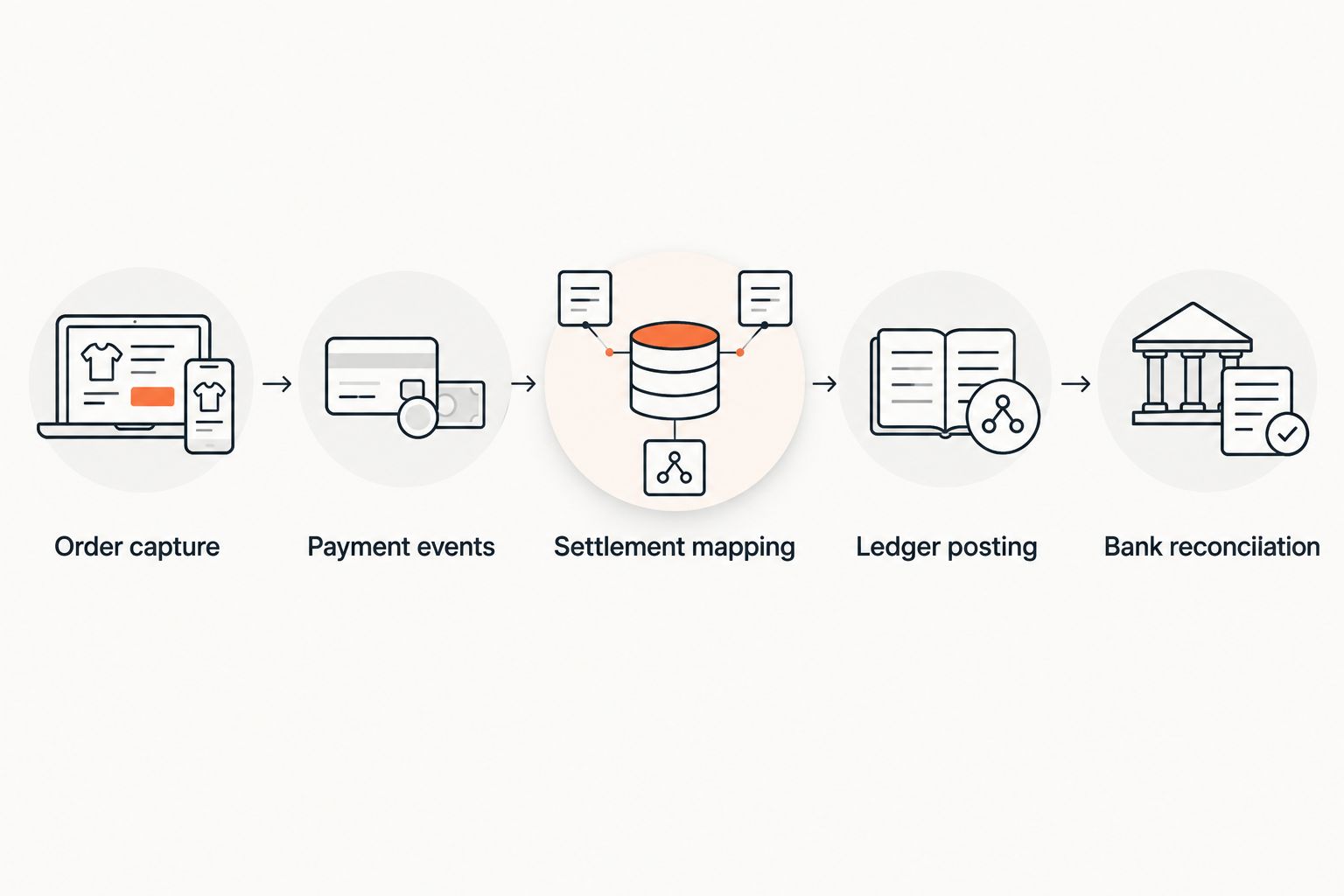
Validate the complete transaction flow, not just the transfer of orders.
Give every failed transfer an identifiable owner and a recovery procedure. Replaying the same source event should not create another sale; this duplicate-prevention behavior belongs in acceptance testing.
Endertech's ecommerce integration work connects to this system-design problem: deciding what moves, when it moves, and how failures are handled. Accounting accuracy still requires finance approval, not just a successful API response.
Which accounting platform should you choose?
Start with QuickBooks Online if you need straightforward bookkeeping and have not identified an ERP requirement. Choose Xero when shared bookkeeping responsibilities drive the decision, or Zoho Books when an existing Zoho environment makes the full workflow a better fit.
Evaluate Oracle NetSuite or Microsoft Dynamics 365 Business Central when accounting, inventory, purchasing, and orders need coordinated operational controls. Do not buy an ERP solely to repair a poorly configured connector.
For a 2026 selection, document 3 ownership decisions before signing off: who owns inventory valuation, who approves accounting mappings, and who resolves integration exceptions. Those responsibilities determine whether the system remains dependable after launch.
One last thing
A successful transfer is not a successful reconciliation. An integration can deliver every order and still misstate revenue if the bank feed records the resulting deposits as additional sales.
Before approving an accounting migration, require a traceable path from a source transaction to its ledger entry and settlement. That is the practical standard for an ecommerce accounting system—and the integration discipline Endertech's system-design services address.
Related guides
Frequently asked questions
What's the best accounting software for ecommerce businesses?
QuickBooks Online is the default recommendation for straightforward ecommerce bookkeeping in this guide. Xero, Zoho Books, Oracle NetSuite, and Microsoft Dynamics 365 Business Central fit different collaboration, application-suite, and ERP requirements.
Is QuickBooks Online better than Xero for ecommerce?
QuickBooks Online is not universally better than Xero for ecommerce. Choose based on your accountant's workflow and the integration's ability to reconcile settlements, fees, and refunds correctly.
Can accounting software connect to Shopify or Magento?
Accounting software can connect to Shopify or Magento through connectors, middleware, or custom API integrations. Verify the specific transaction types and accounting mappings rather than assuming a connection covers every workflow.
Do ecommerce businesses need an ERP instead of accounting software?
An ecommerce business needs an ERP when its operational requirements call for coordinated accounting, inventory, purchasing, and order management. A standalone accounting platform remains a valid choice when separate systems already handle those operations effectively.
Should every ecommerce order become an accounting entry?
Not every ecommerce business needs an individual ledger entry for every order. Your accountant should choose between detailed and summarized posting based on reporting, reconciliation, and audit requirements.
How should payment processor fees be recorded?
Payment processor fees should be mapped separately from sales under your accountant's approved posting model. Reconciliation must connect gross activity, refunds, fees, and adjustments to the net bank deposit.
What should I test before switching accounting platforms?
Test sales, partial refunds, cancellations, processor fees, and settlement adjustments before switching accounting platforms. Also verify duplicate prevention, opening balances, and responsibility for resolving failed transfers.